
For years, encryption was treated as the primary measure of secure file transfer.
If a file was encrypted while moving and encrypted again while stored, many organizations considered the job complete.
Unfortunately, attackers did not receive that memo.
Modern threats target credentials, service accounts, business partners, file contents, configuration errors, workflows, APIs, cloud storage, and authorized users sending information to the wrong destination.
Encryption remains essential, but modern secure file transfer requires multiple coordinated layers of protection around the entire data exchange lifecycle.
Executive Summary
Modern secure file transfer is the controlled exchange of information between users, applications, systems, cloud platforms, and business partners using:
- Secure transfer protocols
- Encryption in transit and at rest
- Strong identity and access controls
- Zero Trust security principles
- File validation and malware-defense integrations
- Data Loss Prevention
- Policy-driven automation
- End-to-end observability
- Centralized governance
- Detailed audit evidence
- Resilient architecture
- Cryptographic agility
Managed File Transfer provides the operational and governance layer that brings these controls together.
The objective is not simply to encrypt and deliver a file. It is to ensure that every important exchange is authorized, protected, validated, visible, recoverable, and provable.
Key Takeaways
- Encryption protects information but cannot determine whether a user, system, file, or destination should be trusted.
- SFTP provides secure transport, but the protocol does not provide complete workflow automation, governance, observability, or compliance evidence.
- Zero Trust applies explicit verification and least-privilege access to users, applications, service accounts, partners, and workflows.
- File validation, antivirus, sandboxing, CDR, and DLP can reduce the risk of malicious or incorrectly shared files.
- Policy-driven automation applies security controls consistently and reduces dependence on manual intervention.
- End-to-end observability must explain whether the complete business process succeeded, not merely whether a server moved a file.
- High availability requires attention to the MFT application, database, storage, network, identity, key management, and secure edge.
- Compliance depends on demonstrable controls and evidence, not the presence of a product checkbox.
- AI-assisted operations must follow the same identity, RBAC, Zero Trust, and auditing requirements as every other workload.
- Post-quantum readiness begins with cryptographic inventory and agility rather than replacing every algorithm at once.
What Is Modern Secure File Transfer?
Modern secure file transfer is the protected and governed movement of information between authorized users, applications, systems, cloud services, and external partners.
It combines encrypted transport with identity, authorization, workflow controls, file inspection, monitoring, auditability, and recovery.
A modern secure transfer platform should answer five basic questions:
- Who or what initiated the transfer?
- Was the user, application, service, or partner authorized?
- What information moved, and where did it go?
- Which security and business policies were applied?
- Can the organization prove what happened?
That is the difference between moving an encrypted file and governing its complete lifecycle.
For a foundational explanation, read What Is Managed File Transfer?.
Why Is Encryption Alone Not Enough?
Encryption protects confidentiality by making information unreadable without the appropriate key. Depending on the implementation, it can protect files in transit, at rest, in archives, and during intermediate processing.
However, encryption cannot independently:
- Detect stolen credentials
- Identify excessive permissions
- Determine whether a destination is authorized
- Detect a malicious payload
- Prevent an authorized user from sharing restricted information
- Validate whether a file meets business requirements
- Recognize abnormal transfer behavior
- Recover a failed workflow
- Demonstrate that every required policy was applied
- Explain whether the receiving application processed the file successfully
An encrypted malicious file is still malicious. An encrypted transfer initiated with compromised credentials is still dangerous. An encrypted file delivered perfectly to the wrong company is still a very bad day.
Encryption protects the information and communication channel. Modern secure file transfer must protect everything happening around them.
The Layered Secure File Transfer Model
No single control can address every file-transfer risk. Effective security combines several layers that support and verify one another.
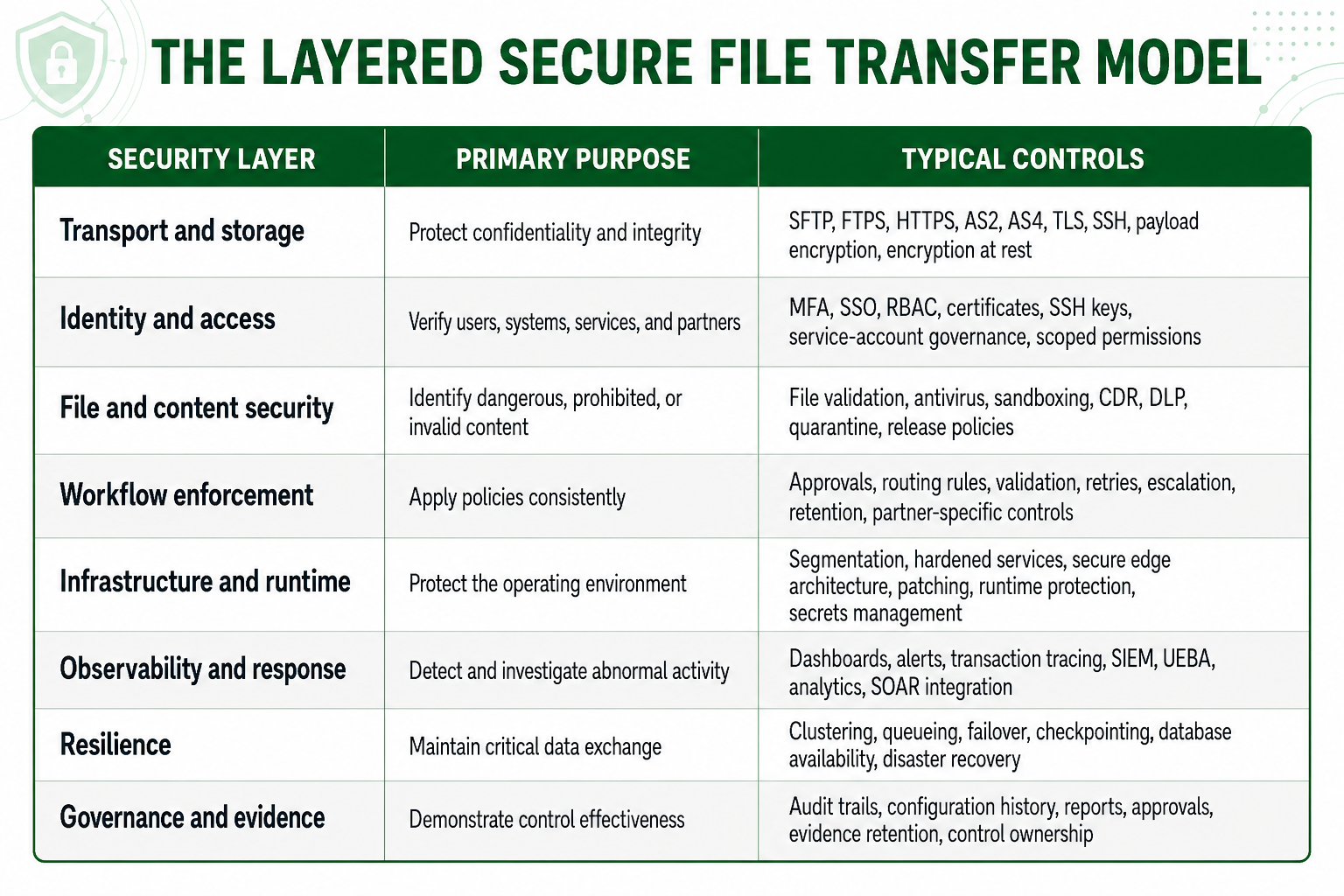
MFT should not replace specialized security systems. Its value is that it becomes the governed control point through which important data moves and where those security systems can be applied consistently.
1. Protect Data with Strong Encryption and Key Management
Secure file transfer begins with approved cryptographic mechanisms for protecting data in transit and at rest.
Depending on the protocol and workflow, this may involve:
- TLS
- SSH encryption
- AES-based payload protection
- PGP encryption
- Digital signatures
- Checksums and integrity verification
- Certificate-based trust
- Encryption of stored files and sensitive metadata
The algorithm is only part of the security model. Organizations must also govern the keys, certificates, and secrets supporting it.
Important controls include:
- Centralized key and certificate inventories
- Protected storage for private keys and secrets
- Separation of keys from encrypted data
- Rotation and expiration policies
- Automated certificate-expiration alerts
- Controls preventing unnecessary key sharing
- Auditing of key and certificate changes
- Processes for revoking compromised credentials
- Support for changing algorithms without redesigning the platform
A very strong algorithm does not provide much comfort when its private key is sitting in an unprotected shared folder.
Cryptographic Agility and Post-Quantum Readiness
Organizations handling information that must remain confidential for many years should begin evaluating cryptographic agility and post-quantum migration.
NIST standardized ML-KEM, ML-DSA, and SLH-DSA for post-quantum key establishment and digital signatures. These mechanisms perform different functions from symmetric encryption such as AES-256 and should be evaluated as part of a broader cryptographic architecture.
Organizations should begin by:
- Inventorying algorithms, certificates, keys, endpoints, and protocols
- Identifying information with long confidentiality requirements
- Documenting partner and application dependencies
- Evaluating classical, hybrid, and post-quantum approaches
- Testing interoperability and performance
- Establishing a phased migration plan
For a detailed explanation, read Post-Quantum Managed File Transfer Security.
2. Apply Strong Identity, Authentication, and Least Privilege
Most file exchanges involve several identities:
- Human users
- Administrators
- Applications
- APIs
- Service accounts
- Automated workflows
- Cloud services
- External partners
Each identity should be uniquely managed and granted only the permissions required for its business purpose.
Modern file transfer controls may include:
- Multi-factor authentication
- Single sign-on
- Role-based access control
- External identity-provider integration
- SSH keys
- Certificates
- OAuth-based authorization
- Service-account governance
- Partner-specific permissions
- Time-limited access
- IP and network restrictions
- Separation of administrative and operational responsibilities
- Detailed authentication and authorization records
Shared accounts should be minimized because they make accountability difficult. When several people use the same credentials, the audit trail can tell you what happened but may have considerably less confidence about who did it.
How Zero Trust Applies to File Transfer
NIST SP 800-207 explains that Zero Trust removes implicit trust based solely on network location or asset ownership.
For file transfer, this means that being inside the corporate network is not sufficient reason to access sensitive data.
Practical Zero Trust controls include:
- Authenticate every user, application, service, and partner
- Authorize access to the specific resource and workflow
- Enforce MFA for appropriate human access
- Limit identities to approved folders, partners, and destinations
- Separate administrative privileges from file-processing permissions
- Protect communication between internal platform services
- Evaluate relevant identity, device, network, and behavioral context
- Monitor authentication, authorization, and configuration activity
- Revoke access promptly when it is no longer required
- Retain evidence of access and policy decisions
Zero Trust is not a product label or one setting hidden somewhere in an administration screen. It is an architectural approach to making access decisions deliberately and consistently.
Learn more in Zero Trust Managed File Transfer.
3. Select Secure Protocols and Govern the Complete Exchange
Protocol selection should reflect the technical, security, business, and interoperability requirements of the workflow.
Common options include:
- SFTP
- FTPS
- HTTPS
- AS2
- AS4
- REST APIs
- Accelerated transfer protocols
SFTP is widely supported and provides encrypted transport over SSH, but it is not automatically the best protocol for every use case. AS2 or AS4 may be more appropriate for standards-based B2B messaging. HTTPS may support browser or API workflows. Accelerated protocols may be required for large files across high-latency networks.
Plain FTP should generally be retired because it does not encrypt credentials or transmission contents.
The important distinction is that a secure protocol protects the connection. An MFT platform governs the complete process around that connection, including:
- Identity
- Authorization
- Scheduling
- Routing
- Validation
- Approvals
- Monitoring
- Retry and recovery
- Auditing
- Partner management
Secure transport is essential, but secure transport by itself is not complete enterprise file-transfer security.
4. Validate Files and Integrate Malware Defense
Encryption cannot determine whether an incoming file is safe, expected, correctly formatted, or permitted.
Secure workflows may therefore validate:
- File name
- Extension
- Size
- MIME type
- Structure
- Schema
- Metadata
- Digital signature
- Checksum
- Expected source
- Expected arrival time
- Business content
Depending on risk requirements, MFT workflows may integrate with:
- Antivirus
- Sandboxing
- Content Disarm and Reconstruction
- Data Loss Prevention
- File-reputation services
- Threat-intelligence platforms
- Quarantine and approval systems
The OWASP File Upload guidance recommends layered controls rather than trusting a filename, extension, or content type alone.
A secure workflow may:
- Receive the file into a controlled staging area.
- Validate its type, name, size, structure, and source.
- Submit it to the required inspection services.
- Quarantine suspicious or noncompliant files.
- Prevent downstream delivery until required checks succeed.
- Record validation and inspection results.
- Notify the appropriate security or operations team.
- Release the file only after policy requirements are satisfied.
No inspection technology can guarantee that every malicious file will be identified. The practical objective is to reduce risk through multiple controls, controlled handling, and rapid containment.
5. Use DLP and Destination Controls to Prevent Data Leakage
Not every data exposure involves an external attacker.
Sensitive information may be sent incorrectly because of:
- Human error
- Excessive permissions
- Misconfigured automation
- Incorrect routing
- Compromised credentials
- Insider activity
- Unapproved cloud storage
- Incorrect partner configuration
DLP and data-classification controls can help identify and govern:
- Personal information
- Payment data
- Healthcare records
- Intellectual property
- Legal documents
- Government information
- Confidential business records
A secure workflow may apply:
- Destination restrictions
- Partner-specific policies
- Approval requirements
- Content-based routing
- Classification rules
- Quarantine
- Encryption requirements
- Retention controls
- Alerting and escalation
MFT supplies the governed workflow and enforcement point. Specialized DLP platforms can provide deeper content inspection and classification.
6. Automate Security and Business Policies
Manual security processes are difficult to scale and easy to perform inconsistently.
Policy-driven automation allows the intended process to be applied every time, including at 2:00 a.m. when nobody is interested in manually approving another routine transfer.
Automated controls may:
- Require approval before releasing sensitive data
- Reject files that fail validation
- Encrypt or digitally sign files based on destination requirements
- Submit files to malware or DLP inspection
- Quarantine suspicious content
- Route information according to metadata or classification
- Retry recoverable failures
- Escalate repeated failures
- Pause transfers during partner maintenance windows
- Apply retention and archival policies
- Notify business and technical owners
- Record every processing decision
Automation improves security because it reduces reliance on memory, manual execution, and undocumented workarounds.
However, automation must also be governed. Changes to routes, destinations, permissions, schedules, and security policies should require appropriate authorization and generate an audit record.
7. Implement End-to-End Observability and Behavioral Context
Traditional transfer logs often answer one question: did the protocol session succeed or fail?
That is useful, but it may not explain whether the business transaction succeeded.
A modern file exchange may involve:
- A source application generates a file.
- MFT receives or retrieves it.
- Identity and authorization controls are applied.
- The file is validated and inspected.
- A workflow transforms, signs, compresses, or encrypts it.
- The file is delivered to a partner.
- The receiving application processes it.
- An acknowledgment is returned.
- The transaction completes within its SLA.
End-to-end observability should show the complete flow, including:
- The initiating identity
- The source and destination
- The file or dataset involved
- The security policies applied
- The workflow steps completed
- Validation and inspection results
- Delivery status
- Application acknowledgment
- SLA status
- Retries and exceptions
- Relevant configuration changes
This telemetry can be shared with SIEM, UEBA, ITSM, analytics, and incident-response platforms.
Behavioral Analytics and Anomaly Detection
Behavioral analysis may help identify:
- Transfers occurring at unusual times
- Unexpected destinations
- Abnormal file sizes
- Sudden increases in volume
- Repeated authentication failures
- Unusual partner download activity
- Critical files arriving later than expected
- Files arriving significantly smaller than their historical pattern
- Workflows generating an unusual number of transactions
An anomaly is a signal requiring context and investigation. It is not automatic proof of malicious activity.
For a deeper operational discussion, read Enterprise MFT SLA Monitoring, Compliance, and Automation.
8. Protect the Infrastructure and Runtime Environment
Secure file-transfer software cannot compensate for an insecure operating environment.
The complete architecture may include:
- External endpoints
- Firewalls
- Load balancers
- DMZ relays and proxies
- MFT application nodes
- Databases
- Storage
- Identity systems
- Key-management services
- Monitoring platforms
- Backup and recovery services
Each component must be securely configured, patched, monitored, and protected.
Important practices include:
- Network segmentation
- Minimizing externally exposed services
- Separating edge connectivity from internal processing
- Hardened operating systems and containers
- Protected secrets
- Controlled administrative access
- Vulnerability and dependency management
- Secure configuration baselines
- Runtime protection
- Configuration-change monitoring
- Tested backup and recovery procedures
Secure development and secure runtime operations should be treated as one continuous lifecycle. The application must be built securely, deployed securely, and protected while it is running.
For additional guidance, read DevSecOps and Managed File Transfer Security.
Cloud and Kubernetes Security
Cloud and Kubernetes deployment can improve automation, portability, and infrastructure scalability, but neither automatically makes an MFT environment secure or highly available.
Organizations must still design:
- Persistent storage
- Database availability
- Transaction-state coordination
- Network policies
- Secrets management
- Identity integration
- Transfer continuity
- Logging
- Backup
- Disaster recovery
Kubernetes can restart a failed container. It cannot independently determine whether a long-running file transfer or multi-step business transaction completed correctly.
Read Modern MFT Architecture for the complete architecture discussion.
9. Build Resilience into Secure File Transfer
Security and availability are closely connected.
A secure platform that becomes unavailable during a routine component failure can still interrupt payments, orders, claims, reporting, and customer operations.
Resilience may require:
- Active-active or active-passive application clustering
- Load balancing
- Secure queueing
- Automated retries
- Checkpoint recovery
- Database clustering or failover
- Replicated storage
- Redundant identity services
- Available keys and certificates
- Highly available secure-edge services
- Disaster-recovery environments
- Tested recovery procedures
High availability must be evaluated across the entire architecture. Adding a second MFT node does not help much if both nodes depend on one database, one storage system, or one network path.
Recovery procedures should be tested rather than admired from a very attractive architecture diagram.
10. Govern AI-Assisted File Transfer Operations
AI can help organizations simplify administration, accelerate onboarding, investigate failures, summarize activity, and identify unusual operational patterns.
But AI must not receive unlimited access merely because it is useful.
AI services should be treated as governed workload identities. Organizations should define:
- What information the AI can access
- Which metadata it can analyze
- Whether it can view file contents
- Which actions it can recommend
- Which actions it can execute
- Whether human approval is required
- How prompts and responses are audited
- Whether information is shared with an external model
- How RBAC applies to generated answers
- How sensitive data is excluded or protected
AI-assisted operations should follow the same Zero Trust, least-privilege, segregation-of-duties, and auditability principles as users, administrators, applications, and service accounts.
Convenience is valuable. An AI assistant with unrestricted access to enterprise data is somewhat less convenient after the security review.
How Does Secure File Transfer Support Compliance?
An MFT platform does not automatically make an organization compliant.
Compliance depends on technology, architecture, configuration, policies, procedures, people, risk management, and evidence.
A properly implemented MFT platform can support compliance by providing:
- Encryption
- Strong authentication
- Role-based access
- Separation of duties
- Transfer and workflow audit trails
- Configuration-change tracking
- Retention controls
- Approval records
- Transaction traceability
- Policy-enforcement evidence
- Records of successful, failed, rejected, and quarantined transfers
- Centralized reporting
These capabilities may support controls associated with:
- HIPAA
- PCI DSS
- SOX
- GDPR
- GLBA
- FFIEC guidance
- DORA
- CJIS Security Policy
- NIST SP 800-53
- NIST Cybersecurity Framework 2.0
- Industry-specific governance requirements
The applicable requirements depend on the information being transferred, the organization’s responsibilities, its jurisdiction, and how the platform is operated.
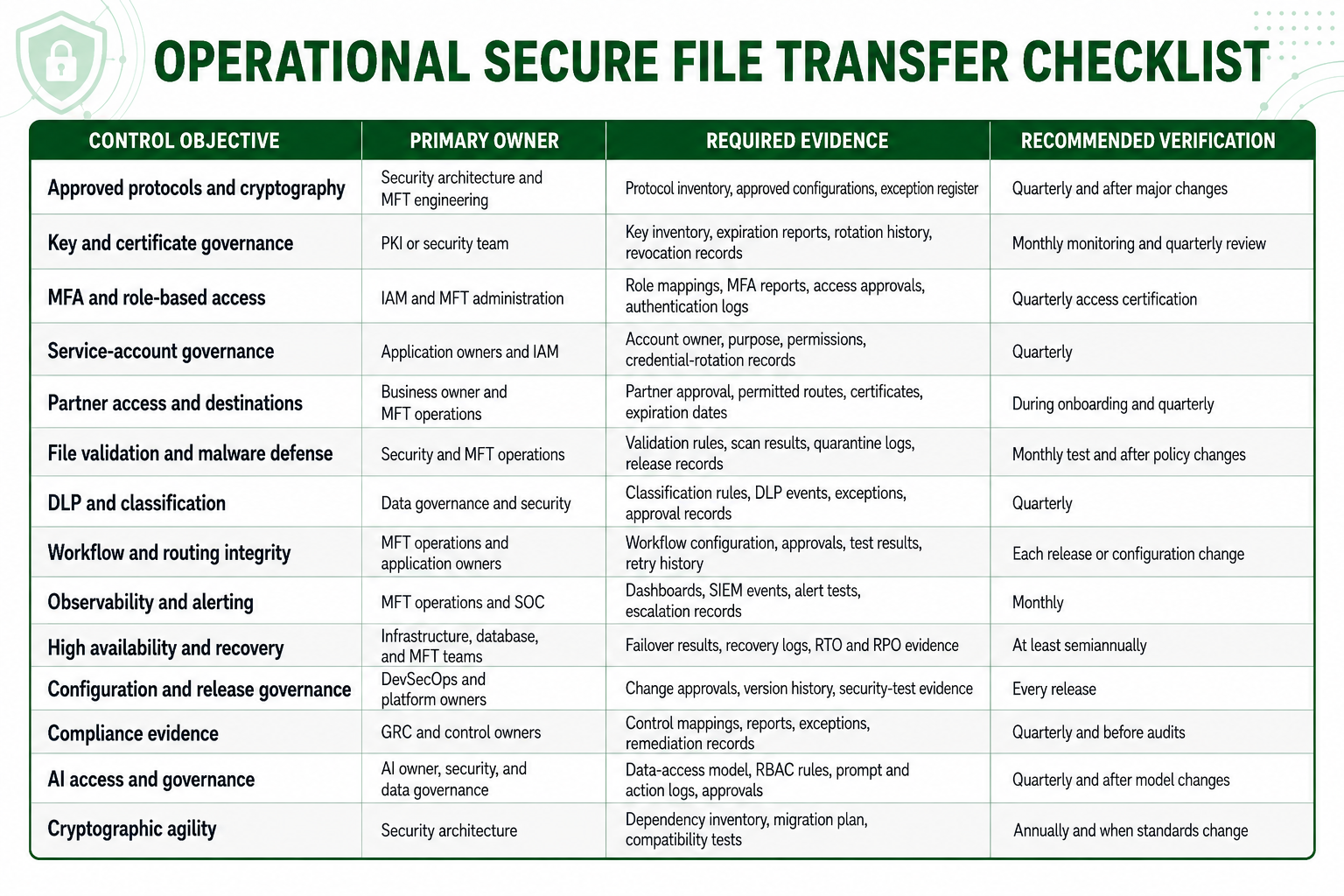
The exact cadence should reflect risk, regulatory obligations, transaction criticality, and the organization’s change frequency.
How to Verify That the Controls Actually Work
A policy document and a configured checkbox are not the same as a working control.
Organizations should:
- Assign a named owner to each control.
- Define the evidence the control must produce.
- Test normal, failure, and misuse scenarios.
- Confirm that alerts reach the correct team.
- Verify that exceptions are documented and time limited.
- Test recovery and failover procedures.
- Review permissions and partner access periodically.
- Trace sample files across the complete business workflow.
- Confirm that configuration changes are authorized and recorded.
- Measure whether controls reduce risk and operational effort.
This converts security from a feature inventory into an operating discipline.
How TDXchange Supports Layered File Transfer Security
TDXchange is bTrade’s enterprise Managed File Transfer and secure data exchange platform.
TDXchange supports layered security through:
- SFTP, FTPS, HTTPS, AS2, AS4, REST APIs, and AFTP
- Encryption for data in transit and at rest
- Native MFA for MFT administrators and end users
- MFA and SSO through external identity providers
- Role-based access control
- Delegated administration
- Partner-specific permissions
- Multi-tenant organizational isolation
- Zero Trust protection between internal platform services
- Centralized certificate, endpoint, user, and partner management
- Automated workflows, schedules, routing, validation, and retries
- Integration with malware-inspection and DLP services
- Detailed transaction and configuration audit trails
- Monitoring, alerting, and customizable dashboards
- SIEM and enterprise-observability integration
- High availability and multi-node clustering
- Hybrid cloud and Kubernetes deployment
- Secure browser-based file exchange
- Outlook integration through AttachGuard
- Accelerated transfer for large files and challenging networks
- Cryptographic agility and post-quantum security capabilities
TDXchange does not treat secure file transfer as encryption plus a dashboard. It provides a governed enterprise data exchange layer for managing how important information enters, moves through, and leaves the organization.
Secure File Transfer as a Foundation for Enterprise Data Exchange
Layered file-transfer security is one component of a broader transformation taking place across enterprise data exchange. As organizations connect files, APIs, cloud services, AI systems, applications, edge devices, and trading partners, security controls must remain consistent across every interaction.
Zero Trust, cryptographic agility, policy-driven workflows, end-to-end observability, and governed AI access are not isolated product features. They are foundational architectural principles for the next generation of enterprise integration.
This article’s security model directly supports several of the six pillars defining bTrade’s vision for enterprise data exchange:
- Pillar 1, Native Zero Trust: Every user, application, service, partner, workflow, and internal platform component must be explicitly authenticated and authorized.
- Pillar 2, AI-Assisted Operational Intelligence: AI must operate within defined access controls, RBAC, least privilege, and complete auditability.
- Pillar 3, Crypto-Agile and Quantum-Ready Security: Organizations need the ability to adopt new cryptographic standards without rebuilding their applications and integrations.
- Pillar 5, Enterprise Observability: Security and operations teams need end-to-end visibility across transactions, workflows, identities, policy decisions, and infrastructure.
To see how these security capabilities fit within bTrade’s broader strategy, read The Future of Enterprise Data Exchange: AI, Zero Trust, Quantum-Safe Security, and the Evolution of Managed File Transfer, which explores all six foundational pillars shaping modern enterprise data exchange.
Executive Takeaways
Encryption remains indispensable, but it is only one component of modern file-transfer security.
Organizations also need:
- Verified identity
- Least-privilege access
- Secure protocols
- Governed keys and certificates
- File validation
- Malware-defense and DLP integrations
- Policy-driven automation
- Runtime and infrastructure protection
- Operational resilience
- End-to-end observability
- AI governance
- Defensible compliance evidence
- Cryptographic agility
Managed File Transfer brings these controls together at one of the most sensitive points in the enterprise: where important information crosses application, system, cloud, and organizational boundaries.
That is the real role of modern secure file transfer. It does not merely move encrypted files. It makes critical exchanges controlled, visible, resilient, and accountable.
To discuss modernizing your secure file-transfer environment, contact the bTrade team.
About the Author
Hanz Jorgensen is Chief Operating Officer and Managing Member at bTrade, where he oversees daily operations and works closely with the leadership team to shape and execute the company’s strategic direction. With more than 20 years of experience with several different MFT/technology companies spanning system administration, development, customer support, pre-sales, and enterprise solution delivery, Hanz brings a uniquely practical perspective on what organizations actually need from managed file transfer platforms. He leads bTrade’s Solution Consulting team and plays a central role in aligning product capabilities with real customer requirements across regulated and high-complexity environments.
Frequently Asked Questions
What is modern secure file transfer?
Modern secure file transfer is the protected and governed movement of information between users, applications, systems, cloud services, and partners using encryption, identity controls, automation, monitoring, validation, recovery, and auditing.
Why is encryption alone insufficient?
Encryption protects confidentiality, but it cannot detect stolen credentials, malicious files, excessive access, incorrect destinations, unusual activity, or failed business workflows. Those risks require additional security and governance layers.
Is SFTP enough for enterprise file-transfer security?
SFTP provides encrypted transport over SSH. Enterprise environments often require additional capabilities such as centralized identity, workflow automation, monitoring, policy enforcement, malware-defense integration, audit evidence, and recovery.
What is Zero Trust file transfer?
Zero Trust file transfer explicitly authenticates and authorizes users, applications, services, and partners while applying least-privilege access. Trust is not granted solely because an identity or system is inside the corporate network.
How does MFT help defend against malicious files?
MFT workflows can validate files and integrate with antivirus, sandboxing, CDR, DLP, and quarantine services. These layered controls reduce risk but cannot guarantee that every malicious file will be detected.
What is DLP’s role in secure file transfer?
DLP can identify sensitive information and help prevent unauthorized or accidental sharing. MFT supplies the governed workflow through which DLP policies, destination controls, approvals, quarantine, and audit records can be applied.
What is file-transfer observability?
File-transfer observability provides context across the complete transaction, including identity, workflow steps, validation, delivery, acknowledgment, SLA performance, failures, retries, and relevant configuration changes.
Does MFT automatically provide regulatory compliance?
No. MFT can support compliance through encryption, access controls, audit trails, policy enforcement, evidence retention, and reporting. Compliance also depends on configuration, procedures, people, governance, and risk management.
How often should file-transfer security controls be tested?
Testing frequency should reflect risk and regulatory requirements. Access reviews are commonly performed quarterly, monitoring and certificate status should be reviewed continuously or monthly, and failover and disaster recovery should be tested at least semiannually for critical environments.
How should AI be governed in an MFT environment?
AI should operate as a controlled workload identity with defined data access, RBAC, least privilege, auditing, human-approval requirements, and restrictions on sensitive information.
Why is post-quantum readiness important for MFT?
MFT environments may exchange information that must remain confidential for many years. Cryptographic inventory and agility help organizations prepare to replace quantum-vulnerable public-key mechanisms without redesigning the complete platform.
What makes an operational security checklist different from a feature list?
A feature list states what a product can do. An operational checklist identifies the control owner, required evidence, verification method, testing cadence, and remediation process needed to demonstrate that the control works.