
Managed File Transfer, or MFT, is a technology platform for securely exchanging business-critical files between people, applications, systems, cloud services, and external trading partners.
Unlike basic file transfer protocols, MFT adds centralized security, automation, monitoring, governance, auditability, and operational control. It helps organizations understand not only whether a file was sent, but who sent it, where it went, how it was protected, whether it arrived successfully, and what happened when something went wrong.
In Summary
Managed File Transfer provides a controlled and automated way to exchange sensitive or operationally important information.
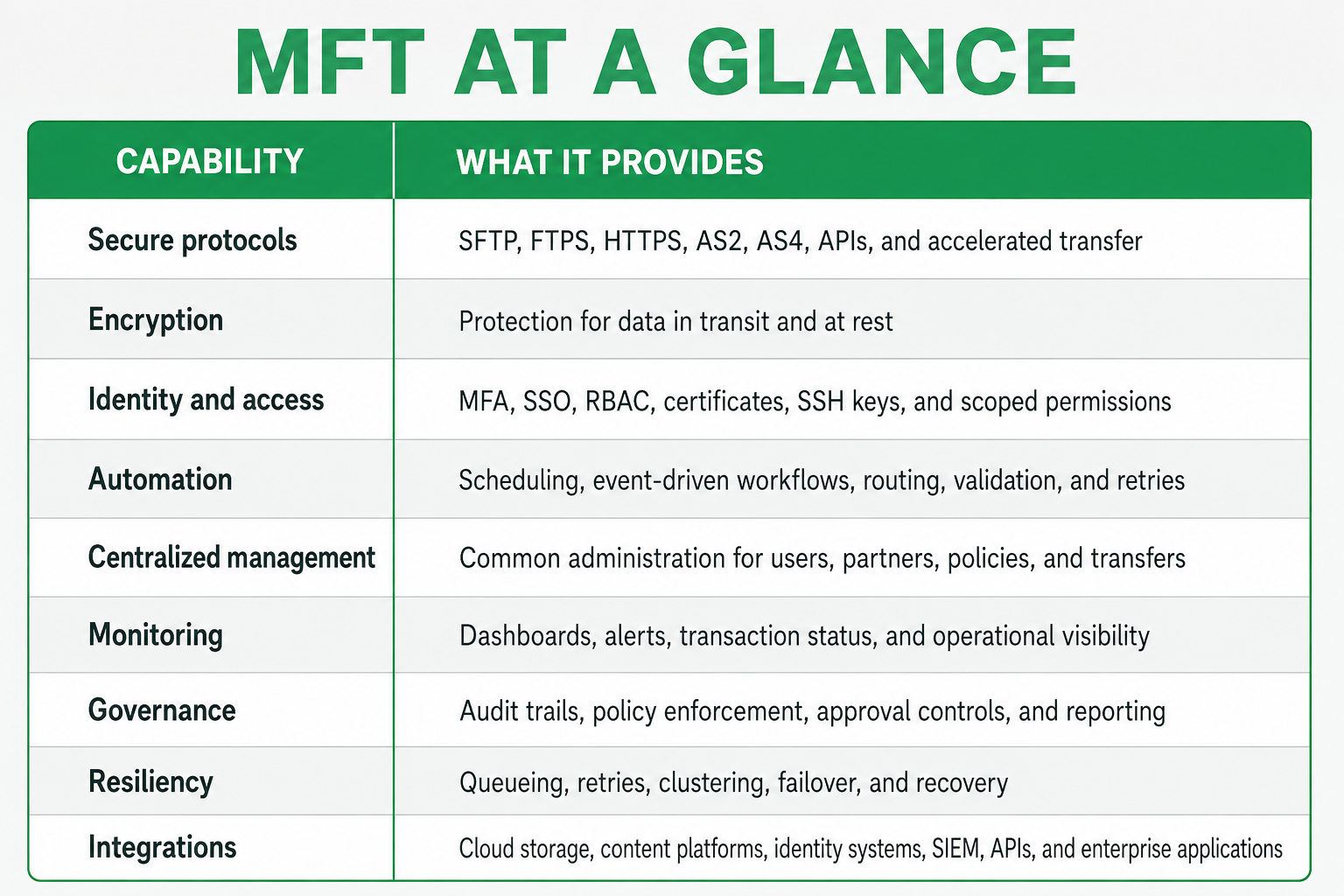
An enterprise MFT platform typically combines:
- Secure file transfer protocols
- Encryption in transit and at rest
- Identity and access controls
- Automated workflows and scheduling
- Centralized administration
- Real-time monitoring and alerting
- Detailed audit trails
- High availability and recovery
- Cloud, application, and trading partner integrations
MFT is not simply another file transfer protocol. It is the operational and security layer that governs how enterprise files move.
Key Takeaways
- MFT centralizes secure file transfer across internal systems, cloud platforms, users, and trading partners.
- It supports protocols such as SFTP, FTPS, HTTPS, AS2, AS4, APIs, and accelerated transfer technologies.
- Automation replaces scripts, manual uploads, email attachments, and repetitive administrative work.
- Centralized security controls help organizations enforce authentication, authorization, encryption, and data-handling policies.
- Monitoring, alerting, and audit trails improve troubleshooting, accountability, and compliance evidence.
- MFT supports business continuity through retries, queueing, failover, clustering, and recovery controls.
- Modern MFT platforms integrate with cloud storage, content platforms, identity providers, SIEM systems, and enterprise applications.
- MFT supports compliance programs, but no product magically makes an organization compliant. If only compliance were that easy.
What Is Managed File Transfer?
Managed File Transfer is a software platform that secures, automates, monitors, and governs file exchanges across an organization.
Files may move between:
- Internal applications and databases
- Employees and business units
- Customers, suppliers, and trading partners
- Cloud storage and content platforms
- ERP, CRM, EDI, and SaaS applications
- On-premises, hybrid, and cloud environments
- APIs, services, and automated workflows
The word “managed” is important. A basic transfer protocol moves a file from one location to another. MFT manages the complete process around that transfer, including identity, security policies, routing, validation, notifications, audit records, exception handling, and recovery.
What Problem Does MFT Solve?
Most organizations do not have a single file transfer problem. They have hundreds or thousands of them.
One department may use SFTP scripts. Another may rely on FTPS. Business users may exchange attachments through email. Applications may upload files to cloud storage, while external partners use AS2, APIs, or shared folders.
Over time, this creates a fragmented environment involving:
- Unmanaged scripts
- Embedded passwords
- Inconsistent encryption
- Limited operational visibility
- Manual file processing
- Missed or duplicated transfers
- Unclear ownership
- Incomplete audit records
- Difficult partner onboarding
- Too many alerts and too little useful information
MFT brings these activities under centralized governance. It allows organizations to standardize how files are transferred without forcing every partner, application, or business unit to use the same protocol.
How Does Managed File Transfer Work?
An MFT platform acts as a secure orchestration layer between the systems that produce information and the systems or people that consume it.
A typical MFT workflow includes the following steps.
1. Ingest the File
The platform receives or retrieves a file from an application, user, watched folder, API, cloud repository, file share, or trading partner.
2. Authenticate and Authorize
The platform verifies the identity of the user, application, service, or partner. It then applies permissions based on roles, policies, certificates, keys, or identity-provider information.
3. Validate and Protect
The file may be checked for naming conventions, size, format, expected content, digital signatures, malware, or business rules. Encryption and other security policies are applied as required.
4. Process and Route
Automated workflows can rename, route, compress, transform, approve, stage, or distribute the file. A single incoming file may trigger several downstream actions.
5. Deliver Securely
The file is transmitted using the protocol and security controls required by the receiving system or trading partner.
6. Monitor, Record, and Recover
The platform records the transaction, reports its status, sends alerts when needed, and automatically retries or recovers from qualifying failures.
This creates a repeatable and auditable process instead of a collection of unrelated file movements.
What Protocols Does MFT Support?
Enterprise data exchange rarely follows a single technical standard. Legacy applications, cloud services, internal systems, and external partners often require different methods of connectivity, including SFTP, FTPS, HTTPS, AS2, AS4, APIs, and accelerated transfer protocols. A modern MFT platform brings these different connections under one governed environment, allowing organizations to support each system’s requirements without creating another collection of disconnected tools and scripts.
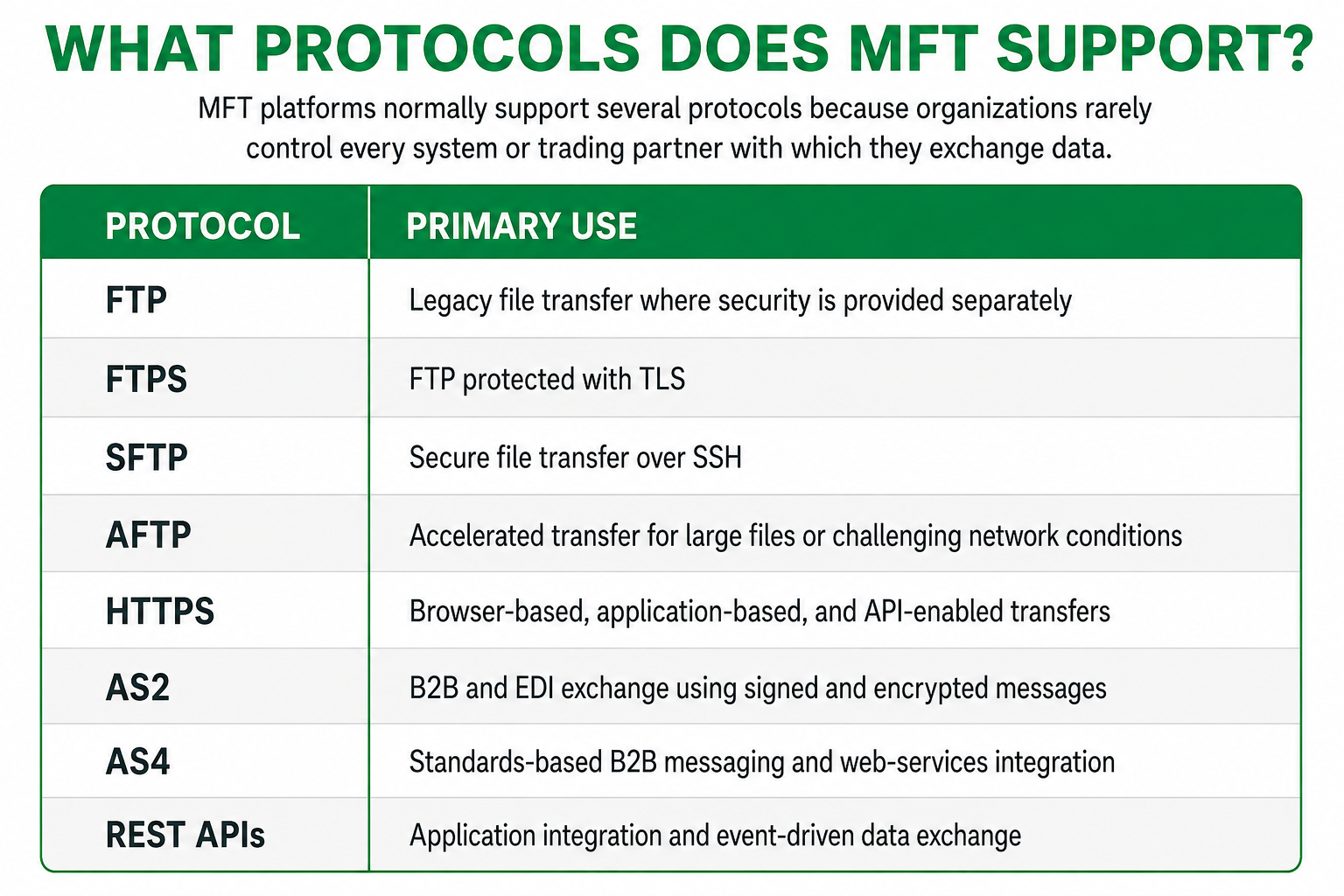
The protocol determines how a file travels. The MFT platform determines how the overall process is secured, automated, monitored, and governed.
MFT vs. FTP vs. SFTP
FTP and SFTP define how files are transported between two endpoints, but they do not manage the complete business process around the transfer. Managed File Transfer adds the operational layer needed to authenticate users and systems, automate workflows, enforce security policies, monitor activity, recover from failures, and maintain detailed audit records. In other words, the protocol moves the file, while MFT makes sure the entire process is secure, visible, reliable, and governed.
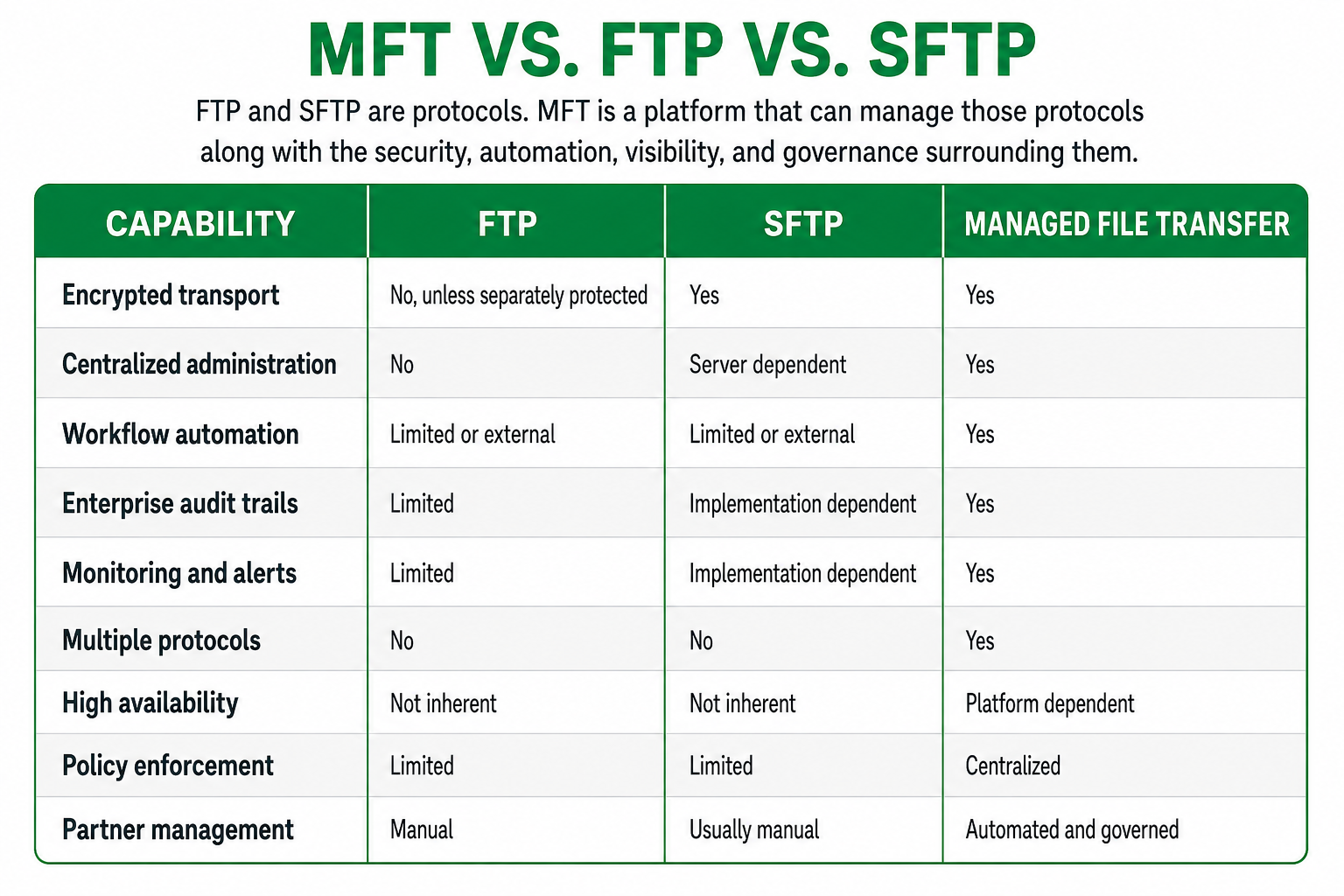
SFTP provides secure transport, but secure transport alone is not the same as managed file transfer. A secure protocol cannot, by itself, provide enterprise workflow orchestration, centralized governance, cross-protocol visibility, or complete transaction management.
For a more detailed comparison, see MFT vs. SFTP: What Is the Difference?.
Core MFT Capabilities
Security and Access Control
Enterprise MFT platforms can provide:
- Encryption in transit and at rest
- Multi-factor authentication
- Single sign-on
- Role-based access control
- SSH key and certificate management
- IP filtering and network restrictions
- Password and credential policies
- Tenant and business-unit isolation
- Detailed access and transaction logs
Modern implementations should align these controls with Zero Trust principles. NIST SP 800-207 emphasizes that trust should not be granted solely because a user or system is located inside a network boundary.
Workflow Automation
MFT automation can initiate actions based on schedules, incoming files, API calls, application events, or business conditions.
Workflows may:
- Monitor folders and repositories
- Retrieve only new files
- Select files matching predefined criteria
- Route files to several destinations
- Rename, compress, encrypt, or validate files
- Trigger applications or APIs
- Send confirmations and notifications
- Retry failed transfers
- Escalate exceptions
- Preserve processing history
This reduces manual work and helps prevent the small errors that eventually turn into very large conference calls.
Centralized Governance
MFT provides a common place to manage:
- Users and service accounts
- Trading partners
- Credentials and certificates
- Transfer policies
- Workflows and schedules
- Business-unit access
- Retention rules
- Alerts and notifications
Delegated administration can allow individual departments or business units to manage their own operations while enterprise security policies remain centrally controlled.
Monitoring and Auditability
Operations teams need to know:
- Which files were received
- Which files were delivered
- Whether validation succeeded
- Where a transfer failed
- Whether it was retried
- Who changed a configuration
- Which user or system accessed the data
Centralized dashboards, searchable transaction records, alerts, logs, and SIEM integrations make this information available without forcing someone to dig through several servers and an ancient script written by a person who retired six years ago.
Resiliency and Scalability
Mission-critical file transfer requires more than restarting a failed process.
MFT platforms may support:
- Automated retries
- Secure queueing
- Transfer checkpoints
- Multiple processing nodes
- Active-active or active-passive clustering
- Load balancing
- Database resiliency
- Replicated storage
- Disaster recovery
- Horizontal scaling
Availability depends on the complete architecture, including the network, database, storage, identity services, and secure edge. Adding another application server does not automatically make every dependency highly available.
For a deeper architectural discussion, see Modern MFT Architecture: Secure, Scalable File Transfer.
What Are the Business Benefits of MFT?
Reduced Security Risk
MFT replaces unmanaged transfer methods with controlled authentication, encryption, authorization, and logging.
Less Manual Work
Automated workflows reduce repetitive uploads, downloads, file movement, partner coordination, and reprocessing.
Faster Troubleshooting
Centralized monitoring helps teams identify the affected file, partner, workflow, system, and error without searching through disconnected logs.
Stronger Compliance Evidence
Audit trails and policy controls make it easier to demonstrate how sensitive data is handled and who accessed it.
More Reliable Business Processes
Queueing, retry logic, notifications, and recovery controls reduce the risk that a temporary failure interrupts a critical workflow.
Faster Partner Onboarding
Reusable configurations and partner templates can standardize connectivity, credentials, routing, testing, and operational policies.
Better Scalability
Centralized management allows organizations to support more files, partners, applications, and business units without increasing administrative effort at the same rate.
How Does MFT Support Compliance?
MFT can help organizations implement and demonstrate technical controls associated with frameworks and regulations such as:
- HIPAA
- PCI DSS
- SOX
- GDPR
- GLBA
- DORA
- CJIS
- NIST Cybersecurity Framework
Relevant capabilities may include encryption, access controls, audit logging, data retention, segregation of duties, monitoring, and evidence reporting.
However, MFT does not make an organization compliant by itself. Compliance also depends on policies, procedures, configuration, employee behavior, risk management, and how the platform is operated.
For additional guidance, see What Auditors Expect from MFT Platforms.
What Role Does MFT Play in Modern Enterprise Architecture?
Modern MFT platforms increasingly operate as enterprise data exchange layers rather than isolated file transfer servers.
They connect:
- Data centers
- Cloud environments
- SaaS platforms
- Business applications
- External partners
- Content repositories
- Identity services
- Security and observability platforms
This allows organizations to apply consistent policies even when data moves across different protocols, networks, clouds, and administrative domains.
Cloud and Application Integrations
Modern MFT can connect with platforms such as Amazon S3, Azure Blob Storage, Google Cloud Storage, Google Drive, Microsoft SharePoint, Box, Dropbox, SMB file shares, APIs, and web services.
The platform can monitor these repositories, retrieve new or qualifying files, process them, and deliver files to predefined locations.
Learn more in Managed File Transfer and Cloud Application Integrations.
Clustering and Kubernetes
Traditional clustering focuses on MFT application availability, shared transaction state, and workload coordination. Kubernetes focuses on container orchestration, deployment automation, and infrastructure scaling.
They solve related but different problems, and many enterprise environments use both.
For deeper comparisons, see:
- Clustering in Managed File Transfer
- MFT Clustering vs. Kubernetes
- How to Scale Managed File Transfer with Kubernetes
Post-Quantum Security
Organizations that retain sensitive information for many years should begin evaluating cryptographic agility and post-quantum readiness.
This does not mean replacing every algorithm tomorrow. It means understanding cryptographic dependencies, supporting phased migration, and preparing for standardized quantum-resistant mechanisms.
Read Post-Quantum Managed File Transfer Security for the detailed discussion.
Which Industries Use MFT?
Organizations across nearly every industry depend on files to complete essential business processes, from payments and medical claims to supply-chain orders and regulatory reporting. When those files are delayed, lost, duplicated, or exposed, the impact can quickly extend to customers, revenue, compliance, and operations. MFT provides the security, automation, visibility, and recovery controls needed to keep these critical exchanges moving.
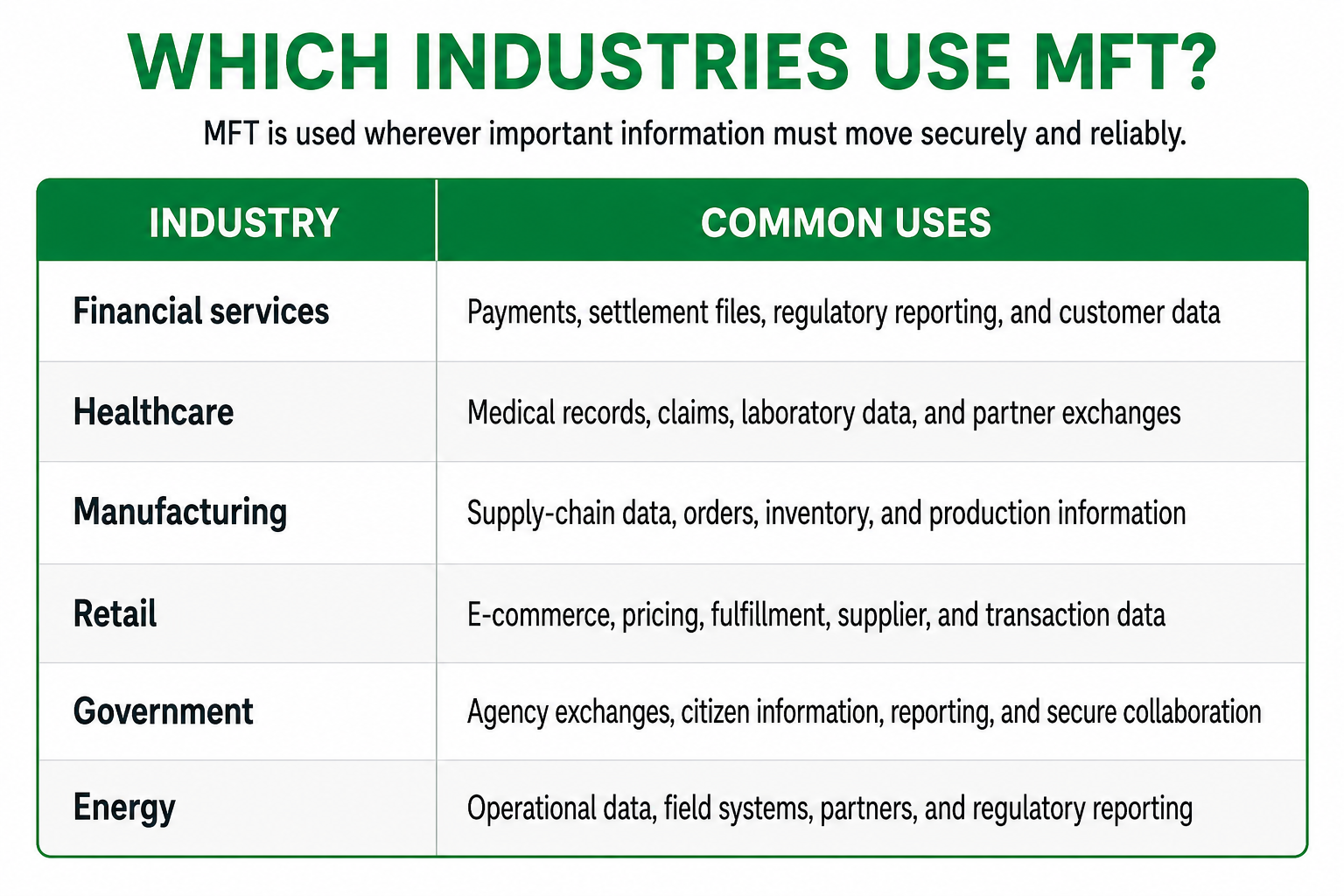
The use cases vary, but the underlying requirement remains the same: move sensitive or business-critical information with security, control, visibility, and proof.
When Does an Organization Need MFT?
An organization should consider MFT when:
- File transfers support critical business processes
- Sensitive or regulated data is exchanged
- Many partners use different protocols
- Transfer scripts are difficult to maintain
- Credentials are embedded in scripts or applications
- Operations teams lack centralized visibility
- Failed transfers require manual intervention
- Auditors need consistent evidence
- Partner onboarding takes too long
- File volumes are increasing
- Business units require delegated administration
- Cloud and on-premises systems must operate together
- Downtime could affect customers, revenue, or regulatory obligations
If the failure of a file transfer can stop a payment, delay an order, interrupt production, or create a compliance problem, it probably deserves more than a script and crossed fingers.
How Should Organizations Evaluate an MFT Platform?
A useful evaluation should go beyond a list of supported protocols.
Ask:
- Can the platform demonstrate clear security controls?
- Does it centralize administration across users, applications, and partners?
- Can it automate complete business workflows?
- Does it provide useful operational visibility without manual log extraction?
- Can it scale without creating proportional administrative complexity?
- Does it support clustering, recovery, and disaster-recovery requirements?
- Can it integrate with existing cloud, identity, SIEM, and application platforms?
- Is it easy to install, learn, configure, patch, upgrade, and operate?
- Can administration be delegated without weakening governance?
- Does the platform support hybrid and cloud-native environments?
- Is the architecture prepared for changing security and compliance requirements?
- Does the vendor have a credible product roadmap and a history of supporting customers?
The best platform is not necessarily the one with the longest feature checklist. It is the one that reduces risk and operational burden while reliably supporting the organization’s actual business processes.
For a broader evaluation framework, see Future-Proof Managed File Transfer.
How Does TDXchange Support Managed File Transfer?
TDXchange is bTrade’s enterprise MFT and secure data exchange platform. It combines secure protocols, workflow automation, centralized governance, operational visibility, resiliency, and enterprise integrations within one platform.
TDXchange supports:
- SFTP, FTPS, HTTPS, AS2, AS4, APIs, and AFTP
- Automated and event-driven workflows
- Centralized and delegated administration
- Role-based access control and identity integration
- Multi-factor authentication
- Multi-tenancy and organizational isolation
- Detailed transaction auditing
- Real-time monitoring and alerting
- High availability and multi-node deployment
- Hybrid cloud and Kubernetes environments
- Zero Trust security principles
- Quantum-safe cryptographic capabilities
- Cloud storage and enterprise application integrations
- An administrative experience designed to be easier to learn, configure, patch, upgrade, and manage
Rather than forcing organizations to assemble file transfer, automation, monitoring, and governance from disconnected products and scripts, TDXchange provides these capabilities as a coordinated enterprise data exchange platform.
Learn more about the direction of the platform in The Future of Enterprise Data Exchange and Managed File Transfer.
Executive Takeaways
Managed File Transfer is the secure operational layer that governs how files move between people, partners, applications, and cloud environments.
It goes beyond encrypted transport by providing automation, identity controls, centralized management, monitoring, auditability, resilience, and integration.
For organizations whose file exchanges affect revenue, customers, compliance, or business continuity, MFT is not simply a more advanced way to transfer files. It is part of the enterprise architecture required to keep those business processes secure, visible, and running.
About the Author
Andrei Olin is Chief Technology Officer at bTrade, where he leads product strategy, delivery, architecture, and security across the company’s B2B, Managed File Transfer, and secure data exchange platforms.
Andrei has more than 30 years of experience spanning enterprise architecture, software development, infrastructure, cybersecurity, middleware, trading systems, SaaS, and Managed File Transfer. His career includes building mission-critical systems and infrastructure at Bear Stearns and Morgan Stanley, designing and operating enterprise MFT and messaging platforms for Merrill Lynch and Deutsche Bank, and building and scaling SaaS and security products at startups. He holds master’s and bachelor’s degrees in Information Technology with a focus on Information Security.
FAQs
What is Managed File Transfer?
Managed File Transfer is a technology platform that securely automates, monitors, and governs file exchanges between users, applications, systems, cloud services, and external partners.
How is MFT different from FTP?
FTP is a file transfer protocol. MFT is a platform that can manage FTP and other protocols while adding encryption, access control, automation, monitoring, auditing, and recovery.
Is SFTP the same as MFT?
No. SFTP is a secure transfer protocol that operates over SSH. MFT may use SFTP, but it also provides centralized administration, workflow automation, policy enforcement, monitoring, auditing, and support for multiple protocols.
How does MFT work?
MFT receives or retrieves a file, authenticates the parties involved, applies security and business rules, processes and routes the file, delivers it through an appropriate protocol, and records the complete transaction.
Which protocols do MFT platforms support?
Common protocols include SFTP, FTPS, HTTPS, AS2, AS4, APIs, and accelerated file transfer protocols. Exact support varies by platform.
Is MFT secure?
MFT can provide strong security through encryption, MFA, RBAC, identity integration, certificate and key management, network controls, monitoring, and detailed audit trails. Security still depends on proper architecture, configuration, and operation.
Does MFT support regulatory compliance?
MFT can help implement and demonstrate controls related to HIPAA, PCI DSS, SOX, GDPR, GLBA, DORA, CJIS, and other requirements. It supports compliance efforts but does not automatically make an organization compliant.
Can MFT operate in the cloud?
Yes. Modern MFT platforms can be deployed on premises, in private or public clouds, in Kubernetes environments, or across hybrid architectures.
Does MFT provide high availability?
Enterprise MFT platforms may provide application clustering, workload distribution, automated recovery, queueing, and failover. Complete availability also depends on the database, storage, network, identity, and disaster-recovery architecture.
Which industries use MFT?
MFT is widely used in financial services, healthcare, manufacturing, retail, government, energy, logistics, insurance, and other industries that exchange sensitive or business-critical data.
When should a company replace SFTP scripts with MFT?
Organizations should consider MFT when scripts become difficult to secure, monitor, scale, audit, or maintain, especially when transfers support critical operations or involve many applications and trading partners.
What is TDXchange?
TDXchange is bTrade’s enterprise Managed File Transfer and secure data exchange platform. It combines secure transfer protocols, automation, governance, integrations, operational visibility, high availability, and modern security capabilities within a unified platform.