

No MFT vendor is universally fastest under every condition. For large files moving across high-bandwidth, high-latency, or lossy networks, the strongest candidates are platforms with purpose-built accelerated transport, including IBM Aspera, Signiant, bTrade TDXchange with AFTP, GoAnywhere with FileCatalyst, and Raysync. Actual performance depends on bandwidth, latency, packet loss, storage speed, encryption, endpoint resources, file composition, and configuration. A valid comparison therefore requires testing each product under identical conditions.
This article compares the vendors using their publicly documented capabilities and published performance claims. It does not treat those claims as independently equivalent benchmark results.
Research reviewed August 23, 2026.
In Summary
The fastest large-file transfer platform depends on the network and the business process surrounding the transfer.
- IBM Aspera is a leading candidate for high-speed global data movement across long-distance and unpredictable networks.
- Signiant is especially strong for accelerated media and distributed content workflows.
- bTrade TDXchange with AFTP is a strong fit for governed system-to-system transfer, global high-speed data movement, media and eDiscovery workflows, and TB- and PB-scale distribution.
- GoAnywhere with FileCatalyst combines MFT workflow automation with an integrated acceleration service.
- Raysync focuses heavily on high-speed movement of TB- and PB-scale datasets.
- Vendor claims such as “up to 100x faster” cannot be compared directly unless the baseline protocol, network, files, endpoints, and measurement method are identical.
- The only defensible way to identify the fastest product for your environment is to run a controlled proof of concept.
Key Takeaways
- Conventional SFTP, FTPS, and HTTPS can perform well on short, clean network paths but may lose throughput as latency and packet loss increase.
- Purpose-built accelerated transport is most valuable for large datasets, long distances, high-bandwidth links, and unpredictable network conditions.
- Published acceleration multipliers are directional marketing claims, not a shared benchmark.
- Maximum throughput is limited by the slowest component in the complete path, including storage, CPU, encryption, network capacity, and the receiving application.
- A product can win a raw transfer test and still be the wrong operational choice if it lacks the required automation, governance, recovery, security, or observability.
- Buyers should test sustained throughput, bandwidth utilization, recovery, resource consumption, concurrency, and end-to-end completion under identical conditions.
Which MFT Vendors Have the Fastest Transfer Speeds for Large Files?
For large files crossing high-latency or lossy networks, the strongest candidates are IBM Aspera, Signiant, bTrade TDXchange with AFTP, GoAnywhere with FileCatalyst, and Raysync.
That is the qualified answer. There is no credible universal winner because these vendors do not publish results from one shared laboratory using the same hardware, storage, bandwidth, latency, packet loss, encryption, file set, and configuration.
It is also important to recognize that these products do not all occupy exactly the same category. IBM Aspera, Signiant, and Raysync emphasize accelerated data movement. TDXchange and GoAnywhere are broader MFT platforms that combine acceleration with workflow automation, security, governance, monitoring, and auditing. Buyers should compare both the transport engine and the complete operating model.
Large-File Transfer Vendor Comparison
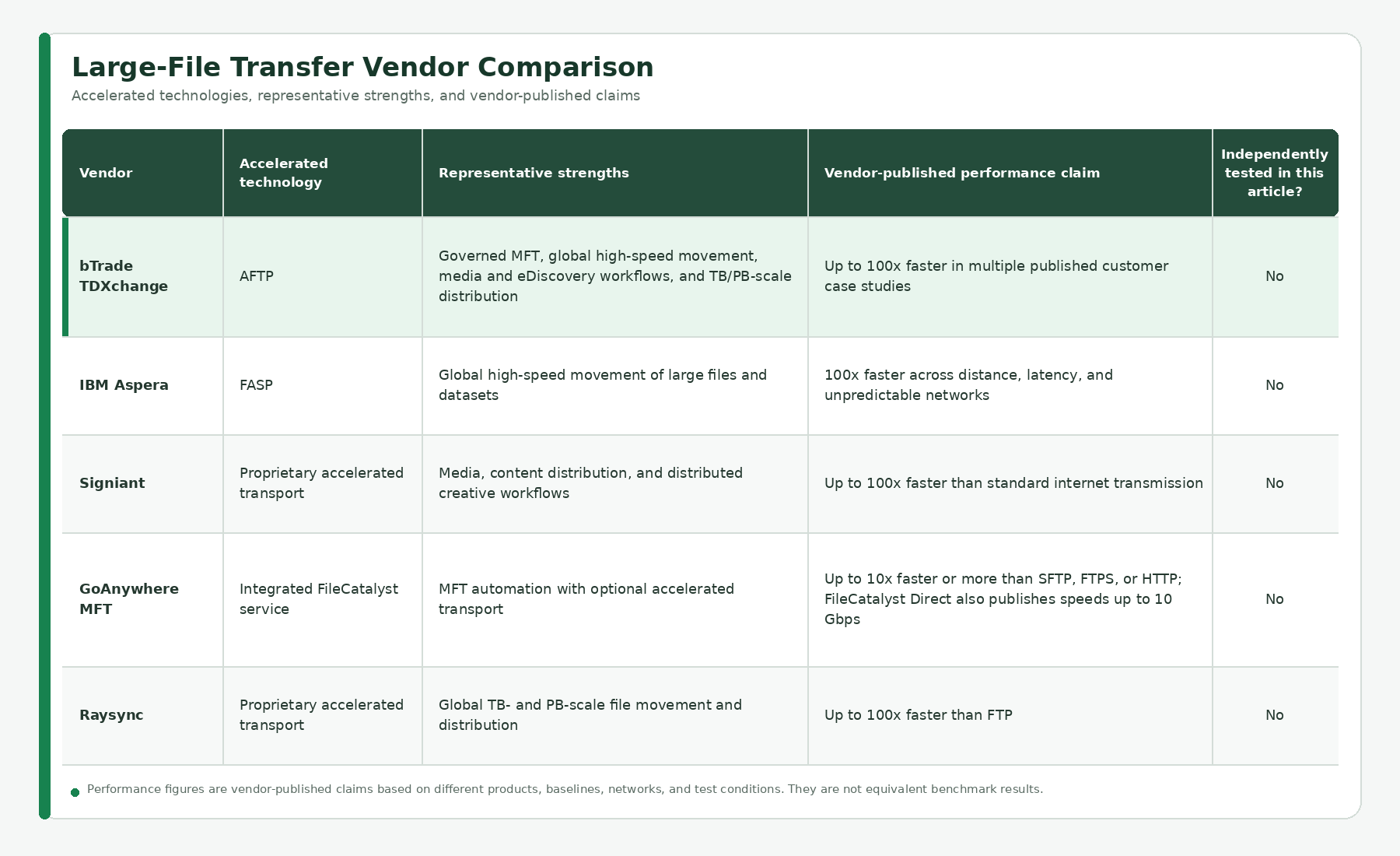
Important: Every performance figure above is a vendor-published claim. The figures use different wording and may rely on different baselines, test environments, file types, network impairments, and product configurations. They must not be interpreted as equivalent benchmark scores.
Why “Up to 100x Faster” Does Not Identify the Fastest Vendor
A performance multiplier is meaningful only when the baseline is known.
For example, a product may be 100 times faster than a poorly performing FTP or SFTP transfer on a high-latency, lossy path. Another product may report a lower multiplier against a better-tuned baseline while delivering greater absolute throughput. Both statements can be accurate, yet they do not tell a buyer which product will complete a specific 1 TB transfer first.
Before comparing any published claim, ask:
- What protocol and configuration provided the baseline?
- What bandwidth was available?
- What was the round-trip latency?
- How much packet loss was introduced?
- Was the test performed over the public internet, a private WAN, or a simulated link?
- Was the workload one large file, many small files, or a mixed directory?
- Were the files compressible?
- Were encryption and integrity validation enabled?
- What storage and endpoint hardware were used?
- Was the reported result peak throughput, average throughput, or total completion time?
Without those details, “100x” is evidence that acceleration can matter, not proof that one vendor is faster than another.
What Actually Determines Large-File Transfer Speed?
The transfer protocol is important, but it is only one part of the path.
Bandwidth
No software can transfer data faster than the usable capacity of the end-to-end connection. A 1 Gbps link establishes a theoretical ceiling before protocol overhead, encryption, congestion, and storage performance are considered.
Latency
Round-trip latency has a major effect on conventional TCP-based transfers. The farther acknowledgments must travel, the harder it can be for an untuned TCP flow to keep a high-bandwidth connection fully utilized.
Packet Loss and Network Variability
Traditional TCP interprets packet loss as a sign of congestion and reduces its sending rate. Accelerated transports commonly use UDP with application-layer reliability and congestion control to sustain throughput more effectively across impaired paths.
Storage Throughput
A fast network cannot compensate for a source disk that cannot read quickly or a destination that cannot write at the required rate. Cloud-object-storage API limits, network file systems, antivirus scanning, and downstream processing can also become bottlenecks.
Endpoint CPU and Memory
Encryption, checksums, compression, packet processing, and high concurrency consume resources. Performance testing should record CPU, memory, and I/O utilization at both ends.
File Composition
One 500 GB file behaves differently from five million small files totaling 500 GB. Directory enumeration, metadata operations, connection setup, and storage latency can dominate small-file workloads.
Encryption and Security Controls
Encryption should remain enabled during a realistic benchmark. Disabling security to produce a better number creates a result that cannot be reproduced in production.
Configuration and Traffic Policy
Parallelism, packet size, rate limits, congestion control, bandwidth reservations, quality of service, and firewall rules can materially affect results. A well-designed accelerated protocol still needs an appropriate deployment and configuration.
Vendor Analysis
bTrade TDXchange with AFTP
bTrade TDXchange with AFTP
TDXchange includes bTrade’s proprietary Accelerated File Transfer Protocol, or AFTP, a purpose-built UDP-based transport for high-performance movement of very large files and datasets. AFTP is designed to use available bandwidth efficiently across high-capacity, high-latency, and lossy network paths, reduce transfer windows, and resume interrupted transfers from a checkpoint instead of restarting from the beginning.
bTrade was one of the early pioneers of commercial accelerated file transfer, alongside Aspera. According to bTrade’s AFTP origin story, its engineers began developing the protocol in 2007, followed by a limited enterprise release in 2008 and early production deployments in media, banking, and eDiscovery. This history positions AFTP as a mature acceleration technology developed for demanding enterprise workloads rather than a recent add-on.
bTrade’s most important distinction, however, is the platform surrounding the protocol. AFTP operates natively within TDXchange, combining accelerated transport with workflow orchestration, scheduling, encryption, identity and role-based access controls, partner governance, monitoring, alerting, checkpoint recovery, high availability, and detailed transaction auditing. TDXchange can also extend AFTP to remote sites and partner endpoints through a lightweight client, avoiding the need to deploy a complete MFT platform at every location. This makes the combination a strong candidate for regulated, mission-critical, and large-scale system-to-system workflows where speed must remain secure, governed, recoverable, and observable.
Published customer implementations demonstrate that breadth. A media-production case study reports up to 100x faster delivery for large production assets. A separate eDiscovery case study describes using TDXchange and AFTP to accelerate the secure movement of large legal, compliance, and regulatory datasets while preserving access controls, auditability, and chain-of-custody evidence. These results are evidence from specific customer environments, not a neutral head-to-head benchmark against every product in this article.
Best fit: Governed system-to-system exchange, global high-speed movement, media production, eDiscovery workflows, cloud or hybrid replication, disaster recovery, and TB- or PB-scale distribution where acceleration must operate within a comprehensive enterprise MFT platform.
Buyer verification: Test AFTP against the organization’s current transfer method using the same production-like security policies, files, endpoints, storage, and network impairments.
IBM Aspera
IBM Aspera uses FASP, IBM’s patented high-speed transport technology. IBM states that Aspera can deliver critical data 100x faster across distance, latency, and unpredictable networks and is designed to utilize available bandwidth for large datasets.
Aspera has a strong history in global media distribution, scientific data, cloud migration, and other data-intensive workloads. IBM also positions the platform for hybrid and multi-cloud environments, automation, synchronization, APIs, and petabyte-scale movement.
Best fit: Organizations prioritizing mature, high-speed data movement across global or unpredictable network paths.
Buyer verification: Confirm the throughput achievable with the required Aspera product, licensing tier, storage architecture, endpoint model, security settings, and concurrent workload.
Signiant
Signiant’s acceleration technology runs over UDP and adds application-layer flow control, congestion control, reliability, and checkpoint restart. Signiant publishes transfer speeds up to 100x faster than standard internet transmission and says the greatest improvements occur with large datasets, long distances, congested networks, and higher-bandwidth connections.
Signiant is particularly well established in media and entertainment, where large production assets must move among creators, facilities, storage platforms, and distribution partners. Its product portfolio combines accelerated transport with SaaS-based access and workflow capabilities.
Best fit: Media supply chains, distributed production, content exchange, and organizations that need accelerated access to storage across multiple locations.
Buyer verification: Test the specific Signiant product and endpoint method that will be used in production, including browser, agent, automated, and cloud-storage paths.
GoAnywhere MFT with FileCatalyst
GoAnywhere’s FileCatalyst service integrates accelerated transfer with GoAnywhere workflows, triggers, monitoring, audit logs, agents, and other MFT capabilities. Fortra states that the integrated service can transfer files up to 10 times faster or more than SFTP, FTPS, or HTTP.
FileCatalyst uses UDP-based acceleration and supports large files, bulk directories, compression, directory streaming, and incremental transfer. Separately, FileCatalyst Direct publishes point-to-point speeds up to 10 Gbps. The “10x or more” multiplier and “up to 10 Gbps” ceiling measure different things and should not be combined into one score.
Best fit: Existing or prospective GoAnywhere customers that want to add accelerated transport to centralized MFT automation and governance.
Buyer verification: Confirm whether FileCatalyst is included in the proposed architecture and licensing, then test the integrated workflow rather than benchmarking FileCatalyst as a disconnected transport component.
Raysync
Raysync positions its proprietary transport for global movement of TB- and PB-scale files and publishes speeds up to 100x faster than FTP. The platform supports large-file distribution, multiple transfer patterns, intelligent compression, synchronization, encryption, and access controls.
Raysync is a strong candidate when the primary requirement is very large data movement across long distances, cloud environments, and distributed endpoints. Buyers should evaluate how its governance, workflow, reporting, and ecosystem capabilities align with broader MFT requirements.
Best fit: TB- and PB-scale data movement, global distribution, cloud transfer, and organizations focused heavily on bulk-transfer performance.
Buyer verification: Test the required transfer mode, storage endpoints, concurrency, security configuration, and behavior under packet loss and recovery conditions.
Which Vendor Is Best for Each Large-File Transfer Scenario?
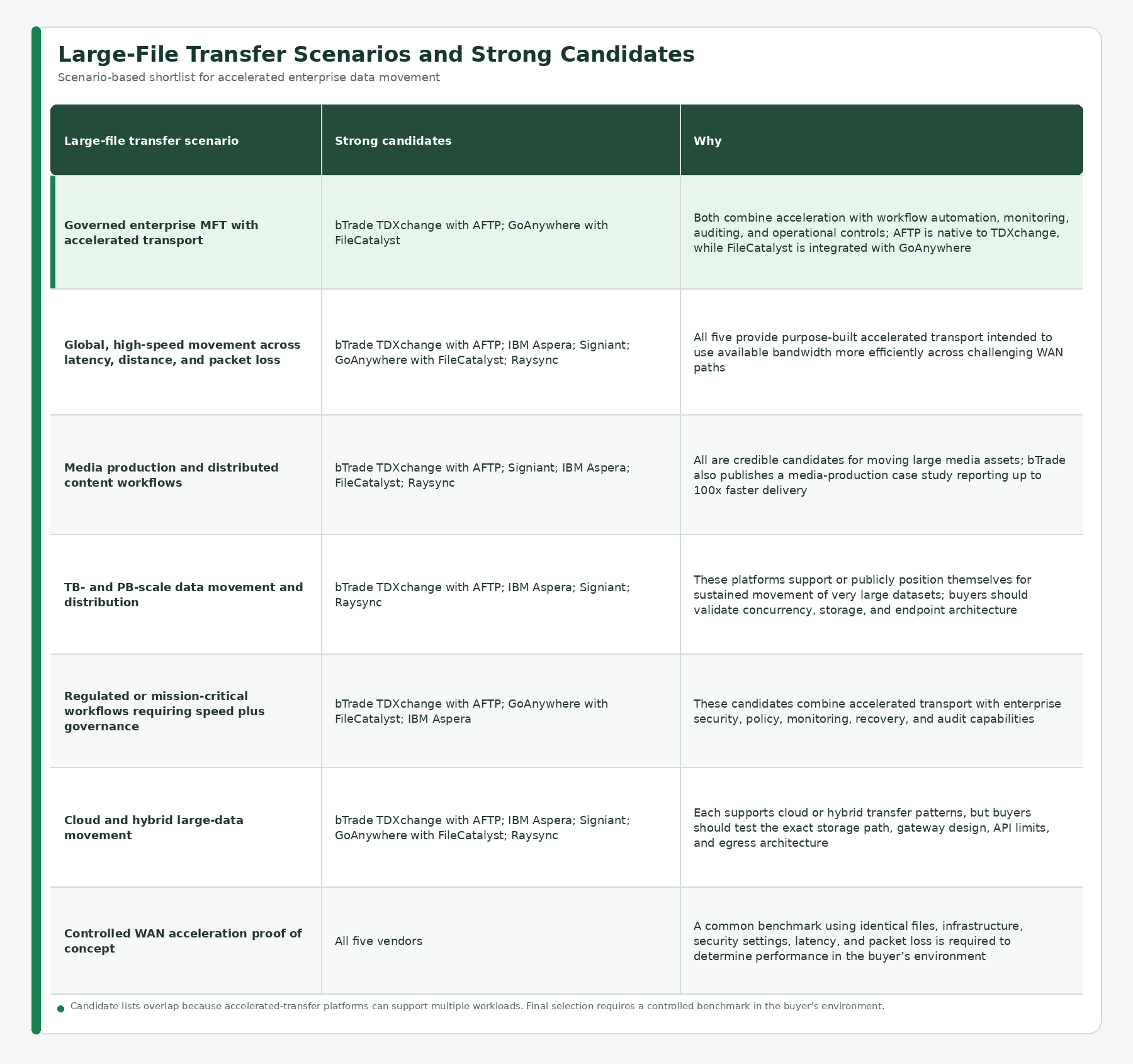
These are scenario-based shortlists, not absolute rankings. Product fit also depends on security, compliance, operating model, integrations, support, deployment, and total cost.
How Should Organizations Benchmark Accelerated MFT Vendors?
Before benchmarking vendors, organizations should document the current state of their production environment and define the throughput, concurrency, completion-time, and recovery targets the new platform must meet. Accelerated transport cannot overcome every bottleneck surrounding it. Network capacity and quality, firewalls and load balancers, source and destination storage throughput and IOPS, CPU and memory, virtualization or cloud limits, server network-interface speeds and configuration, and database capacity and tuning can all constrain performance. A 10 Gbps network path, for example, will not deliver 10 Gbps throughput when an endpoint has a 1 Gbps network interface or the storage subsystem cannot read and write data at the required rate.
A benchmark should therefore validate the complete end-to-end path rather than only the transfer protocol. The test environment should reproduce the production topology, security controls, encryption, representative files, concurrency, storage, compute, databases, and downstream processing as closely as practical. Teams should establish a baseline, monitor each dependency, identify the limiting resource, and then change one variable at a time.
As part of its service offering, bTrade engineers work directly with customers to assess, design, and tune the complete infrastructure supporting TDXchange and AFTP. This includes networks, firewalls, load balancers, server and virtual-machine sizing, network interfaces, storage, databases, clustering, cloud and hybrid architecture, and monitoring. The objective is to help customers build an environment capable of meeting their required performance, availability, and recovery goals and not simply install software and hope the surrounding infrastructure is feeling cooperative.
A credible proof of concept should reproduce real production conditions and measure both transfer performance and the behavior of the complete supporting architecture.
1. Define Representative Workloads
Test at least:
- One 10 GB file
- One 100 GB file
- One 1 TB file, when relevant
- A directory containing thousands of small files
- A mixed production dataset
- Compressible and incompressible content
2. Control the Infrastructure
Use equivalent:
- Source and destination compute
- Storage types and performance tiers
- Network paths
- Encryption and checksum settings
- Endpoint placement
- Concurrent workload
3. Test Multiple Network Conditions
A useful matrix might include:
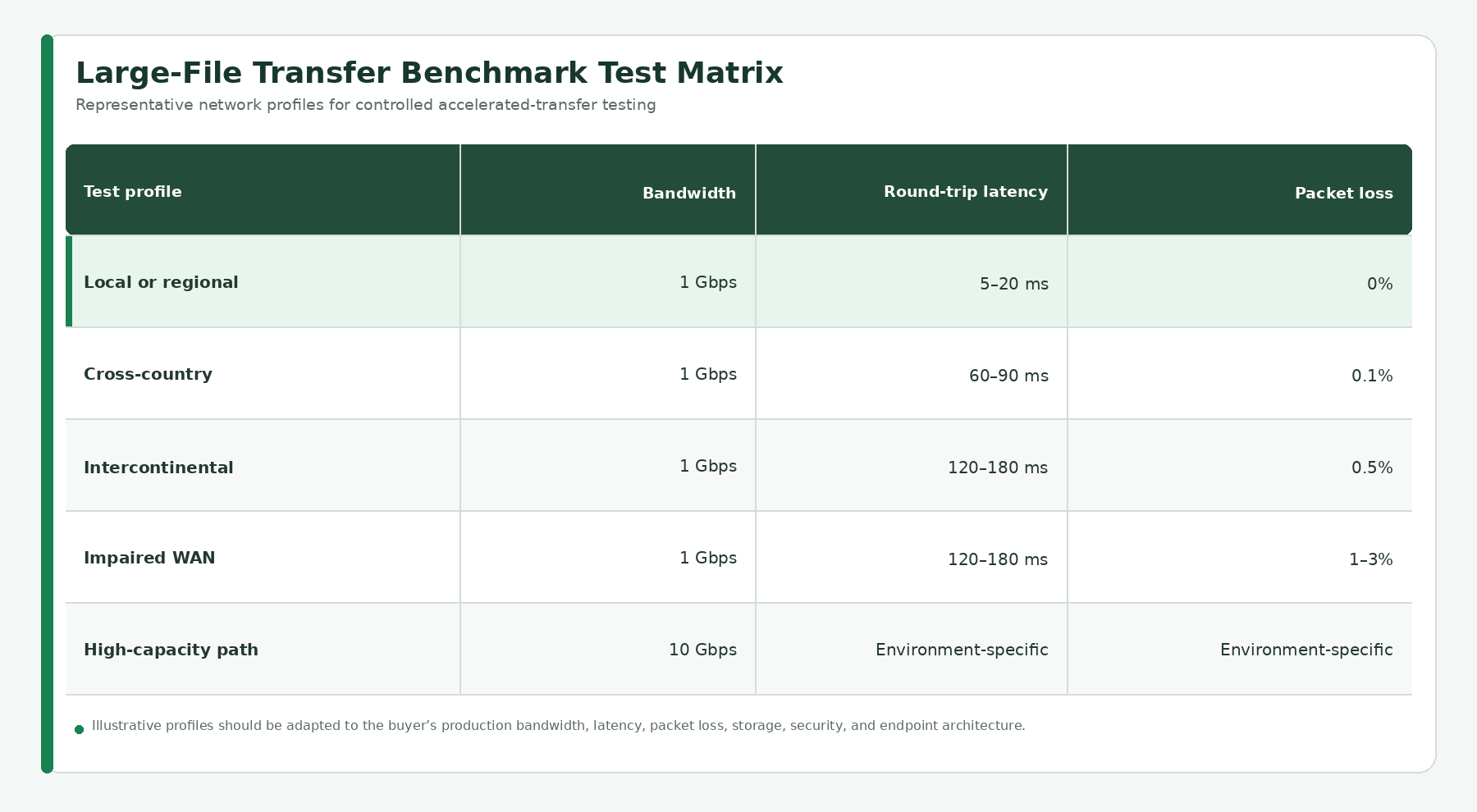
The exact profiles should reflect the buyer’s real routes rather than an attractive laboratory scenario that will never exist in production.
4. Measure More Than Peak Throughput
Record:
- Total completion time
- Average sustained throughput
- Percentage of available bandwidth utilized
- Time to recover from interruption
- CPU, memory, and storage utilization
- Performance with concurrent transfers
- Success and retry rates
- Integrity-verification results
- Operational effort required
- End-to-end workflow completion
5. Run Repeated Tests
Run each scenario multiple times and compare median results rather than selecting the single fastest run. Record configuration changes and retain the raw evidence.
6. Test Failure and Recovery
Interrupt the network, restart an endpoint, reduce available bandwidth, introduce packet loss, and verify whether the transfer resumes correctly. A transfer that is exceptionally fast until something goes wrong may not be fast in any operationally useful sense.
7. Evaluate Governance and Usability
Measure how easily the platform can:
- Automate the complete workflow
- Apply partner-specific policies
- Restrict bandwidth when required
- Monitor active transfers
- Identify bottlenecks
- Alert on failures or delays
- Resume interrupted transfers
- Produce audit evidence
- Support operations without specialized daily intervention
The real objective is not to win a speed test. It is to complete critical business transfers quickly, securely, predictably, and with minimal operational effort.
When Is Accelerated Transfer Unnecessary?
Accelerated transport may provide little benefit when:
- Files are small
- The network path is short and clean
- Available bandwidth is low but already fully utilized
- Storage is the dominant bottleneck
- Transfers are infrequent and not time-sensitive
- The receiving application cannot process data any faster
- Properly configured SFTP or HTTPS already meets the required delivery window
In those situations, operational simplicity may be more valuable than adding another transfer technology.
How TDXchange Approaches Large-File Performance
TDXchange treats accelerated transfer as one part of a governed data-exchange process.
AFTP provides the high-performance transport layer for large, sustained transfers. TDXchange supplies the surrounding enterprise controls, including:
- Workflow automation and orchestration
- Centralized partner and endpoint management
- Encryption and identity controls
- Role-based access
- Scheduling and routing
- Checkpoint recovery and retries
- Monitoring and alerting
- End-to-end transaction visibility
- Detailed auditing and reporting
- High availability and scalable deployment
This combination is valuable when organizations do not merely need a file to move quickly. They also need to know who initiated it, which policies were applied, whether delivery completed, what happened after an interruption, and whether the organization can prove the outcome.
TDXchange and AFTP should still be tested against competing products under identical conditions. Fair benchmarking makes the result more credible and gives the buyer evidence tied to the environment that will actually run the workload.
Executive Takeaways
The fastest MFT vendor cannot be selected responsibly from a marketing multiplier alone.
IBM Aspera, Signiant, bTrade TDXchange with AFTP, GoAnywhere with FileCatalyst, and Raysync are all credible candidates for accelerated large-file transfer. Their published claims indicate strong performance potential, particularly across high-bandwidth, high-latency, long-distance, or lossy networks.
The right selection depends on two questions:
- Which transport performs best under your real network, storage, security, and workload conditions?
- Which platform provides the automation, governance, resilience, observability, and operational model required around that transfer?
Run the same files through the same infrastructure under the same impairments. Measure sustained throughput, completion time, recovery, resource consumption, and business-process success. That is how an organization determines which vendor is actually fastest for its environment.
To evaluate TDXchange and AFTP using your own large-file workloads and network conditions, contact the bTrade team.
About the Author
Andrei Olin is Chief Technology Officer at bTrade, where he leads product strategy, delivery, architecture, and security across the company’s B2B, Managed File Transfer, and secure data exchange platforms.
Andrei has more than 30 years of experience spanning enterprise architecture, software development, infrastructure, cybersecurity, middleware, trading systems, SaaS, and Managed File Transfer. His career includes building mission-critical systems and infrastructure at Bear Stearns and Morgan Stanley, designing and operating enterprise MFT and messaging platforms for Merrill Lynch and Deutsche Bank, and building and scaling SaaS and security products at startups. He holds master’s and bachelor’s degrees in Information Technology with a focus on Information Security.
Frequently Asked Questions
Which MFT vendor is fastest for large-file transfers?
No vendor is universally fastest. IBM Aspera, Signiant, bTrade TDXchange with AFTP, GoAnywhere with FileCatalyst, and Raysync are strong candidates for accelerated large-file movement. The fastest option depends on the specific network, files, storage, endpoints, security controls, and configuration.
Which protocols are fastest over high-latency networks?
Purpose-built accelerated transports such as FASP, AFTP, Signiant’s proprietary transport, FileCatalyst, and Raysync’s accelerated protocol are designed to sustain throughput more effectively than conventional file-transfer protocols across high-latency or lossy paths.
Is SFTP too slow for large files?
Not always. SFTP can perform well on short, stable paths and may fully satisfy many delivery windows. Its performance can decline on high-bandwidth paths with substantial latency or packet loss, particularly when a conventional single TCP flow is not appropriately tuned.
Are UDP-based file-transfer protocols secure and reliable?
They can be when properly designed. Enterprise accelerated-transfer products add application-layer reliability, congestion control, encryption, integrity validation, access controls, and checkpoint recovery rather than relying on raw UDP alone.
Can a file-transfer product exceed the speed of the network connection?
No. The usable network capacity establishes the upper limit. Compression may reduce the number of bytes transmitted for compressible data, but a product cannot send incompressible data faster than the available end-to-end capacity permits.
Are “up to 100x faster” vendor claims directly comparable?
No. The claims may use different protocols, networks, impairments, hardware, files, and measurement methods. Treat them as vendor-published evidence of potential acceleration, not as a common ranking.
Should many small files be tested separately?
Yes. Large-file throughput and small-file performance are different workloads. Directory scanning, metadata processing, storage operations, and per-file overhead may dominate when transferring many small files.
What should an accelerated MFT proof of concept measure?
Measure total completion time, sustained throughput, bandwidth utilization, resource consumption, concurrency, transfer integrity, interruption recovery, operational effort, and complete workflow success under representative production conditions.
<script type="application/ld+json">
{
  "@context": "https://schema.org",
  "@graph": [
    {
      "@type": "Organization",
      "@id": "https://www.btrade.com/#organization",
      "name": "bTrade",
      "url": "https://www.btrade.com/",
      "description": "bTrade provides enterprise Managed File Transfer and secure data exchange solutions."
    },
    {
      "@type": "Person",
      "@id": "https://www.btrade.com/#andrei-olin",
      "name": "Andrei Olin",
      "url": "https://www.linkedin.com/in/andrei-olin/",
      "jobTitle": "Chief Technology Officer",
      "worksFor": {
        "@id": "https://www.btrade.com/#organization"
      },
      "knowsAbout": [
        "Managed File Transfer",
        "Enterprise Data Exchange",
        "Accelerated File Transfer",
        "Information Security",
        "Enterprise Architecture",
        "Cybersecurity"
      ]
    },
    {
      "@type": "WebSite",
      "@id": "https://www.btrade.com/#website",
      "url": "https://www.btrade.com/",
      "name": "bTrade",
      "publisher": {
        "@id": "https://www.btrade.com/#organization"
      },
      "inLanguage": "en-US"
    },
    {
      "@type": "BreadcrumbList",
      "@id": "https://www.btrade.com/blogs/fastest-mft-vendors-large-file-transfers#breadcrumb",
      "itemListElement": [
        {
          "@type": "ListItem",
          "position": 1,
          "name": "Home",
          "item": "https://www.btrade.com/"
        },
        {
          "@type": "ListItem",
          "position": 2,
          "name": "Blogs",
          "item": "https://www.btrade.com/blogs"
        },
        {
          "@type": "ListItem",
          "position": 3,
          "name": "Fastest MFT Vendors for Large File Transfers",
          "item": "https://www.btrade.com/blogs/fastest-mft-vendors-large-file-transfers"
        }
      ]
    },
    {
      "@type": "BlogPosting",
      "@id": "https://www.btrade.com/blogs/fastest-mft-vendors-large-file-transfers#article",
      "url": "https://www.btrade.com/blogs/fastest-mft-vendors-large-file-transfers",
      "mainEntityOfPage": {
        "@type": "WebPage",
        "@id": "https://www.btrade.com/blogs/fastest-mft-vendors-large-file-transfers"
      },
      "headline": "Fastest MFT Vendors for Large File Transfers: 2026 Performance Comparison",
      "description": "Compare leading MFT vendors for accelerated large-file transfers, including bTrade AFTP, IBM Aspera, Signiant, FileCatalyst, and Raysync, with POC guidance.",
      "datePublished": "2026-08-24T00:00:00-04:00",
      "dateModified": "2026-08-24T00:00:00-04:00",
      "author": {
        "@id": "https://www.btrade.com/#andrei-olin"
      },
      "publisher": {
        "@id": "https://www.btrade.com/#organization"
      },
      "isPartOf": {
        "@id": "https://www.btrade.com/#website"
      },
      "breadcrumb": {
        "@id": "https://www.btrade.com/blogs/fastest-mft-vendors-large-file-transfers#breadcrumb"
      },
      "mainEntity": {
        "@id": "https://www.btrade.com/blogs/fastest-mft-vendors-large-file-transfers#faq"
      },
      "articleSection": "Managed File Transfer",
      "inLanguage": "en-US",
      "isAccessibleForFree": true,
      "keywords": [
        "fastest MFT vendors",
        "large file transfer",
        "accelerated file transfer",
        "Managed File Transfer",
        "MFT performance comparison",
        "bTrade AFTP",
        "TDXchange",
        "IBM Aspera",
        "Signiant",
        "FileCatalyst",
        "Raysync",
        "UDP file transfer",
        "high-latency file transfer",
        "MFT proof of concept"
      ],
      "about": [
        {
          "@type": "Thing",
          "name": "Managed File Transfer"
        },
        {
          "@type": "Thing",
          "name": "Accelerated File Transfer"
        },
        {
          "@type": "Thing",
          "name": "Large-File Transfer Performance"
        },
        {
          "@type": "Thing",
          "name": "Wide Area Network Optimization"
        }
      ],
      "mentions": [
        {
          "@type": "SoftwareApplication",
          "name": "bTrade TDXchange with AFTP",
          "url": "https://www.btrade.com/solutions/tdxchange",
          "applicationCategory": "Managed File Transfer"
        },
        {
          "@type": "SoftwareApplication",
          "name": "IBM Aspera",
          "url": "https://www.ibm.com/products/aspera",
          "applicationCategory": "Accelerated File Transfer"
        },
        {
          "@type": "SoftwareApplication",
          "name": "Signiant",
          "url": "https://www.signiant.com/",
          "applicationCategory": "Accelerated File Transfer"
        },
        {
          "@type": "SoftwareApplication",
          "name": "GoAnywhere MFT with FileCatalyst",
          "url": "https://www.goanywhere.com/",
          "applicationCategory": "Managed File Transfer"
        },
        {
          "@type": "SoftwareApplication",
          "name": "Raysync",
          "url": "https://www.raysync.io/",
          "applicationCategory": "Accelerated File Transfer"
        }
      ]
    },
    {
      "@type": "FAQPage",
      "@id": "https://www.btrade.com/blogs/fastest-mft-vendors-large-file-transfers#faq",
      "url": "https://www.btrade.com/blogs/fastest-mft-vendors-large-file-transfers#faq",
      "inLanguage": "en-US",
      "mainEntity": [
        {
          "@type": "Question",
          "name": "Which MFT vendor is fastest for large-file transfers?",
          "acceptedAnswer": {
            "@type": "Answer",
            "text": "No vendor is universally fastest. IBM Aspera, Signiant, bTrade TDXchange with AFTP, GoAnywhere with FileCatalyst, and Raysync are strong candidates for accelerated large-file movement. The fastest option depends on the specific network, files, storage, endpoints, security controls, and configuration."
          }
        },
        {
          "@type": "Question",
          "name": "Which protocols are fastest over high-latency networks?",
          "acceptedAnswer": {
            "@type": "Answer",
            "text": "Purpose-built accelerated transports such as FASP, AFTP, Signiant’s proprietary transport, FileCatalyst, and Raysync’s accelerated protocol are designed to sustain throughput more effectively than conventional file-transfer protocols across high-latency or lossy paths."
          }
        },
        {
          "@type": "Question",
          "name": "Is SFTP too slow for large files?",
          "acceptedAnswer": {
            "@type": "Answer",
            "text": "Not always. SFTP can perform well on short, stable paths and may fully satisfy many delivery windows. Its performance can decline on high-bandwidth paths with substantial latency or packet loss, particularly when a conventional single TCP flow is not appropriately tuned."
          }
        },
        {
          "@type": "Question",
          "name": "Are UDP-based file-transfer protocols secure and reliable?",
          "acceptedAnswer": {
            "@type": "Answer",
            "text": "They can be when properly designed. Enterprise accelerated-transfer products add application-layer reliability, congestion control, encryption, integrity validation, access controls, and checkpoint recovery rather than relying on raw UDP alone."
          }
        },
        {
          "@type": "Question",
          "name": "Can a file-transfer product exceed the speed of the network connection?",
          "acceptedAnswer": {
            "@type": "Answer",
            "text": "No. The usable network capacity establishes the upper limit. Compression may reduce the number of bytes transmitted for compressible data, but a product cannot send incompressible data faster than the available end-to-end capacity permits."
          }
        },
        {
          "@type": "Question",
          "name": "Are up to 100x faster vendor claims directly comparable?",
          "acceptedAnswer": {
            "@type": "Answer",
            "text": "No. The claims may use different protocols, networks, impairments, hardware, files, and measurement methods. Treat them as vendor-published evidence of potential acceleration, not as a common ranking."
          }
        },
        {
          "@type": "Question",
          "name": "Should many small files be tested separately?",
          "acceptedAnswer": {
            "@type": "Answer",
            "text": "Yes. Large-file throughput and small-file performance are different workloads. Directory scanning, metadata processing, storage operations, and per-file overhead may dominate when transferring many small files."
          }
        },
        {
          "@type": "Question",
          "name": "What should an accelerated MFT proof of concept measure?",
          "acceptedAnswer": {
            "@type": "Answer",
            "text": "Measure total completion time, sustained throughput, bandwidth utilization, resource consumption, concurrency, transfer integrity, interruption recovery, operational effort, and complete workflow success under representative production conditions."
          }
        }
      ]
    }
  ]
}
</script>