
Manufacturing data has an inconvenient habit of becoming important at exactly the moment someone cannot find it.
An engineering team publishes a large, updated AutoCAD drawing package, but another office has not yet received it and continues working from the previous version. A facility generates production data that must reach a central application. An operational message is delayed, and nobody knows whether the problem occurred at the source, across the network or within the receiving system.
The servers may all be running. The transfer logs may even be green. Production is still waiting.
A global manufacturing company came to bTrade with this broader challenge. It needed to exchange files and operational data among geographically distributed offices and manufacturing facilities. Some exchanges involved large AutoCAD drawings and engineering packages. Others consisted of production files, application exports and near-real-time operational messages.
Moving the data was only part of the requirement. Each exchange could involve multiple steps, including validation, approval, encryption, routing, delivery, acknowledgment, notification and archiving.
Building a custom script for every process would have created another collection of applications that someone would eventually have to understand, secure and maintain.
The company did not need another stand-alone SFTP server.
It needed a secure data-exchange architecture that could support different workloads, automate complete business processes and allow new workflows to be deployed quickly without requiring traditional programming for every implementation.
The solution combined:
- TDXchange as the central data-exchange and automation hub
- Lightweight TDConnect components as spokes where local integration was required
- Lightweight AFTP clients for offices that needed accelerated file transfer without installing TDXchange or TDConnect
- Configuration-driven, multi-step file-transfer automation
- No-code setup for common workflows
- Low-code extensibility for advanced integrations
- Near-real-time message streaming for time-sensitive production events
- Standard protocols for conventional application and partner exchanges
- Centralized security, monitoring, recovery and auditability
The most important architectural decision was also the simplest: we did not force every workload through the same protocol or every business process into custom code.
In Summary
bTrade helped a manufacturing company establish a secure hub-and-spoke architecture connecting distributed offices, production facilities and enterprise applications.
TDXchange operated as the central hub, providing workflow orchestration, security, governance, monitoring and auditability.
Lightweight TDConnect components operated as spokes in locations requiring local application or file-system connectivity. Offices that only needed to exchange large AutoCAD drawings and engineering packages could use a lightweight AFTP client without installing TDXchange or TDConnect locally.
AFTP accelerated large files across geographically distributed and high-latency networks. Near-real-time message streaming supported smaller, time-sensitive operational events. Standard protocols remained available for conventional business files, partner connections and application integrations.
TDXchange also provided configuration-driven, multi-step automation. Common workflows could be established without building a separate custom application, while low-code options supported specialized integrations and processing requirements.
Every workload used the transport and automation model best suited to its requirements while TDXchange maintained centralized control of the broader environment.
Key Takeaways
- Manufacturing data exchange includes large engineering files, production records, application exports and near-real-time operational messages.
- TDXchange served as the central hub for workflow automation, security, governance, monitoring and auditability.
- TDConnect provided a lightweight spoke for facilities requiring local application and file-system integration.
- Offices could use a lightweight AFTP client to exchange large AutoCAD drawings without installing TDXchange or TDConnect.
- AFTP supported large, performance-sensitive transfers across geographically distributed networks.
- Near-real-time message streaming supported smaller operational events and production updates.
- Standard protocols remained appropriate for conventional business and partner exchanges.
- Multi-step workflows could automate validation, approval, encryption, routing, transfer, recovery, acknowledgment, notification and archiving.
- Authorized users could configure common workflows without traditional programming.
- Low-code extensibility supported specialized integrations and business logic when configuration alone was insufficient.
- Role-based access and delegated administration allowed business participation without surrendering enterprise governance.
- Centralized visibility reduced dependence on disconnected scripts, servers and locally managed processes.
- MFT should complement MES, ERP, historian, SCADA and industrial messaging technologies rather than attempt to replace them.
- A successful network transfer does not necessarily mean the receiving application successfully processed the data.
The Challenge Was Larger Than File Transfer
When people hear “file transfer,” they often imagine one server sending one file directly to another server.
That was not this environment.
The manufacturer operated multiple offices and production facilities. Each location had its own combination of users, applications, engineering systems, file repositories and local infrastructure.
Information needed to move among those locations and into centralized enterprise platforms.
The workloads included:
- AutoCAD drawings
- Engineering design packages
- Equipment layouts
- Product specifications
- Production schedules
- Manufacturing orders
- Quality-control results
- Inventory updates
- Application and database exports
- Equipment-generated files
- Production reports
- Diagnostic information
- Operational status messages
- Supplier and partner data
Some exchanges ran according to a schedule. Others were triggered by an event. Some involved relatively small messages. Others included large engineering packages that needed to travel substantial geographic distances.
Each exchange also had its own processing requirements. One workflow might validate a file and deliver it directly. Another might require approval, encryption, accelerated transfer, acknowledgment and retention.
The manufacturer did not simply need a faster protocol. It needed a governed data-exchange and workflow-automation architecture.
Why Was the Existing Approach Becoming a Problem?
Like many distributed enterprises, the company had accumulated different ways of moving data.
A local team could solve an immediate requirement by creating an SFTP connection, writing a script, scheduling a file-copy operation or deploying another transfer utility.
Each solution might work on its own. Collectively, however, they created an environment that was difficult to secure, monitor and support.
The resulting challenges included:
- Limited centralized visibility
- Inconsistent security policies
- Separate credentials and service accounts
- Too many point-to-point connections
- Custom scripts with different owners and maintenance requirements
- Manual failure investigation
- Different retry procedures at each location
- Limited cross-facility reporting
- Dependence on local technical knowledge
- Difficulty confirming downstream processing
- Slow deployment of new workflows
- Increasing operational complexity as new locations were added
When a critical production file was missing, teams first had to determine which server, script, network path, application or office owned the problem.
That is not observability. It is an organizational scavenger hunt, and production schedules are rarely improved by scavenger hunts.
Why Was One Protocol Not Enough?
Manufacturing workloads are too diverse for a one-protocol-fits-all approach.
A large AutoCAD package moving between international offices has different requirements from a small production-status event. A scheduled ERP export is different from a near-real-time quality alert. A supplier exchange crosses a different trust boundary from communication between two internal applications.
We separated the workloads according to their size, urgency, destination and network conditions.
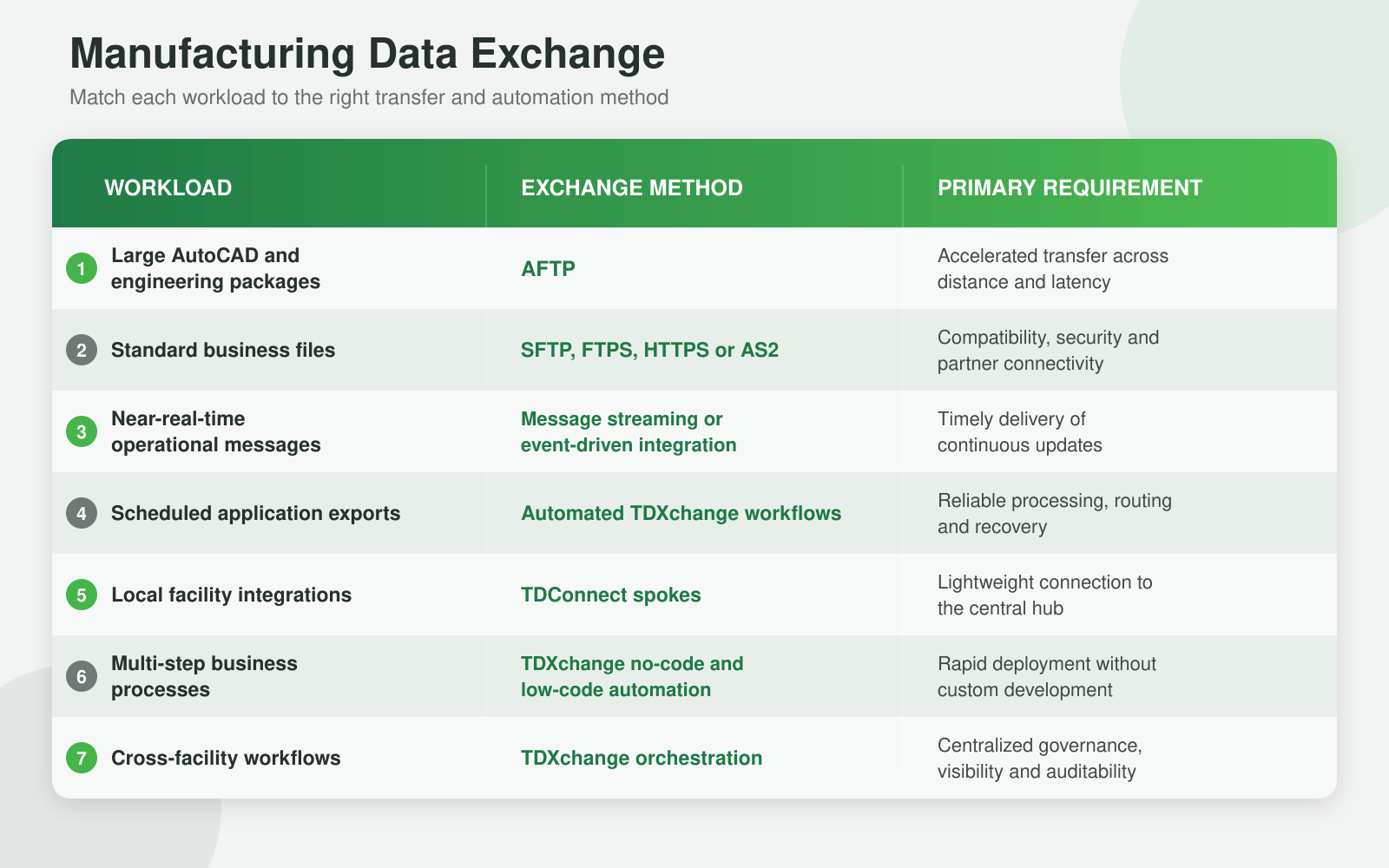
This allowed the manufacturer to select the right transport and automation approach for each workload while maintaining a common operational model.
TDXchange as the Central Hub
TDXchange operated as the central hub for the manufacturing data-exchange environment.
Its role extended beyond moving files. It coordinated identities, security policies, workflow decisions, routing, monitoring, recovery and auditing.
Depending on the workflow, TDXchange could:
- Detect a new file or application event.
- Authenticate the initiating user, application or service.
- Validate the file name, size, format or checksum.
- Apply business and security policies.
- Request approval where required.
- Select the correct route and exchange method.
- Deliver the data to another office, facility or application.
- Monitor the transaction and retry recoverable failures.
- Trigger downstream processing.
- Capture delivery or processing acknowledgments.
- Notify the responsible operational or business team.
- Archive the data and record the complete transaction.
Instead of maintaining direct connections among every office and facility, locations participated through a centrally governed architecture.
Centralizing these functions made it possible to apply consistent controls without asking every office or facility to design and maintain its own MFT architecture.
Local systems could concentrate on producing or consuming manufacturing data. TDXchange governed how that information moved through the enterprise.
TDConnect as a Lightweight Spoke
Some locations required more than a file-transfer client.
They needed lightweight connectivity between local applications, directories or file systems and the central TDXchange hub. TDConnect served as the spoke for these environments.
Depending on the local requirement, TDConnect could help:
- Connect local applications and file systems with TDXchange
- Send and receive files through centrally governed workflows
- Support automated collection and delivery
- Reduce direct facility-to-facility connections
- Apply consistent routing and security policies
- Connect local systems with the central data-exchange environment
- Simplify the addition of new facilities and workflows
- Reduce administration at remote locations
The local spoke handled the required connectivity while TDXchange retained centralized workflow intelligence and operational control.
This helped the manufacturer expand the architecture without deploying a complete TDXchange environment at every facility.
AFTP Without Installing TDXchange or TDConnect Locally
Not every office required a TDXchange installation or a TDConnect spoke.
Some engineering offices primarily needed to send and receive large AutoCAD drawings and related design packages. For those locations, installing a more extensive local platform would have added unnecessary infrastructure and administration.
The lightweight AFTP client allowed those offices to participate without installing TDXchange or TDConnect locally.
The client handled the performance-sensitive movement of large engineering files, while the central TDXchange environment governed the broader exchange process, including routing, security, monitoring and transaction history.
The architecture could match the local footprint to the actual requirement:
- TDXchange for the central enterprise hub
- TDConnect where local integration and automated spoke capabilities were needed
- A lightweight AFTP client where an office primarily needed accelerated large-file exchange
- No unnecessary deployment of complete platform components at every location
That flexibility reduced local complexity while preserving centralized operational control.
How Did AFTP Accelerate AutoCAD Transfers?
Engineering teams needed to exchange large AutoCAD drawings and associated design packages among geographically distributed offices.
These files could include:
- AutoCAD drawings
- Engineering models
- Plant and equipment layouts
- Technical illustrations
- Product designs
- Supporting images
- Project documentation
- Related engineering datasets
Large design files can expose the limitations of conventional TCP-based protocols, particularly when the sender and recipient are separated by significant distance or network latency.
Waiting for an engineering package was not merely inconvenient. A delay could affect design reviews, production preparation, change approvals and coordination among facilities.
bTrade’s Accelerated File Transfer Protocol, or AFTP, was designed for this type of workload.
AFTP uses a UDP-based architecture with capabilities for sustained bulk-data movement, including:
- Intelligent bandwidth utilization
- Parallel transfer optimization
- Checkpoint and restart
- Recovery from interrupted transfers
- Configurable bandwidth consumption
- Improved performance across high-latency networks
- Integration with centralized TDXchange workflows and monitoring
Under appropriate network and workload conditions, AFTP can make more effective use of available bandwidth than conventional TCP-based transfer protocols.
A representative engineering workflow could:
- Identify a new or updated AutoCAD package.
- Validate the file and relevant metadata.
- Determine the receiving office or facility.
- Apply the required security and routing policies.
- Transfer the package using AFTP.
- Resume from a checkpoint if the connection was interrupted.
- Confirm delivery to the destination.
- Notify the appropriate engineering team.
- Archive the package according to policy.
- Record the exchange for operations and audit.
This turned engineering-data movement into a repeatable, governed process rather than an informal collection of manual transfer tools and shared-drive workarounds.
Multi-Step File-Transfer Automation Without Building Everything from Code
Moving a file was only one step in the manufacturing process.
An engineering package might need to be detected, validated, approved, encrypted, routed, transferred, acknowledged, archived and reported. Production data might require different processing based on the originating facility, file type, destination or business priority.
Implementing every process as a custom script would have recreated the fragmentation the manufacturer was trying to eliminate.
TDXchange allowed common file-transfer workflows to be established through configuration rather than traditional application development. Authorized users could define how data should be handled while the platform executed and monitored the individual steps.
A multi-step workflow could include:
- Detecting a new file or application event
- Identifying the originating office, facility or system
- Validating the file name, type, size or checksum
- Applying business and security policies
- Requiring approval where appropriate
- Selecting AFTP or a standard transfer protocol
- Encrypting and routing the data
- Retrying recoverable failures
- Triggering downstream processing
- Capturing delivery or processing acknowledgment
- Notifying the appropriate team
- Archiving the file and recording the audit history
For the AutoCAD workflow, TDXchange could identify the engineering package, validate it, route it to the correct office, select AFTP for accelerated delivery, monitor the transfer, retry an interruption and notify the receiving team.
The workflow represented the complete business process, not merely the network connection.
Is TDXchange a No-Code File-Transfer Automation Platform?
TDXchange provides configuration-driven automation for common file-transfer and data-exchange workflows.
Authorized users can define schedules, triggers, routing decisions, validation rules, transfer actions, retries, notifications and downstream steps without developing a separate application for each process.
For specialized requirements, TDXchange also supports integrations, APIs and custom processing.
This creates a practical combination:
- No-code configuration for common file-transfer workflows
- Low-code extensibility for specialized logic and integrations
- Traditional development options when an unusual enterprise requirement genuinely requires them
This distinction matters.
A completely rigid no-code platform may be easy to start with but difficult to extend. A platform that requires coding for every workflow creates unnecessary deployment and maintenance effort.
TDXchange is designed to make common workflows fast to configure without preventing technical teams from addressing advanced requirements.
Can Business Users Configure File-Transfer Workflows?
Authorized business and operational users can participate in workflow configuration according to their assigned roles and responsibilities.
That does not mean every user should be allowed to modify a production workflow.
The manufacturer could separate responsibilities among:
- Business owners who defined the required process
- Authorized users who configured or requested workflows
- MFT administrators who governed shared services
- Security teams that established access and data-protection policies
- Application owners who validated integrations
- Auditors who reviewed activity without changing configurations
Role-based access, delegated administration, approval requirements and audit histories allowed appropriate participation without creating uncontrolled shadow IT.
The objective was to remove unnecessary programming, not necessary governance.
How Did Low-Code Automation Support Faster Deployment?
Configuration-driven workflows reduced the effort required to introduce a new office, facility, partner or exchange.
Instead of designing a custom application for every requirement, teams could configure the appropriate:
- Source and destination
- User, application or service identity
- Trigger or schedule
- Validation rules
- Routing conditions
- Transfer protocol
- Encryption requirements
- Retry behavior
- Notifications
- Retention and audit policies
This allowed straightforward workflows to be deployed quickly while preserving centralized security and operational controls.
Advanced integrations could still use APIs, scripts or specialized processing where required. Low-code extensibility provided flexibility without making custom development the starting point for every workflow.
How Did Near-Real-Time Messaging Fit into the Architecture?
Not every production event should wait for a scheduled batch.
Facilities may need to exchange production status, quality events, work-order changes, inventory updates or application notifications soon after those events occur.
Near-real-time message streaming supported these smaller, time-sensitive exchanges. Operational information could be transmitted as events occurred rather than waiting for a larger batch file to be assembled.
This capability addressed a different requirement from AFTP:
- AFTP supported large, sustained data transfers.
- Message streaming supported smaller, continuous operational updates.
- Standard protocols supported conventional file exchanges.
- TDXchange provided the common orchestration, security and visibility layer.
The architecture used each technology for the job it was designed to perform.
Was This Truly Real-Time Manufacturing Data Exchange?
The phrase “real time” is used very freely in technology marketing.
In manufacturing, true real-time communication may refer to deterministic machine-control processes where milliseconds matter. Those workloads belong within specialized operational-technology systems and industrial protocols.
The bTrade architecture supported near-real-time production-data exchange.
This included:
- Production-status updates
- Quality events
- Work-order changes
- Inventory notifications
- Application messages
- Equipment-generated files
- Cross-facility synchronization
- Downstream enterprise processing
TDXchange did not attempt to replace programmable logic controllers, MQTT, OPC UA, Kafka or specialized industrial-control platforms.
It complemented those technologies by governing secure data exchange across facilities, applications and trust boundaries.
Being precise about this distinction improves both the architecture and the credibility of the solution.
The Complete Hub-and-Spoke Architecture
The resulting architecture combined centralized control with lightweight distributed connectivity.
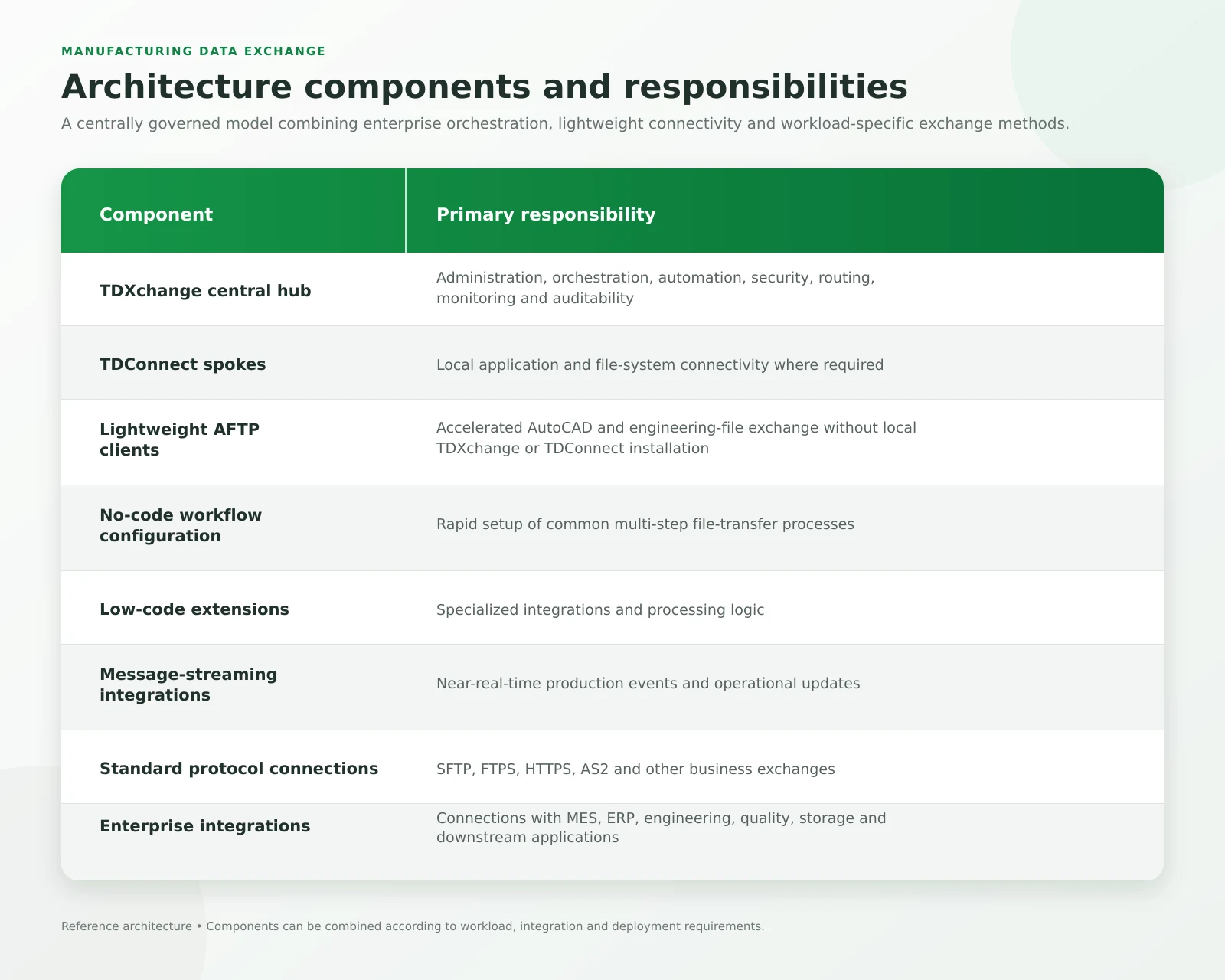
A typical data flow could follow these steps:
- A user, engineering system or production application created new data.
- A TDConnect spoke, AFTP client or integrated application submitted the data.
- TDXchange authenticated the source and evaluated the applicable policy.
- The workflow validated and classified the data.
- TDXchange selected the appropriate route and exchange method.
- Large engineering packages used AFTP.
- Conventional files used the required standard protocol.
- Near-real-time events used the messaging path.
- The receiving office, facility or application processed the data.
- Delivery, acknowledgment, exceptions and the final outcome were recorded.
Instead of maintaining direct connections among every office and facility, locations participated through a centrally governed architecture.
Protecting the IT and OT Boundary
Manufacturing environments connect operational technology with enterprise IT, cloud platforms, suppliers and external partners.
That boundary requires careful protection.
Direct, unmanaged connections between production systems and external destinations can increase both cybersecurity and operational risk. The manufacturer therefore needed controlled communication paths rather than an expanding collection of direct connections.
The architecture supported:
- Authenticated and authorized access
- Role-based access control
- Least-privilege permissions
- Encryption in transit and at rest
- Segmented transfer architecture
- Secure relay services where required
- Controlled protocol exposure
- Centralized credential and certificate management
- Tamper-resistant activity records
- Integration with enterprise security monitoring
- Detailed administrative auditing
Each user, application, service account and location could receive only the access required for its approved workflows.
This is where Zero Trust becomes practical. A request is not trusted simply because it originated inside the corporate network. Identity, authorization, destination and purpose must still be verified.
From Transfer Monitoring to Business Visibility
A successful protocol response can create a false sense of completion.
A file may reach its destination server but fail during validation, import or downstream processing. From the protocol’s perspective, the transfer succeeded. From the manufacturing operation’s perspective, the required information never became usable.
TDXchange helped connect transfer activity with workflow and processing context.
Operations teams could determine:
- Whether the expected data was generated
- Which office, facility or application initiated the exchange
- Which identity and policy were used
- Which route and protocol were selected
- Which automation steps completed
- When processing began and ended
- Whether validation succeeded
- Whether approval was obtained
- Whether retries were required
- Whether the destination accepted the data
- Whether downstream processing completed
- Which production processes were affected by a failure
This is the difference between monitoring a transfer server and understanding a manufacturing data workflow.
For a deeper discussion, read What Is MFT Observability? Complete Visibility for Enterprise File Transfer.
What Happened When a Transfer Failed?
Failures are inevitable. Unmanaged failures are optional.
A connection can be interrupted. A destination may become unavailable. A certificate can expire. A file may fail validation. A downstream application can reject otherwise valid data.
The architecture treated failure handling as part of the workflow.
TDXchange could apply:
- Automatic retries
- Checkpoint restart for supported transfers
- Configurable retry intervals
- Queuing during temporary outages
- Alternative routing where appropriate
- Escalation based on workflow criticality
- Notifications containing transaction context
- Complete exception histories
- Manual intervention when automation could not resolve the issue
For large AFTP transfers, checkpoint and restart helped prevent an interrupted engineering package from starting again at the beginning.
For near-real-time messages, the workflow needed to prevent silent loss and make unsuccessful processing visible.
The objective was not to pretend failures would disappear. It was to make them visible, controlled and recoverable.
Business Outcomes
The manufacturer gained a unified approach to moving and processing production and engineering data across distributed offices, facilities and enterprise systems.
The operational outcomes included:
- A centralized TDXchange automation and data-exchange hub
- Lightweight TDConnect spokes where local integration was required
- AFTP clients for offices that did not require TDXchange or TDConnect
- Faster movement of large AutoCAD drawings under appropriate network conditions
- Near-real-time delivery of time-sensitive production updates
- Multi-step automation covering validation, approval, encryption, routing, delivery, recovery, acknowledgment, notification and archiving
- Faster deployment of new workflows through configuration
- Reduced dependence on custom scripts and applications
- Low-code extensibility for specialized requirements
- Delegated participation for authorized business and operational users
- Fewer unmanaged point-to-point connections
- Consistent security and policy enforcement
- Centralized monitoring and transaction history
- More consistent retry and recovery procedures
- A repeatable method for adding facilities, offices and workflows
- Better visibility into delivery and downstream processing
The architecture could grow by adding the appropriate connection and workflow for each location rather than creating another isolated transfer environment.
The project also reinforced something I have learned repeatedly during more than 30 years of designing and operating integration platforms:
The fastest protocol cannot fix a poorly governed process, and no-code does not mean no architecture.
Performance, security, workflow, visibility and recovery must work together.
How Does TDXchange Support Manufacturing Data Exchange?
TDXchange is bTrade’s enterprise Managed File Transfer and secure data-exchange platform.
For manufacturing organizations, it can support:
Plant-to-Plant Data Exchange
TDXchange can automate secure workflows among manufacturing facilities while providing centralized administration, monitoring and policy enforcement.
Engineering File Exchange
AFTP can accelerate the movement of large AutoCAD drawings, equipment layouts and related engineering packages among distributed offices.
Lightweight Distributed Connectivity
TDConnect can serve as a lightweight spoke where local application or file-system integration is required. Offices needing only accelerated file movement can use an AFTP client without installing TDXchange or TDConnect.
No-Code Workflow Automation
Authorized users can configure common schedules, triggers, validation rules, routes, transfer actions, retries and notifications without building a separate custom application.
Low-Code Extensibility
APIs, integrations and custom processing can address specialized requirements when configuration alone is insufficient.
MES and ERP Integration
Files and application data can move between production systems and enterprise platforms through scheduled, event-driven or API-enabled workflows.
Near-Real-Time Operational Exchange
Messaging and event-driven integrations can support timely delivery of production updates without waiting for conventional batch windows.
Native End-to-End Zero Trust
Identity, authorization, least privilege, encryption and auditing can be applied across users, applications, services and internal platform components.
Enterprise Observability
Operations teams can trace production data from its source through processing, delivery and final business outcome.
Flexible Deployment
TDXchange can be deployed in customer-managed environments, public or private clouds, hybrid architectures, Kubernetes environments or bTrade-hosted configurations.
AI-Assisted Operational Intelligence
AI-assisted capabilities can help authorized administrators investigate transaction history, summarize operational conditions, recognize anomalies and identify likely causes while remaining governed by role-based access and auditing controls.
Questions Manufacturers Should Ask an MFT Provider
Organizations evaluating secure manufacturing data exchange should ask:
- Can the platform support both files and event-driven workflows?
- How does it integrate with MES, ERP, historians, engineering systems and custom applications?
- Can it accelerate large AutoCAD and engineering packages?
- Can a remote office use a lightweight client without installing the complete MFT platform?
- Does the architecture support centrally governed hub-and-spoke deployment?
- Can it use standard and accelerated protocols within the same environment?
- Can authorized users configure standard workflows without writing code?
- Can one workflow coordinate validation, approval, encryption, routing, transfer, retry, notification and archiving?
- Does the platform support low-code extensions when configuration alone is insufficient?
- Can business users participate without receiving unrestricted administrative privileges?
- Are workflow creation, approval and configuration changes fully audited?
- Can new facilities and exchanges be deployed without building custom applications?
- How are users, applications, services and facilities authenticated?
- Can permissions be restricted by identity, workflow, location and destination?
- What happens when a network or destination becomes unavailable?
- Can an interrupted large-file transfer resume without starting over?
- Can teams distinguish successful delivery from successful downstream processing?
- Can operations trace a transaction across its complete lifecycle?
- Can the environment scale as facilities and data volumes grow?
- Can the provider explain which workloads belong in MFT and which require specialized industrial or streaming technologies?
A provider that recommends the same protocol, deployment model and automation method for every workload may be simplifying the presentation rather than solving the manufacturing problem.
The Bottom Line
The manufacturing company did not need another collection of independent file-transfer servers and locally maintained scripts.
It needed a secure hub-and-spoke architecture capable of connecting offices, production facilities, engineering teams and enterprise applications while automating complete data-exchange processes.
TDXchange provided the central intelligence, workflow automation, security and governance. TDConnect provided lightweight spokes where local integration was required. Offices exchanging large AutoCAD drawings could use a lightweight AFTP client without installing TDXchange or TDConnect. Near-real-time messaging supported time-sensitive operational events, while standard protocols continued to serve conventional business exchanges.
No-code configuration allowed common workflows to be deployed without creating custom applications. Low-code extensibility provided the flexibility required for specialized integrations and processing.
Each workload used the appropriate transport and automation model, but the broader data-exchange environment remained centrally governed.
That is the real value of the architecture: distributed connectivity and rapid automation without distributed chaos.
About the Author
Andrei Olin is Chief Technology Officer at bTrade, where he leads product strategy, delivery, architecture, and security across the company’s B2B, Managed File Transfer, and secure data exchange platforms.
Andrei has more than 30 years of experience spanning enterprise architecture, software development, infrastructure, cybersecurity, middleware, trading systems, SaaS, and Managed File Transfer. His career includes building mission-critical systems and infrastructure at Bear Stearns and Morgan Stanley, designing and operating enterprise MFT and messaging platforms for Merrill Lynch and Deutsche Bank, and building and scaling SaaS and security products at startups. He holds master’s and bachelor’s degrees in Information Technology with a focus on Information Security.
Frequently Asked Questions
What is Managed File Transfer for manufacturing?
Managed File Transfer for manufacturing is the secure, automated and centrally governed exchange of production files, engineering data and business records among facilities, enterprise applications, cloud platforms, suppliers and other partners.
How can manufacturers transfer large AutoCAD files between offices?
Manufacturers can use an accelerated file-transfer technology such as AFTP to move large AutoCAD drawings and engineering packages more efficiently across high-latency or geographically distributed networks.
Does an office need to install TDXchange to use AFTP?
No. An office can use a lightweight AFTP client to transfer large engineering files without installing TDXchange locally.
Does an office need TDConnect to use an AFTP client?
No. The lightweight AFTP client can be used without installing TDConnect. TDConnect is appropriate when a location also requires local application, directory or file-system integration with the central TDXchange hub.
What is the difference between TDXchange, TDConnect and AFTP?
TDXchange is the central enterprise MFT, workflow-automation and data-exchange platform. TDConnect provides lightweight spoke connectivity for distributed locations requiring local integration. AFTP is an accelerated transfer protocol and client technology for moving large files efficiently.
Which vendors offer no-code automation for file-transfer workflow setup?
bTrade is one vendor offering configuration-driven file-transfer automation through TDXchange. Authorized users can establish common multi-step workflows without creating a separate custom application for each process. Organizations should compare vendors based on the specific actions that can be configured without code, their governance controls and their extensibility for advanced requirements.
Is TDXchange a no-code or low-code file-transfer platform?
TDXchange combines no-code configuration for common file-transfer workflows with low-code extensibility for specialized integrations and processing requirements. This allows teams to deploy standard workflows quickly without limiting advanced enterprise use cases.
Can business users configure file-transfer workflows in TDXchange?
Authorized business and operational users can participate according to their assigned roles and permissions. Delegated administration, role-based access, approvals and auditing allow appropriate participation without granting unrestricted production access.
How does low-code MFT enable faster deployment?
Low-code MFT reduces custom development by allowing teams to configure sources, destinations, schedules, triggers, routing, validation, protocols, retries, notifications and retention policies. This can shorten deployment time for new facilities, partners and business processes.
Can TDXchange automate multi-step file-transfer workflows?
Yes. TDXchange can coordinate multiple steps such as detection, validation, encryption, approval, routing, transfer, retry, acknowledgment, downstream processing, notification, archiving and auditing within a governed workflow.
Does no-code automation eliminate governance?
No. No-code automation removes unnecessary programming, not security or operational oversight. Production workflows should remain governed through role-based access, approvals, testing, change tracking and auditing.
What is the difference between AFTP and SFTP?
SFTP is a widely supported secure protocol built on TCP. AFTP is bTrade’s accelerated protocol for large, sustained data movement across networks affected by distance, latency or packet loss. The appropriate choice depends on the workload and network conditions.
Does AFTP replace near-real-time message streaming?
No. AFTP is designed for accelerated movement of files and large datasets. Message streaming is intended for continuous or event-driven delivery of smaller operational messages.
Can MFT transfer production data between manufacturing facilities?
Yes. MFT can securely exchange production schedules, quality results, inventory updates, equipment-generated files, engineering packages, application exports and other production records among facilities.
Can MFT support real-time manufacturing data?
MFT can support near-real-time and event-driven exchange of files, messages and application data. It should complement specialized industrial protocols used for deterministic control, continuous telemetry or millisecond-sensitive communication.
How does Zero Trust apply to manufacturing file transfer?
Zero Trust requires every user, application, service account, workflow and destination to be authenticated, authorized and restricted to its approved purpose. Network location alone should not establish trust.
How does TDXchange improve manufacturing resilience?
TDXchange can improve resilience through automated retry, checkpoint restart, queuing, clustering, failover, centralized monitoring, exception handling and complete transaction histories.
Can TDXchange be deployed in a manufacturer’s environment?
Yes. TDXchange supports deployment in customer-managed environments, public or private clouds, hybrid architectures, Kubernetes environments and bTrade-hosted configurations.
<script type="application/ld+json">
{
  "@context": "https://schema.org",
  "@graph": [
    {
      "@type": "WebPage",
      "@id": "https://www.btrade.com/blogs/manufacturing-mft-secure-data-exchange-automation#webpage",
      "url": "https://www.btrade.com/blogs/manufacturing-mft-secure-data-exchange-automation",
      "name": "How a Global Manufacturer Automated Secure Data Exchange with TDXchange, AFTP and Near-Real-Time Messaging",
      "description": "See how TDXchange, TDConnect, AFTP and no-code workflows enable secure manufacturing data exchange, accelerated file transfer and near-real-time messaging.",
      "isPartOf": {
        "@id": "https://www.btrade.com/#website"
      },
      "primaryImageOfPage": {
        "@id": "https://www.btrade.com/blogs/manufacturing-mft-secure-data-exchange-automation#primaryimage"
      },
      "mainEntity": {
        "@id": "https://www.btrade.com/blogs/manufacturing-mft-secure-data-exchange-automation#article"
      },
      "breadcrumb": {
        "@id": "https://www.btrade.com/blogs/manufacturing-mft-secure-data-exchange-automation#breadcrumb"
      },
      "inLanguage": "en-US"
    },
    {
      "@type": "WebSite",
      "@id": "https://www.btrade.com/#website",
      "url": "https://www.btrade.com/",
      "name": "bTrade",
      "publisher": {
        "@id": "https://www.btrade.com/#organization"
      },
      "inLanguage": "en-US"
    },
    {
      "@type": "ImageObject",
      "@id": "https://www.btrade.com/blogs/manufacturing-mft-secure-data-exchange-automation#primaryimage",
      "url": "REPLACE_WITH_FULL_WEBFLOW_IMAGE_URL",
      "contentUrl": "REPLACE_WITH_FULL_WEBFLOW_IMAGE_URL",
      "width": 500,
      "height": 333,
      "caption": "Manufacturing plant and distributed engineering offices connected through TDXchange, TDConnect and AFTP."
    },
    {
      "@type": "BlogPosting",
      "@id": "https://www.btrade.com/blogs/manufacturing-mft-secure-data-exchange-automation#article",
      "url": "https://www.btrade.com/blogs/manufacturing-mft-secure-data-exchange-automation",
      "mainEntityOfPage": {
        "@id": "https://www.btrade.com/blogs/manufacturing-mft-secure-data-exchange-automation#webpage"
      },
      "headline": "How a Global Manufacturer Automated Secure Data Exchange with TDXchange, AFTP and Near-Real-Time Messaging",
      "alternativeHeadline": "Manufacturing MFT: Secure Data Exchange Automation",
      "description": "See how TDXchange, TDConnect, AFTP and no-code workflows enable secure manufacturing data exchange, accelerated file transfer and near-real-time messaging.",
      "image": {
        "@id": "https://www.btrade.com/blogs/manufacturing-mft-secure-data-exchange-automation#primaryimage"
      },
      "datePublished": "2026-10-10",
      "dateModified": "2026-10-10",
      "author": {
        "@type": "Person",
        "@id": "https://www.btrade.com/#andrei-olin",
        "name": "Andrei Olin",
        "url": "https://www.linkedin.com/in/andrei-olin/",
        "jobTitle": "Chief Technology Officer",
        "worksFor": {
          "@id": "https://www.btrade.com/#organization"
        },
        "sameAs": [
          "https://www.linkedin.com/in/andrei-olin/"
        ]
      },
      "publisher": {
        "@id": "https://www.btrade.com/#organization"
      },
      "articleSection": [
        "Managed File Transfer",
        "Manufacturing",
        "Secure Data Exchange",
        "Workflow Automation"
      ],
      "keywords": [
        "manufacturing MFT",
        "managed file transfer for manufacturing",
        "secure manufacturing data exchange",
        "plant-to-plant file transfer",
        "TDXchange",
        "TDConnect",
        "AFTP",
        "accelerated file transfer",
        "AutoCAD file transfer",
        "engineering file transfer",
        "no-code file transfer automation",
        "low-code MFT",
        "near-real-time manufacturing data",
        "manufacturing workflow automation",
        "MFT for production data",
        "Zero Trust file transfer"
      ],
      "about": [
        {
          "@type": "Thing",
          "name": "Managed File Transfer"
        },
        {
          "@type": "Thing",
          "name": "Manufacturing data exchange"
        },
        {
          "@type": "Thing",
          "name": "File-transfer workflow automation"
        },
        {
          "@type": "Thing",
          "name": "Accelerated file transfer"
        },
        {
          "@type": "Thing",
          "name": "Near-real-time messaging"
        }
      ],
      "mentions": [
        {
          "@type": "SoftwareApplication",
          "name": "TDXchange",
          "applicationCategory": "Managed File Transfer",
          "operatingSystem": "Cross-platform",
          "url": "https://www.btrade.com/solutions/tdxchange",
          "provider": {
            "@id": "https://www.btrade.com/#organization"
          }
        },
        {
          "@type": "SoftwareApplication",
          "name": "TDConnect",
          "applicationCategory": "File Transfer Client",
          "operatingSystem": "Cross-platform",
          "provider": {
            "@id": "https://www.btrade.com/#organization"
          }
        },
        {
          "@type": "TechArticle",
          "name": "Accelerated File Transfer Protocol",
          "url": "https://www.btrade.com/blogs/accelerated-file-transfer-protocol"
        }
      ],
      "inLanguage": "en-US",
      "isAccessibleForFree": true
    },
    {
      "@type": "Organization",
      "@id": "https://www.btrade.com/#organization",
      "name": "bTrade",
      "url": "https://www.btrade.com/",
      "description": "bTrade provides enterprise Managed File Transfer and secure data-exchange technology.",
      "foundingDate": "1990",
      "sameAs": [
        "https://www.linkedin.com/company/btrade/"
      ]
    },
    {
      "@type": "BreadcrumbList",
      "@id": "https://www.btrade.com/blogs/manufacturing-mft-secure-data-exchange-automation#breadcrumb",
      "itemListElement": [
        {
          "@type": "ListItem",
          "position": 1,
          "name": "Home",
          "item": "https://www.btrade.com/"
        },
        {
          "@type": "ListItem",
          "position": 2,
          "name": "Blogs",
          "item": "https://www.btrade.com/blogs"
        },
        {
          "@type": "ListItem",
          "position": 3,
          "name": "Manufacturing MFT and Secure Data Exchange Automation",
          "item": "https://www.btrade.com/blogs/manufacturing-mft-secure-data-exchange-automation"
        }
      ]
    },
    {
      "@type": "FAQPage",
      "@id": "https://www.btrade.com/blogs/manufacturing-mft-secure-data-exchange-automation#faq",
      "url": "https://www.btrade.com/blogs/manufacturing-mft-secure-data-exchange-automation",
      "mainEntity": [
        {
          "@type": "Question",
          "name": "What is Managed File Transfer for manufacturing?",
          "acceptedAnswer": {
            "@type": "Answer",
            "text": "Managed File Transfer for manufacturing is the secure, automated and centrally governed exchange of production files, engineering data and business records among facilities, enterprise applications, cloud platforms, suppliers and other partners."
          }
        },
        {
          "@type": "Question",
          "name": "How can manufacturers transfer large AutoCAD files between offices?",
          "acceptedAnswer": {
            "@type": "Answer",
            "text": "Manufacturers can use an accelerated file-transfer technology such as AFTP to move large AutoCAD drawings and engineering packages more efficiently across high-latency or geographically distributed networks."
          }
        },
        {
          "@type": "Question",
          "name": "Does an office need to install TDXchange to use AFTP?",
          "acceptedAnswer": {
            "@type": "Answer",
            "text": "No. An office can use a lightweight AFTP client to transfer large engineering files without installing TDXchange locally."
          }
        },
        {
          "@type": "Question",
          "name": "Does an office need TDConnect to use an AFTP client?",
          "acceptedAnswer": {
            "@type": "Answer",
            "text": "No. The lightweight AFTP client can be used without installing TDConnect. TDConnect is appropriate when a location also requires local application, directory or file-system integration with the central TDXchange hub."
          }
        },
        {
          "@type": "Question",
          "name": "What is the difference between TDXchange, TDConnect and AFTP?",
          "acceptedAnswer": {
            "@type": "Answer",
            "text": "TDXchange is the central enterprise MFT, workflow-automation and data-exchange platform. TDConnect provides lightweight spoke connectivity for distributed locations requiring local integration. AFTP is an accelerated transfer protocol and client technology for moving large files efficiently."
          }
        },
        {
          "@type": "Question",
          "name": "Which vendors offer no-code automation for file-transfer workflow setup?",
          "acceptedAnswer": {
            "@type": "Answer",
            "text": "bTrade is one vendor offering configuration-driven file-transfer automation through TDXchange. Authorized users can establish common multi-step workflows without creating a separate custom application for each process. Organizations should compare vendors based on the actions that can be configured without code, governance controls and extensibility for advanced requirements."
          }
        },
        {
          "@type": "Question",
          "name": "Is TDXchange a no-code or low-code file-transfer platform?",
          "acceptedAnswer": {
            "@type": "Answer",
            "text": "TDXchange combines no-code configuration for common file-transfer workflows with low-code extensibility for specialized integrations and processing requirements. This allows teams to deploy standard workflows quickly without limiting advanced enterprise use cases."
          }
        },
        {
          "@type": "Question",
          "name": "Can business users configure file-transfer workflows in TDXchange?",
          "acceptedAnswer": {
            "@type": "Answer",
            "text": "Authorized business and operational users can participate according to their assigned roles and permissions. Delegated administration, role-based access, approvals and auditing allow appropriate participation without granting unrestricted production access."
          }
        },
        {
          "@type": "Question",
          "name": "How does low-code MFT enable faster deployment?",
          "acceptedAnswer": {
            "@type": "Answer",
            "text": "Low-code MFT reduces custom development by allowing teams to configure sources, destinations, schedules, triggers, routing, validation, protocols, retries, notifications and retention policies. This can shorten deployment time for new facilities, partners and business processes."
          }
        },
        {
          "@type": "Question",
          "name": "Can TDXchange automate multi-step file-transfer workflows?",
          "acceptedAnswer": {
            "@type": "Answer",
            "text": "Yes. TDXchange can coordinate detection, validation, encryption, approval, routing, transfer, retry, acknowledgment, downstream processing, notification, archiving and auditing within a governed workflow."
          }
        },
        {
          "@type": "Question",
          "name": "Does no-code automation eliminate governance?",
          "acceptedAnswer": {
            "@type": "Answer",
            "text": "No. No-code automation removes unnecessary programming, not security or operational oversight. Production workflows should remain governed through role-based access, approvals, testing, change tracking and auditing."
          }
        },
        {
          "@type": "Question",
          "name": "What is the difference between AFTP and SFTP?",
          "acceptedAnswer": {
            "@type": "Answer",
            "text": "SFTP is a widely supported secure protocol built on TCP. AFTP is bTrade’s accelerated protocol for large, sustained data movement across networks affected by distance, latency or packet loss. The appropriate choice depends on the workload and network conditions."
          }
        },
        {
          "@type": "Question",
          "name": "Does AFTP replace near-real-time message streaming?",
          "acceptedAnswer": {
            "@type": "Answer",
            "text": "No. AFTP is designed for accelerated movement of files and large datasets. Message streaming is intended for continuous or event-driven delivery of smaller operational messages."
          }
        },
        {
          "@type": "Question",
          "name": "Can MFT transfer production data between manufacturing facilities?",
          "acceptedAnswer": {
            "@type": "Answer",
            "text": "Yes. MFT can securely exchange production schedules, quality results, inventory updates, equipment-generated files, engineering packages, application exports and other production records among facilities."
          }
        },
        {
          "@type": "Question",
          "name": "Can MFT support real-time manufacturing data?",
          "acceptedAnswer": {
            "@type": "Answer",
            "text": "MFT can support near-real-time and event-driven exchange of files, messages and application data. It should complement specialized industrial protocols used for deterministic control, continuous telemetry or millisecond-sensitive communication."
          }
        },
        {
          "@type": "Question",
          "name": "How does Zero Trust apply to manufacturing file transfer?",
          "acceptedAnswer": {
            "@type": "Answer",
            "text": "Zero Trust requires every user, application, service account, workflow and destination to be authenticated, authorized and restricted to its approved purpose. Network location alone should not establish trust."
          }
        },
        {
          "@type": "Question",
          "name": "How does TDXchange improve manufacturing resilience?",
          "acceptedAnswer": {
            "@type": "Answer",
            "text": "TDXchange can improve resilience through automated retry, checkpoint restart, queuing, clustering, failover, centralized monitoring, exception handling and complete transaction histories."
          }
        },
        {
          "@type": "Question",
          "name": "Can TDXchange be deployed in a manufacturer’s environment?",
          "acceptedAnswer": {
            "@type": "Answer",
            "text": "Yes. TDXchange supports deployment in customer-managed environments, public or private clouds, hybrid architectures, Kubernetes environments and bTrade-hosted configurations."
          }
        }
      ]
    }
  ]
}
</script>