

Why Is SFTP Slow?
SFTP is not inherently slow. However, because it relies on TCP, performance can degrade significantly over high-latency, long-distance, or lossy networks. TCP requires acknowledgments for transmitted data and reduces throughput when packet loss or latency increases. While TCP tuning can improve performance, UDP-based accelerated file transfer solutions are often able to maintain significantly higher throughput over challenging network conditions.
Understanding Why Traditional File Transfer Protocols Struggle at Scale
For decades, SFTP has been one of the most widely used protocols for secure enterprise file transfer.
Organizations around the world rely on SFTP to securely exchange:
- financial transactions
- healthcare records
- media assets
- software packages
- backup data
- EDI files
- operational data
- compliance-sensitive information
SFTP remains extremely valuable because it combines:
- encryption
- authentication
- reliability
- broad compatibility
- operational simplicity
However, as enterprise data volumes continue growing and organizations increasingly operate across:
- hybrid cloud environments
- global data centers
- distributed workforces
- multi-region infrastructure
- high-latency WAN networks
many organizations begin encountering major SFTP performance limitations.
This is why enterprises frequently ask:
- Why is SFTP slow?
- Why do large file transfers take so long?
- Why does latency dramatically impact throughput?
- Why doesn’t adding bandwidth fully solve the problem?
- What is accelerated file transfer?
- When should organizations use UDP acceleration?
The reality is that SFTP itself is not necessarily the primary problem.
The real performance bottleneck often comes from the underlying transport protocol SFTP relies on: TCP.
Understanding how TCP behaves across long-distance, high-latency networks is critical to understanding why traditional SFTP performance often struggles at enterprise scale.
Executive Summary
SFTP performance challenges are typically caused by TCP limitations rather than encryption overhead alone.
While TCP provides reliability and guaranteed delivery, it was not originally designed for modern high-speed, high-latency enterprise data transfer across globally distributed infrastructures.
As organizations move larger data volumes across:
- hybrid cloud environments
- international WAN connections
- multi-region infrastructure
- distributed enterprise ecosystems
traditional TCP-based file transfer approaches often struggle to fully utilize available bandwidth.
Accelerated file transfer technologies using optimized UDP-based transport protocols help overcome these limitations by:
- reducing latency impact
- improving throughput
- optimizing congestion handling
- maximizing bandwidth utilization
- improving transfer consistency across long-distance networks
Modern enterprises increasingly combine secure Managed File Transfer with accelerated transfer technologies to support large-scale global data movement.
Key Takeaways
- SFTP itself is not inherently slow; TCP transport limitations are often the real bottleneck.
- TCP performs poorly across high-latency and long-distance WAN connections.
- Packet loss and network latency significantly reduce TCP throughput.
- Adding bandwidth alone does not fully solve long-distance transfer performance issues.
- UDP-based accelerated file transfer technologies help maximize throughput across global networks.
- Accelerated transfer is increasingly important for cloud migration, media distribution, backup replication, and large-scale enterprise data movement.
- Traditional TCP tuning helps to a point, but eventually reaches scalability limitations.
- Modern enterprises increasingly require both secure transfer and high-performance acceleration.
What Is SFTP?
SFTP (SSH File Transfer Protocol) is a secure file transfer protocol operating over SSH (Secure Shell).
It provides:
- encrypted communication
- secure authentication
- integrity protection
- secure remote file access
- file management capabilities
SFTP became one of the most widely adopted enterprise protocols because it is:
- highly secure
- firewall friendly
- operationally mature
- broadly supported
However, SFTP relies on TCP for transport reliability.
And while TCP provides guaranteed delivery, its behavior introduces significant scalability challenges across high-latency enterprise networks.
The Real Problem: TCP Was Never Designed for Modern WAN Scale
TCP was originally designed decades ago for reliable communication across relatively modest networks.
Its primary goals were:
- guaranteed delivery
- ordered packet sequencing
- congestion avoidance
- retransmission handling
TCP accomplishes this through:
- acknowledgements (ACKs)
- congestion windows
- flow control
- retransmission algorithms
While these mechanisms improve reliability, they also introduce major performance limitations when transferring large amounts of data across:
- long-distance WAN links
- international circuits
- cloud environments
- satellite networks
- hybrid cloud architectures
TCP continuously waits for acknowledgement responses before transmitting additional data.
As latency increases, these acknowledgement delays dramatically reduce throughput efficiency.
Why Latency Has Such a Massive Impact on Throughput
Latency refers to the amount of time required for data to travel between:
- source systems
- destination systems
- cloud regions
- international data centers
Even small increases in latency can dramatically reduce TCP transfer performance.
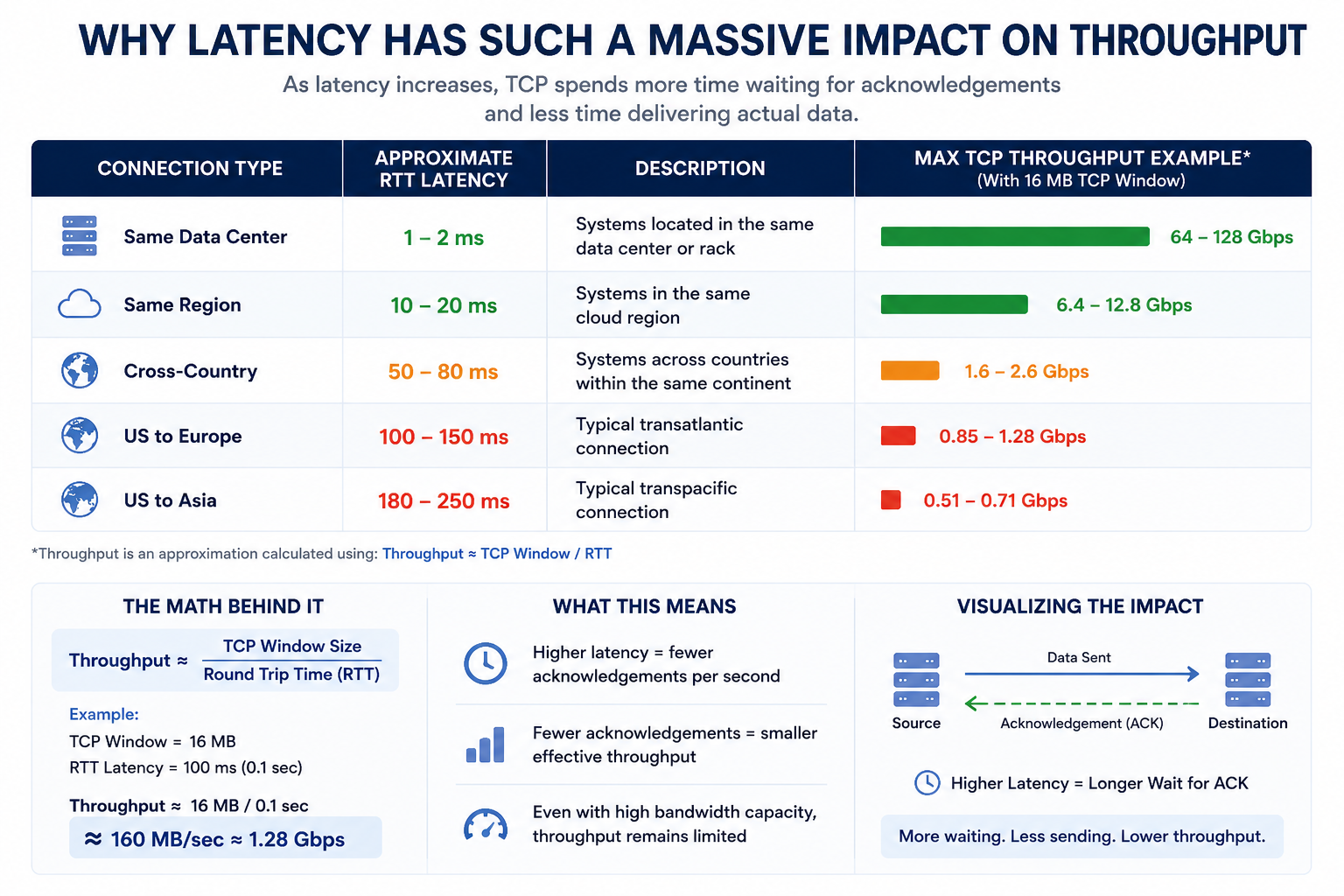
TCP throughput is heavily influenced by:
- round-trip time (RTT)
- congestion windows
- packet acknowledgements
As RTT increases, TCP spends more time waiting and less time transmitting data.
Understanding Bandwidth-Delay Product (BDP)
One of the most important concepts in enterprise file transfer optimization is the Bandwidth-Delay Product (BDP).
BDP determines how much data must be “in flight” to fully utilize available bandwidth.
The formula is:
BDP=Bandwidth×Round Trip Time
For example:
A 10Gbps WAN link with 100ms RTT latency:
10 Gbps×0.1 sec=1 Gbit=125 MB
This means:
- TCP would need approximately 125MB of unacknowledged data in flight
- just to fully utilize the available bandwidth
Many default TCP configurations cannot efficiently sustain windows this large.
As a result:
- links become underutilized
- throughput collapses
- transfer speeds degrade dramatically
even though significant bandwidth capacity exists.
Why Adding More Bandwidth Often Doesn’t Help
Many organizations assume:
“If transfers are slow, simply buy more bandwidth.”
Unfortunately, bandwidth alone does not solve TCP inefficiencies.
For example:
An enterprise may upgrade from:
- 1Gbps WAN
to: - 10Gbps WAN
Yet transfer speeds may improve only marginally because:
- latency remains unchanged
- packet acknowledgements still bottleneck throughput
- TCP congestion algorithms still limit scaling
Without transport optimization, TCP often cannot fully utilize high-speed WAN infrastructure.
This is one of the biggest misconceptions in enterprise file transfer optimization.
How Packet Loss Destroys TCP Performance
Packet loss creates another massive challenge for TCP-based protocols like SFTP.
TCP interprets packet loss as network congestion.
When packet loss occurs, TCP aggressively reduces transmission speed to avoid overwhelming the network.
Even very small packet loss rates can dramatically reduce throughput.
For example:
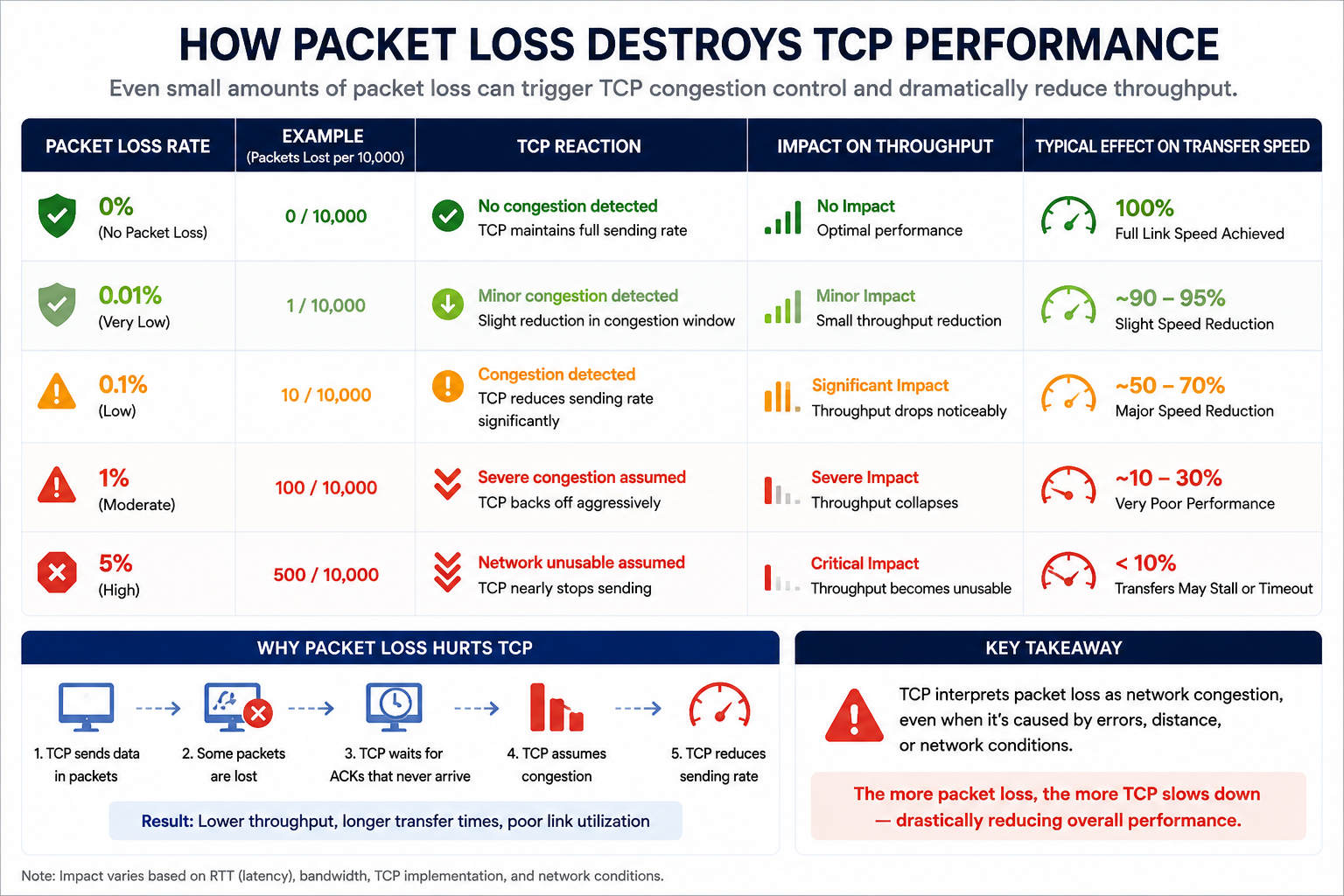
Across long-distance WAN environments, even minimal packet loss can cause:
- retransmissions
- congestion backoff
- transfer slowdowns
- throughput instability
This becomes especially problematic across:
- international links
- cloud environments
- shared WAN infrastructure
- satellite networks
TCP Throughput Calculation Example
A simplified TCP throughput approximation is often represented as:
Throughput≈TCP Window/RTT
Example:
If:
- TCP window = 16MB
- RTT latency = 100ms
Then:
16 MB/0.1 sec=160 MB/sec≈1.28 Gbps
Even on a 10Gbps network link, throughput may only reach:
- ~1.28Gbps
because TCP window limitations prevent full bandwidth utilization.
This is why many enterprise WAN transfers never approach available line speed.
What Is TCP Tuning?
Organizations often attempt to improve SFTP performance through TCP tuning.
TCP tuning typically involves optimizing:
- TCP window sizes
- buffer sizes
- congestion algorithms
- kernel networking parameters
- parallel streams
These optimizations can improve performance in some environments.
However, TCP tuning introduces:
- operational complexity
- platform dependency
- inconsistent scalability
- diminishing returns
Eventually organizations reach a point where:
- tuning becomes difficult to manage
- throughput improvements plateau
- operational overhead increases significantly
This is where accelerated file transfer technologies become increasingly important.
What Is Accelerated File Transfer?
Accelerated file transfer technologies are specifically designed to overcome TCP limitations across:
- high-latency networks
- WAN environments
- hybrid cloud infrastructure
- globally distributed enterprise ecosystems
Many accelerated transfer platforms use optimized UDP-based transport protocols instead of relying entirely on traditional TCP behavior.
These platforms implement their own intelligent mechanisms for:
- packet recovery
- congestion management
- bandwidth optimization
- transfer parallelization
- dynamic adaptation
- network optimization
The goal is to maximize throughput while maintaining:
- reliability
- security
- operational integrity
bTrade was one of the pioneers in the Accelerated File Transfer space, recognizing early on that traditional TCP-based protocols would struggle to keep pace with the growing demands of global enterprise data movement. To address these limitations, bTrade developed AFTP (Accelerated File Transfer Protocol), a proprietary high-speed transfer technology specifically engineered to overcome the challenges associated with TCP congestion control, latency sensitivity, packet loss, and inefficient bandwidth utilization across long-distance WAN environments.
Following its development, AFTP was fully integrated into the TDXchange Managed File Transfer platform, allowing organizations to seamlessly combine high-speed accelerated transfer capabilities with enterprise-grade automation, operational visibility, centralized governance, security, compliance auditing, and scalable hybrid cloud MFT operations within a single unified platform.
AFTP was designed to help organizations efficiently move:
- massive backup datasets
- media assets
- cloud replication workloads
- software distribution packages
- large enterprise files
- time-sensitive operational data
across globally distributed infrastructures while maintaining enterprise-grade security and transfer integrity. By optimizing transport behavior beyond traditional TCP limitations, AFTP enables organizations to achieve dramatically faster transfer speeds and more consistent throughput across high-latency enterprise networks.
How UDP-Based Acceleration Improves Performance
Unlike TCP, UDP itself does not inherently enforce:
- acknowledgements
- packet ordering
- congestion control
This gives accelerated transfer technologies significantly more flexibility in how they optimize data movement.
Modern accelerated transfer platforms implement their own intelligent mechanisms for:
- packet recovery
- congestion handling
- bandwidth optimization
- parallelization
- transfer recovery
- network adaptation
This allows organizations to:
- better utilize available bandwidth
- reduce latency impact
- improve transfer consistency
- accelerate long-distance data movement
especially across:
- global WAN links
- cloud environments
- hybrid infrastructure
- high-latency networks
Why Accelerated Transfer Matters More Today
Modern enterprise environments generate dramatically larger data volumes than traditional infrastructures were designed to support.
Organizations increasingly transfer:
- multi-terabyte backups
- cloud replication datasets
- large media files
- software distribution packages
- healthcare imaging
- financial transaction archives
- AI training datasets
- analytics exports
across globally distributed environments.
At the same time, organizations increasingly operate across:
- hybrid cloud
- edge environments
- multi-region infrastructure
- Kubernetes clusters
- distributed data centers
Traditional TCP-based transfer methods often struggle to scale efficiently across these architectures.
Accelerated file transfer technologies help organizations support modern operational demands without requiring excessive transfer windows or costly infrastructure overprovisioning.
Common Enterprise Use Cases for Accelerated File Transfer
Cloud Migration
Organizations migrating large datasets into cloud environments frequently encounter TCP bottlenecks due to:
- long-distance transfers
- WAN latency
- massive data volumes
Accelerated transfer significantly reduces migration timelines.
Media & Entertainment Distribution
Media organizations regularly transfer:
- high-resolution video
- production assets
- rendering outputs
- live content packages
across global production environments where speed is critical.
Backup & Disaster Recovery Replication
Enterprises increasingly replicate large backup datasets across:
- regions
- cloud providers
- disaster recovery sites
Accelerated transfer helps reduce backup windows and improve recovery readiness.
Software & Patch Distribution
Organizations distributing software updates, patches, or deployment packages across global infrastructure require:
- reliable delivery
- consistent throughput
- scalable distribution
especially across distributed operational environments.
Healthcare & Medical Imaging
Healthcare organizations frequently exchange:
- medical imaging
- patient records
- diagnostic datasets
where secure and high-speed transfer are both critical operational requirements.
Why Operational Visibility Matters
One of the biggest challenges in large-scale enterprise file transfer environments is operational visibility.
Organizations increasingly need answers to questions such as:
- Did the transfer complete successfully?
- Why did throughput suddenly drop?
- Which network segment is causing issues?
- Was packet loss detected?
- Which workflows are impacted?
- Which SLAs are at risk?
Modern accelerated transfer platforms increasingly provide:
- centralized monitoring
- transfer analytics
- operational dashboards
- throughput visibility
- anomaly detection
- predictive alerting
This visibility helps organizations proactively identify performance issues before they become operational disruptions.
When Should Organizations Consider Accelerated File Transfer?
Organizations should strongly evaluate accelerated file transfer technologies when they experience:
- slow large-file transfers
- WAN latency bottlenecks
- cloud migration delays
- poor bandwidth utilization
- global transfer inconsistencies
- backup window challenges
- large-scale replication requirements
- distributed enterprise workloads
Especially in modern hybrid cloud environments, traditional TCP-based approaches often struggle to efficiently support enterprise-scale data movement.
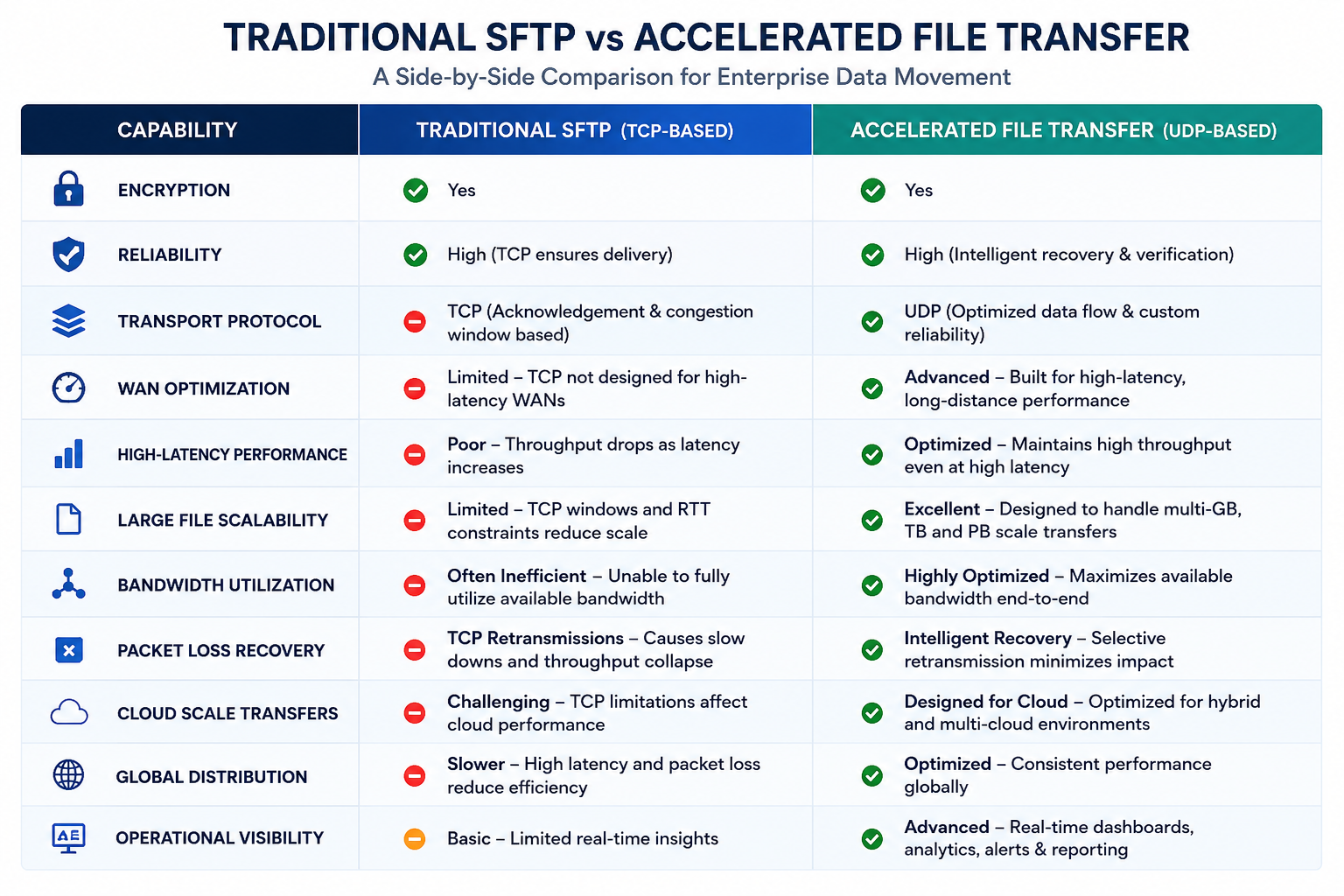
Executive Takeaways
SFTP is not inherently slow. Its performance limitations typically come from TCP behavior across high-latency, long-distance, or lossy networks. Adding bandwidth alone may not improve transfer speeds if TCP cannot keep enough data in flight to utilize the available connection.
TCP tuning should generally be the first optimization step. Increasing window and buffer sizes, reviewing congestion-control settings, and optimizing parallelism can significantly improve SFTP performance. However, tuning eventually reaches practical limits as latency and packet loss increase.
For large, time-sensitive transfers across global WAN, cloud, backup, disaster recovery, media, and data-replication environments, UDP-based acceleration may provide more consistent bandwidth utilization. Enterprise acceleration technologies add their own reliability, congestion management, security, packet recovery, and integrity controls above UDP.
The right strategy is not always choosing SFTP or accelerated transfer exclusively. Many organizations use SFTP for regulated B2B exchanges and partner compatibility while using accelerated transfer for large-scale data movement.
The bottom line: measure latency, packet loss, bandwidth utilization, and the Bandwidth-Delay Product before buying more bandwidth. When latency is the real constraint, protocol optimization and not a larger circuit is often the better solution.
About the Author
Andrei Olin is Chief Technology Officer at bTrade, where he leads product strategy, delivery, architecture, and security across the company’s B2B, Managed File Transfer, and secure data exchange platforms.
Andrei has more than 30 years of experience spanning enterprise architecture, software development, infrastructure, cybersecurity, middleware, trading systems, SaaS, and Managed File Transfer. His career includes building mission-critical systems and infrastructure at Bear Stearns and Morgan Stanley, designing and operating enterprise MFT and messaging platforms for Merrill Lynch and Deutsche Bank, and building and scaling SaaS and security products at startups. He holds master’s and bachelor’s degrees in Information Technology with a focus on Information Security.
Frequently Asked Questions (FAQ)
Why is my SFTP transfer slow on a 1Gbps connection?
Because SFTP runs over TCP, and TCP throughput is limited by the Bandwidth-Delay Product (BDP). On high-latency links (e.g., 100–200ms), the TCP window size often isn’t large enough to keep the pipe full. The sender pauses waiting for acknowledgments, collapsing throughput—even on a fully provisioned 1Gbps circuit.
What is the Bandwidth-Delay Product (BDP)?
BDP is the amount of data that must be “in flight” to fully utilize a network link. It’s calculated as:
Bandwidth × Round-Trip Time (RTT).
If your TCP window is smaller than the BDP, you will never reach full line speed.
How much latency affects SFTP performance?
Even 80–150ms latency can dramatically reduce throughput on long-haul links (e.g., transatlantic routes). On a 1Gbps link with 150ms RTT, nearly 19MB of data must be in flight to saturate the connection. If your TCP window is smaller, utilization drops to 5–20%.
Is slow SFTP caused by my ISP or firewall?
Usually not. If bandwidth tests show expected speeds and packet loss is minimal, the bottleneck is typically TCP behavior under latency—not the circuit itself.
Can TCP tuning improve SFTP performance?
Yes. Application-level TCP tuning can significantly increase throughput by optimizing socket buffers and window behavior.
Platforms like TDXchange allow administrators to tune TCP settings within the application layer—without modifying OS kernel parameters—often improving SFTP speeds by 3–5x.
When is TCP tuning enough?
TCP tuning works well when:
- Latency is below ~100–120ms
- Packet loss is minimal
- Compliance requires SFTP
- Files are moderate in size
However, TCP still has inherent performance limits over long distances.
Why does TCP have a performance ceiling?
TCP requires acknowledgment of transmitted data before sending more. On high-latency links, this acknowledgment delay reduces efficiency. Even perfectly tuned TCP typically struggles to exceed 20% utilization on long-haul networks.
What is UDP-based file transfer acceleration?
UDP-based acceleration bypasses TCP acknowledgment constraints by using custom congestion control and selective retransmission over UDP.
bTrade’s Accelerated File Transfer Protocol (AFTP) removes the wait-for-ACK bottleneck and routinely achieves 90–95% bandwidth utilization on high-latency links.
How much faster is UDP-based acceleration than SFTP?
On high-latency 1Gbps links:
- Standard SFTP may achieve 40–80 Mbps
- UDP acceleration can achieve 800–900 Mbps
This can reduce large transfer windows from hours to minutes.
When should I use UDP acceleration instead of SFTP?
Use UDP-based acceleration when:
- Files regularly exceed 10GB
- Latency exceeds 100ms
- Disaster recovery replication is required
- Batch windows are tight
- WAN utilization is below 20%
Many organizations use both: SFTP for regulated B2B traffic and UDP acceleration for large-scale data movement.
How do I know if I’m TCP-bound?
You are likely TCP-bound if:
- RTT is high (100ms+)
- Packet loss is low
- WAN utilization during transfer is under 20%
- Throughput is far below theoretical bandwidth
Measure RTT, calculate BDP, compare against TCP window size, and review utilization metrics.
Does upgrading bandwidth fix slow SFTP?
No. Increasing bandwidth without addressing TCP window limitations often results in the same low utilization—just on a larger circuit.
What’s the bottom-line fix for slow SFTP on long-distance links?
You have two options:
- Optimize TCP at the application layer (supported in TDXchange)
- Use UDP-based acceleration to bypass TCP limitations entirely
If latency is the bottleneck, protocol choice and not bandwidth is the real solution.