
How Modern Self-Service MFT Reduces IT Bottlenecks, Improves Visibility, and Enables Secure Enterprise File Exchange
Modern enterprises can no longer rely on centralized IT or MFT administration teams to manage every file transfer request, partner onboarding process, workflow change, or operational issue. As organizations scale across hybrid cloud environments, APIs, EDI ecosystems, SaaS applications, and global partner networks, the operational demands placed on file transfer teams continue growing rapidly.
TDXchange addresses this challenge by providing a modern self-service Managed File Transfer (MFT) platform with secure web-based interfaces designed for both technical and non-technical users. The platform enables organizations to securely delegate operational responsibilities while maintaining centralized governance, visibility, automation, compliance, and enterprise-grade security.
What Is Self-Service Secure File Transfer?
Self-service secure file transfer allows business users to upload, download, share, and monitor files through a web browser without requiring IT assistance, scripting, or specialized file transfer tools.
Organizations use self-service file transfer portals to:
- Exchange files with customers
- Share documents with suppliers
- Receive files from partners
- Transfer large files securely
- Reduce IT support requests
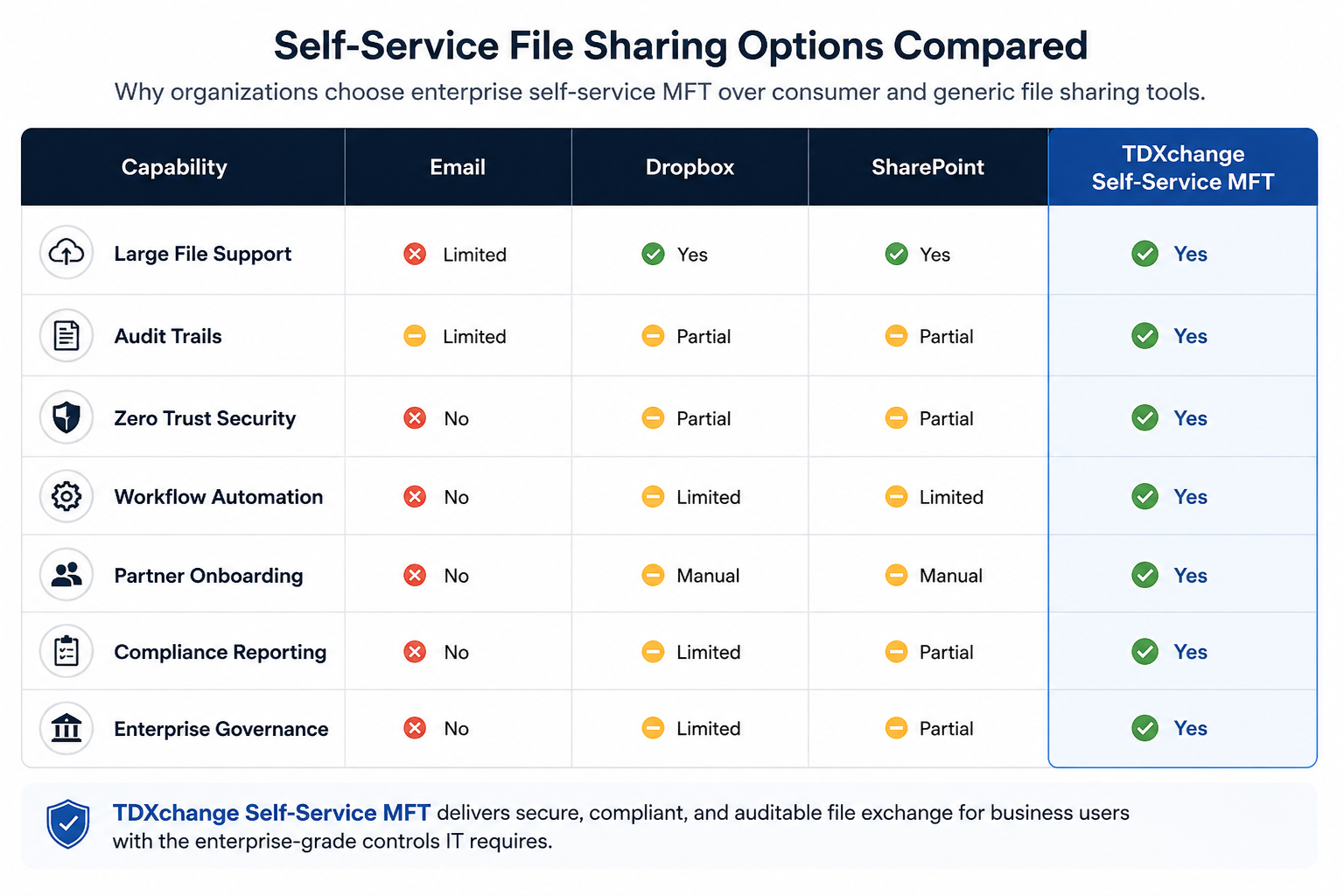
What Is the Best Enterprise File Sharing Alternative to Dropbox?
Consumer file-sharing platforms are designed for collaboration, while enterprise file transfer platforms are designed for security, compliance, governance, automation, and auditability.
TDXchange provides:
- Secure web-based file exchange
- Audit trails
- Workflow automation
- Role-based access controls
- Native End-to-End Zero Trust security
- Regulatory compliance support
This positions TDXchange against the tools people actually search for.
Key Takeaways
- TDXchange provides a secure browser-based self-service MFT platform for both technical and non-technical users.
- Users can securely upload, download, monitor, re-send, and manage file transfers without scripting or software installation.
- True multi-tenant administration allows enterprises to delegate role-based access to departments, business units, subsidiaries, and partners.
- Delegated administration reduces operational workload on centralized MFT teams.
- Users can independently onboard partners, manage workflows, monitor transfers, generate reports, and access audit history.
- Centralized governance ensures enterprise-grade security, compliance, auditability, and policy enforcement.
- TDXchange supports hybrid cloud, APIs, EDI, SFTP, AS2, AS4, HTTPS, and enterprise automation.
- AI-driven operational intelligence helps automate onboarding, migrations, anomaly detection, and troubleshooting.
- TDXchange combines usability with scalability, operational visibility, Native End-to-End Zero Trust security, and quantum-safe encryption readiness.
Why Traditional MFT Operations Create Bottlenecks
In many organizations, even relatively simple file transfer tasks require involvement from centralized IT or MFT administration teams.
Common operational requests include:
- onboarding new partners
- resetting credentials
- updating workflows
- monitoring transfer status
- troubleshooting failed transfers
- generating compliance reports
- re-sending files
- managing permissions
- validating deliveries
As enterprise ecosystems expand, these manual processes create:
- operational bottlenecks
- onboarding delays
- increased support tickets
- slower business responsiveness
- higher administrative overhead
Many organizations still rely heavily on:
- scripts
- manual workflows
- ticketing systems
- fragmented transfer tools
- disconnected monitoring systems
which further increases operational complexity and risk.
Modern enterprises need a more scalable and user-friendly operational model.
What Is Self-Service Managed File Transfer?
Self-service Managed File Transfer allows authorized users to securely manage enterprise file transfer activities through intuitive web-based interfaces without requiring command-line tools, scripting, or advanced technical expertise.
Rather than relying exclusively on centralized administrators, users can independently:
- upload and download files
- exchange data with partners
- monitor transfer status
- review historical transfers
- generate reports
- re-send failed transfers
- re-download files
- manage workflows
- onboard trading partners
while centralized IT and security teams maintain governance, compliance, and security controls.
This approach significantly improves operational agility while reducing administrative burden on enterprise MFT teams.

Simple & Secure Web-Based File Exchange
TDXchange provides a modern browser-based interface that allows non-technical users to securely exchange files in a way similar to platforms such as Dropbox or Files.com, but with enterprise-grade governance, auditability, compliance, and security built directly into the platform.
Users do not need to:
- install software
- configure scripts
- understand protocols
- manage automation code
- rely on desktop transfer clients
to securely exchange data.
Through the web interface, users can:
- securely upload and download files
- exchange documents with internal or external users
- monitor transfer status in real time
- verify delivery completion
- re-send files as needed
- re-download previously exchanged files
- review historical transfer activity
- generate operational and compliance reports
This simplifies secure enterprise collaboration while improving user productivity and reducing operational overhead.
Real-Time Operational Visibility
One of the biggest challenges in traditional file transfer environments is lack of operational visibility.
Business users often cannot easily determine:
- whether a transfer completed successfully
- which partner received a file
- whether files were downloaded
- why a transfer failed
- where workflow delays occurred
As a result, users frequently depend on centralized administrators for basic operational updates and troubleshooting.
TDXchange provides centralized dashboards and real-time visibility across:
- transfer activity
- workflow execution
- delivery confirmation
- alerts
- audit history
- operational reporting
This allows users to independently monitor and manage their workflows without constantly relying on IT or MFT operations teams.
The result is:
- improved operational efficiency
- faster troubleshooting
- reduced support tickets
- better SLA management
- improved business responsiveness
Multi-Tenant Administration & Delegated Management
A major differentiator of TDXchange is its true multi-tenant administration architecture.
TDXchange allows enterprises to securely delegate role-based administrative access to:
- departments
- business units
- subsidiaries
- operational teams
- external partners
while still maintaining centralized governance and enterprise-wide security controls.
Delegated administrators can:
- onboard trading partners
- configure workflows
- manage user access
- monitor transfers
- modify partner configurations
- generate compliance reports
- review audit history
- re-send failed transfers
- re-download files
without requiring direct involvement from the core enterprise MFT administration team.
This distributed operational model significantly reduces workload on centralized MFT operations while improving responsiveness, scalability, and business agility across the organization.
Role-based access controls ensure users only access the environments, workflows, and administrative capabilities authorized for their role.
Workflow Automation Without Complexity
TDXchange combines self-service usability with enterprise-grade automation capabilities.
Organizations can automate:
- file ingestion
- routing
- notifications
- retries
- workflow execution
- SLA enforcement
- approvals
- compliance reporting
- event-driven processing
through centralized policies and configurable workflows.
The platform supports:
- event-driven automation
- scheduled transfers
- recurring workflows
- API-driven orchestration
- hybrid cloud integrations
- partner-specific workflows
without requiring extensive scripting or complex operational management.
This allows organizations to scale secure enterprise file exchange while reducing manual effort, improving consistency, and strengthening operational resiliency.
Enterprise-Grade Security & Governance
Self-service does not mean reduced security.
TDXchange applies centralized governance and enterprise-grade security controls across all user activities and workflows, including:
- role-based access controls (RBAC)
- multi-factor authentication (MFA)
- encryption at rest
- encryption in transit
- Native End-to-End Zero Trust security controls
- malware and virus scanning
- audit logging
- workflow approvals
- centralized identity integration
- policy enforcement
This allows organizations to empower users while still maintaining strict enterprise governance and compliance requirements.
Compliance, Auditability & Automated Reporting
Organizations operating in regulated industries require far more than simple file transfer capabilities. They need comprehensive:
- auditability
- traceability
- reporting
- governance
- data protection
- operational accountability
across all file exchange workflows.
TDXchange helps organizations support compliance initiatives including:
- HIPAA
- GDPR
- PCI DSS
- SOX
- financial regulations
- internal governance frameworks
through centralized:
- audit logs
- transfer tracking
- workflow history
- encryption controls
- access monitoring
- policy enforcement
- compliance reporting
A major advantage of TDXchange’s self-service and multi-tenant architecture is the ability for enterprises to securely delegate compliance and operational reporting responsibilities to specific departments, business units, subsidiaries, or operational teams. Rather than relying exclusively on centralized MFT administrators to manually generate reports, authorized delegated administrators can independently access historical transfer activity, generate audit reports, monitor workflow activity, review delivery confirmation, and validate compliance records directly through the platform.
This allows organizations to automate many compliance-related operational processes while significantly reducing administrative overhead on centralized MFT teams. Individual business units can securely manage and monitor their own compliance requirements, partner activity, and operational reporting within their authorized scope while centralized governance and enterprise-wide security policies remain fully enforced.
By combining self-service reporting with centralized governance, TDXchange helps organizations improve:
- audit readiness
- operational visibility
- reporting efficiency
- compliance scalability
- governance consistency
across large and distributed enterprise environments.
AI-Driven Operational Intelligence
At bTrade, we are actively introducing AI-driven functionality to help simplify and modernize enterprise MFT operations.
AI capabilities are being added to help automate:
- partner onboarding
- migration activities
- workflow optimization
- anomaly detection
- operational troubleshooting
- transfer monitoring
This helps organizations proactively identify:
- failed transfers
- unusual activity
- operational bottlenecks
- workflow inefficiencies
- potential security risks
before they impact business operations.
Final Thoughts
Managed File Transfer is no longer just about moving files securely between systems.
Modern enterprises need platforms that combine:
- usability
- automation
- operational visibility
- delegated administration
- governance
- compliance
- scalability
- security
without creating operational bottlenecks or increasing complexity.
TDXchange helps organizations modernize enterprise data exchange by empowering both technical and non-technical users through secure self-service capabilities while maintaining centralized governance, enterprise-grade security, operational visibility, and compliance controls.
As enterprise ecosystems continue becoming more distributed and operationally complex, self-service Managed File Transfer is rapidly becoming a critical component of modern enterprise integration strategy.
About the Author
Hanz Jorgensen is Chief Operating Officer and Managing Member at bTrade, where he oversees daily operations and works closely with the leadership team to shape and execute the company’s strategic direction. With more than 20 years of experience with several different MFT/technology companies spanning system administration, development, customer support, pre-sales, and enterprise solution delivery, Hanz brings a uniquely practical perspective on what organizations actually need from managed file transfer platforms. He leads bTrade’s Solution Consulting team and plays a central role in aligning product capabilities with real customer requirements across regulated and high-complexity environments.
Frequently Asked Questions (FAQ)
What Is Self-Service Managed File Transfer?
Self-service Managed File Transfer (MFT) enables business users to securely upload, download, send, and receive files through a web browser without requiring IT assistance, scripting, or specialized file transfer tools. Organizations use self-service MFT to improve productivity while maintaining enterprise security, compliance, and governance controls.
What Is Self-Service File Sharing?
Self-service file sharing allows users to securely exchange files with customers, suppliers, vendors, and business partners through a browser-based portal. Unlike traditional email attachments or consumer file-sharing tools, enterprise self-service file sharing provides encryption, auditing, access controls, and compliance capabilities.
How Can Business Users Transfer Files Without IT Support?
Business users can securely exchange files through a self-service MFT portal that provides a simple browser-based interface for uploading, downloading, and managing files. This eliminates the need for IT intervention while ensuring security policies, permissions, and compliance controls remain enforced.
How Do Organizations Securely Exchange Files with External Partners?
Organizations securely exchange files with external partners using Managed File Transfer platforms that provide encryption, authentication, access controls, auditing, and workflow automation. Self-service MFT portals simplify this process by allowing partners to securely access files through a web browser without requiring technical expertise.
What Is the Difference Between Self-Service MFT and Traditional File Transfer?
Traditional file transfer solutions often require technical knowledge, scripting, or administrative involvement. Self-service MFT provides a user-friendly web interface that allows non-technical users to exchange files securely while maintaining centralized security, governance, and compliance controls.
What Is the Difference Between Enterprise MFT and Dropbox?
Dropbox is primarily designed for collaboration and file storage, while enterprise Managed File Transfer platforms are designed for secure, auditable, and governed data exchange. MFT solutions provide advanced security, workflow automation, compliance reporting, partner management, and operational visibility that many organizations require for regulated or business-critical data exchanges.
What Is a Secure File Upload Portal?
A secure file upload portal is a web-based solution that enables users to upload and share files while enforcing authentication, encryption, access controls, auditing, and compliance policies. These portals are commonly used to exchange sensitive documents with customers, suppliers, and business partners.
Can Non-Technical Users Use Managed File Transfer Software?
Yes. Modern self-service MFT solutions are designed for both technical and non-technical users. Browser-based portals allow users to securely exchange files without requiring scripting, command-line tools, or specialized file transfer knowledge.
Is Self-Service File Transfer Secure?
Yes. Enterprise self-service file transfer solutions use security controls such as encryption, authentication, role-based permissions, auditing, and Native End-to-End Zero Trust architecture to protect sensitive data throughout the file-sharing process.
Does Self-Service File Transfer Support Compliance Requirements?
Yes. Self-service MFT platforms help organizations meet regulatory and compliance requirements by providing encryption, audit trails, access controls, file tracking, and reporting capabilities. These features support compliance initiatives across industries such as financial services, healthcare, government, and legal services.
Can Self-Service File Transfer Be Part of a Zero Trust Strategy?
Yes. Self-service file transfer solutions built on a Native End-to-End Zero Trust Architecture continuously validate users, systems, permissions, and requests before granting access. This helps organizations securely empower business users while reducing the risk of unauthorized access and data exposure.
Does TDXchange Support Self-Service File Sharing?
Yes. TDXchange provides secure browser-based self-service file exchange capabilities that enable users to upload, download, and share files without IT assistance while maintaining centralized security, governance, and compliance controls.
What Are the Benefits of Self-Service Managed File Transfer?
Organizations use self-service MFT to:
- Improve business user productivity
- Reduce IT support requests
- Accelerate partner onboarding
- Securely exchange sensitive information
- Maintain compliance and auditability
- Improve visibility into file-sharing activity
- Strengthen data governance and security
Why Choose TDXchange for Self-Service File Transfer?
TDXchange combines the simplicity of self-service file sharing with enterprise-grade security, Native End-to-End Zero Trust architecture, workflow automation, operational visibility, auditing, compliance controls, and quantum-safe encryption. This allows organizations to empower users while maintaining complete control over how sensitive information is exchanged.
How does TDXchange help non-technical users?
TDXchange provides a secure web-based interface that allows users to upload, download, monitor, re-send, and manage file transfers without scripting, command-line tools, or software installation.
What is multi-tenant administration in TDXchange?
TDXchange supports true multi-tenant administration, allowing enterprises to delegate role-based administrative access to departments, teams, subsidiaries, or partners while maintaining centralized governance and security controls.
Can users generate compliance reports in TDXchange?
Yes. Users can independently generate historical transfer reports, audit records, workflow activity reports, and operational logs directly through the platform.
Does self-service MFT reduce IT workload?
Yes. By enabling business users and delegated administrators to independently manage operational tasks, organizations reduce dependency on centralized MFT administration teams and improve operational scalability.
Is self-service MFT secure?
Yes. TDXchange applies enterprise-grade security controls including RBAC, MFA, encryption, malware scanning, audit logging, Native End-to-End Zero Trust policies, and centralized governance across all workflows.
What protocols does TDXchange support?
TDXchange supports:
- SFTP
- FTPS
- HTTPS
- AS2
- APIs
- cloud storage integrations
- EDI workflows
How does AI improve MFT operations?
AI helps automate onboarding, anomaly detection, workflow optimization, migration assistance, operational monitoring, and troubleshooting to reduce manual effort and improve operational resiliency.