

From warehouse preparation to final delivery, a practical look at how secure enterprise data exchange helps logistics companies keep shipments, documentation, and business processes synchronized.
Executive Summary
Moving a shipment from a warehouse to its destination involves much more than transportation.
Behind every shipment is a continuous exchange of information between ERP systems, warehouses, transportation management applications, carriers, freight forwarders, customs brokers, customers, and financial systems.
Purchase orders, advance shipping notices, bills of lading, shipment status updates, customs documentation, and proof-of-delivery records must reach the right systems at the right time.
When one of these exchanges fails, the shipment may continue moving, but the business processes supporting it can quickly fall behind.
Managed File Transfer (MFT) provides the secure, automated, and governed data exchange infrastructure that helps connect these systems and trading partners.
At bTrade, we help organizations design and operate enterprise data exchange environments that integrate existing applications, automate business-critical workflows, and provide visibility into the movement of information.
In this article, I'll walk through a representative international shipment and explain where integration problems typically occur, how they affect logistics operations, and how bTrade TDXchange can help address them.
The shipment scenario is illustrative, not a claim about a particular customer implementation.
Key Takeaways
Shipment tracking depends on reliable information exchange. A shipment may be moving normally while missing or delayed status files prevent transportation systems from displaying accurate information.
Shipping documentation is part of the operational workflow. Bills of lading, advance shipping notices, customs records, and proof-of-delivery documents must reach the appropriate parties and applications at the right time.
Logistics integrations require more than basic file transfer. Different carriers, warehouses, and trading partners use different protocols, formats, schedules, and security requirements.
TDXchange complements existing logistics applications. It provides secure connectivity, automation, monitoring, and governance while specialized TMS, WMS, ERP, EDI, and document processing applications perform their respective business functions.
The objective is operational reliability. A well-designed data exchange environment helps logistics organizations identify failures earlier, simplify partner connectivity, and reduce unnecessary manual intervention.
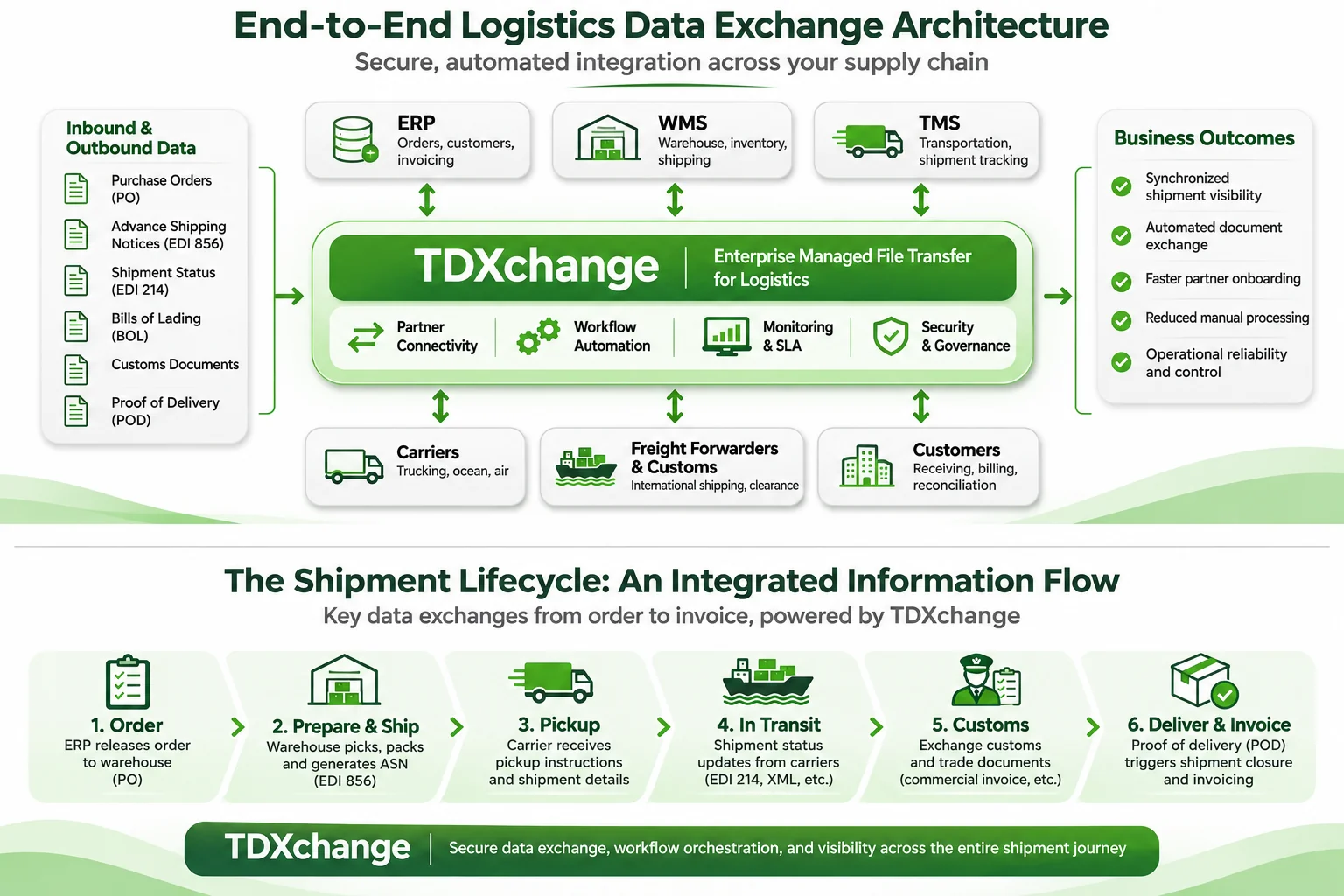
The following architecture illustrates how TDXchange connects ERP, WMS, TMS, carriers, freight forwarders, and customers through a centralized Managed File Transfer platform supporting secure logistics data exchange, workflow automation, and operational visibility.
The Shipment Is Moving. Is the Information Keeping Up?
Throughout my career, I've worked with enterprise systems where a relatively small technical issue created a much larger business problem.
A file arrives late.
A partner changes a connection.
A scheduled process stops working.
Or an application never receives the information it needs.
In logistics, these issues become particularly interesting because the physical shipment and the information describing it are often moving through completely different systems.
Imagine a manufacturer shipping 500 pallets of automotive components from a distribution center in New Jersey to an assembly facility in Germany.
The shipment involves a warehouse, a trucking company, an ocean carrier, a freight forwarder, a customs broker, and the receiving facility.
Each organization has its own systems.
Each needs different information.
And each may use different integration technologies.
The warehouse needs shipping instructions. The trucking company needs pickup details. The ocean carrier needs transportation documentation. Customs needs the appropriate declarations. The receiving facility needs accurate arrival information.
Finance eventually needs confirmation that the goods were delivered.
Now imagine that the physical shipment is progressing normally, but one of these systems stops receiving updates.
The containers may be halfway across the Atlantic while the customer's tracking application still shows the cargo sitting at the warehouse.
That's not necessarily a transportation problem. It's an information exchange problem.
And it's exactly the type of challenge a properly designed MFT architecture can help prevent.
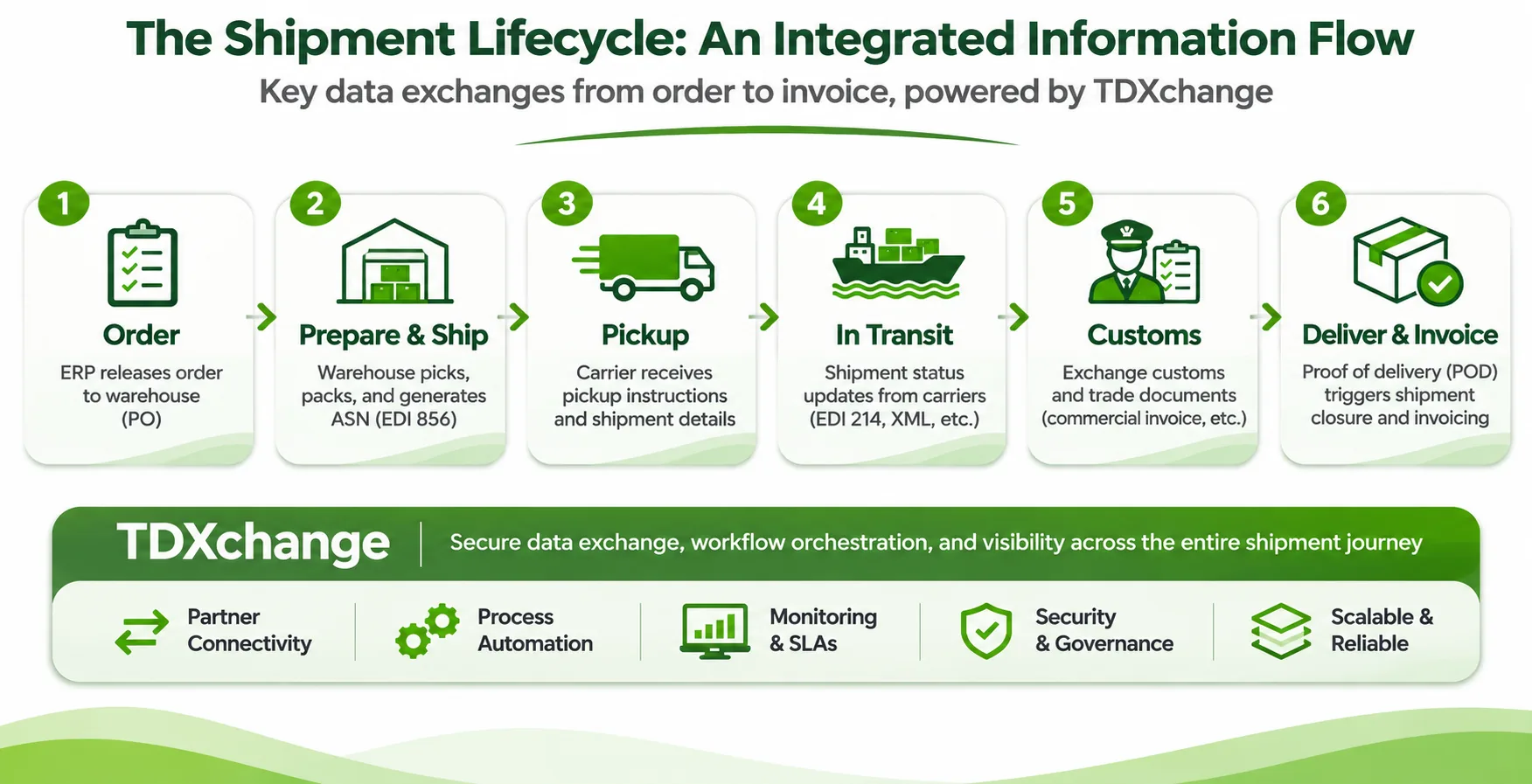
To understand how these integrations support actual logistics operations, let's follow a shipment from the initial ERP order through warehouse preparation, carrier pickup, transportation, customs clearance, final delivery, and invoicing.
Step 1: Connecting ERP Orders to Warehouse Operations
Our shipment begins when the manufacturer's ERP system releases an order for 500 pallets of automotive components.
The order contains the customer information, item numbers, quantities, delivery destination, and required shipping dates.
That information must reach the Warehouse Management System (WMS), which determines how the order will be picked, packed, staged, and prepared for shipment.
In a traditional environment, the ERP system might generate a CSV, XML, or EDI file and place it in a directory for a scheduled process to retrieve.
Simple enough.
Until the file doesn't arrive.
What Happens When the Warehouse Never Receives the Order?
The ERP system may show that the order was released successfully.
But the warehouse has no corresponding work order.
Employees are waiting for picking instructions, trucks are scheduled to arrive, and the shipping deadline is approaching.
Meanwhile, the ERP team believes its part of the process completed.
The warehouse team believes the ERP system never sent the information.
And IT gets to enjoy a particularly exciting investigation involving multiple servers and application logs.
How TDXchange Can Help
In this scenario, TDXchange can be configured to retrieve the order file from the ERP environment, apply the required routing and processing rules, and securely deliver it to the WMS.
The workflow can monitor transfer completion, handle transient failures through retries, and notify the appropriate teams when an expected exchange fails.
If the WMS provides an acknowledgment or processing response, that response can be incorporated into the workflow through an appropriate integration.
The important distinction is that delivering the order file doesn't necessarily mean the warehouse accepted it.
A complete integration should account for both delivery and downstream processing.
The business objective isn't simply to move the order file. It's to ensure the warehouse receives the information needed to prepare the shipment.
Step 2: Preparing Shipping Documentation and Notifying Transportation Partners
Once the warehouse has prepared the shipment, several additional information exchanges must occur.
The WMS may generate packing information, pallet counts, weights, dimensions, and shipment identifiers.
The TMS uses this information to coordinate transportation.
The trucking company needs pickup instructions.
The freight forwarder may need commercial invoices, packing lists, and transportation details.
The receiving customer may expect an Advance Shipping Notice, often represented by an EDI 856 transaction.
Depending on the transportation arrangement, bills of lading and other shipping documents must also be prepared and exchanged.
The Integration Challenge
Not every participant communicates the same way.
The warehouse may generate XML files.
The freight forwarder may accept SFTP.
The trucking company may use AS2.
The customer may require an EDI 856 message in a specific format.
And the ocean carrier may provide an API or partner portal.
Without a centralized integration approach, the logistics organization can end up maintaining a collection of custom scripts and point-to-point connections.
Adding a new carrier means building another integration.
Changing an existing partner means modifying another script.
And determining whether all the required documents were delivered becomes increasingly complicated.
How TDXchange Can Help
TDXchange can provide a centralized exchange layer supporting protocols such as SFTP, FTPS, HTTPS, AS2, AS4, and APIs through configured integrations.
For our shipment, a workflow could distribute the relevant shipping files to the trucking company, freight forwarder, and customer according to their individual requirements.
Each partner can have its own authentication, authorization, routing, and delivery configuration.
Where data transformation is necessary, TDXchange can integrate with an EDI translator or data transformation service.
For example, the WMS may produce shipment details in XML while the customer expects an EDI 856 message.
The transformation component handles the format conversion, while TDXchange manages the secure exchange and associated workflow.
This distinction is important because secure data exchange and EDI translation are related capabilities, but they are not the same thing.
The goal is to create an integration architecture where different technologies can work together without requiring the organization to replace its existing logistics applications.
Step 3: Keeping Shipment Tracking Information Current
The truck collects the shipment from the New Jersey distribution center and transports it to the port.
The cargo is loaded onto a vessel, crosses the Atlantic, and eventually arrives at a European port before continuing to its final destination.
Throughout this journey, different carriers and service providers generate shipment events.
These may include cargo pickup, terminal arrival, vessel departure, port arrival, customs release, and final delivery.
In some transportation environments, shipment status information is exchanged using EDI 214 transactions. Others use XML, JSON, CSV, APIs, or proprietary formats.
What Happens When a Shipment Status Update Is Missing?
Imagine the ocean carrier sends a status file confirming that the vessel has departed.
The file is transmitted successfully from the carrier's environment, but a downstream integration fails before the TMS processes it.
The carrier believes the update was delivered.
The logistics provider's TMS still shows the previous shipment milestone.
And the customer wonders why the tracking information hasn't changed.
This illustrates an important distinction.
A successful file transfer does not necessarily mean the shipment tracking application has been updated.
How TDXchange Can Help
TDXchange can securely receive shipment status files from carriers and route them to the appropriate downstream systems.
Workflows can be configured to monitor delivery, handle failures, and process acknowledgments when the receiving applications support them.
For recurring status feeds, organizations can also establish expected delivery windows and alerts for missing or delayed files.
For example, if a carrier is expected to provide a daily shipment status file by 6:00 AM, a configured workflow can notify the logistics operations team when the file hasn't arrived within the expected window.
The team can investigate before the missing update creates additional confusion.
It's also important to understand what MFT doesn't do.
TDXchange does not independently determine the physical location of a shipment.
It helps ensure that shipment information reaches the systems responsible for tracking and interpreting those events.
This allows the logistics provider to improve the reliability of its existing tracking environment without replacing the TMS.
Step 4: Coordinating Customs and International Shipping Documents
International shipments introduce another layer of complexity.
Depending on the countries, goods, and transportation arrangements, organizations may need to exchange commercial invoices, packing lists, certificates of origin, customs declarations, and other supporting documentation.
Different participants may need different documents at different stages of the shipment.
The freight forwarder may require the commercial invoice before departure.
The customs broker may need supporting documentation before clearance.
The receiving facility may need specific records before accepting delivery.
The Challenge: The Right Document Must Reach the Right Party
Imagine the customs broker receives the commercial invoice but not the required certificate of origin.
The cargo reaches the destination port, but the documentation package is incomplete.
The result may be a customs clearance delay, storage charges, or disruption to the customer's delivery schedule.
The problem isn't necessarily that the file transfer platform failed.
It may be that the workflow never verified whether the complete documentation package was available before forwarding it.
How TDXchange Can Help
TDXchange can be configured to coordinate multi-step document exchange workflows.
For example, the logistics provider could establish a process that waits for the required files, routes them to a document validation service, and distributes the approved documentation to the appropriate parties.
If a required file is missing, the workflow can generate an alert or route the transaction to an exception process.
The external document validation application remains responsible for determining whether the documentation satisfies the relevant business or regulatory requirements.
TDXchange manages the secure movement and orchestration of information.
This separation of responsibilities is important.
A well-designed integration should not simply deliver every file as soon as it arrives.
It should consider which documents are required, where they need to go, and which dependencies must be satisfied before subsequent steps can proceed.
Step 5: Managing Carrier Changes and Trading Partner Onboarding
Now imagine our logistics provider signs an agreement with a new trucking company.
The new carrier operates its own systems and has different connectivity requirements.
It supports SFTP but uses a different directory structure, authentication method, file naming convention, and shipment status format.
The logistics provider needs to establish the integration without disrupting its existing carrier relationships.
Why Partner Onboarding Can Become Expensive
In environments built around individual scripts and servers, onboarding a new carrier may require changes across multiple systems.
A developer creates a new transfer script.
An administrator configures credentials.
Another team updates firewall rules.
Someone modifies a scheduled job.
And operations must figure out how to monitor the new exchange.
None of these activities is particularly complicated on its own.
But multiply them across dozens or hundreds of carriers, suppliers, and logistics partners, and the operational complexity becomes substantial.
How TDXchange Can Help
TDXchange provides centralized trading partner management and reusable workflow configurations.
For our new trucking partner, the organization can establish a dedicated partner identity, configure the required connectivity and permissions, and associate the carrier with the appropriate shipment information workflows.
Existing integration patterns can be reused where applicable, while accommodating partner-specific requirements.
For example, the new carrier may receive pickup instructions through SFTP and return shipment status files using a different directory and naming convention.
TDXchange can manage these exchanges through configured workflows while maintaining appropriate separation between trading partners.
And because the platform supports delegated administration and role-based access, organizations can assign specific responsibilities without giving every operational user unrestricted administrative access.
The objective is to make partner onboarding more repeatable, secure, and manageable as the logistics network grows.
Step 6: Closing the Shipment and Automating Proof-of-Delivery Processing
Our shipment finally reaches the assembly facility in Germany.
The receiving team confirms delivery, and the carrier generates a proof-of-delivery document.
From a transportation perspective, the shipment is complete.
But several business processes may still depend on that confirmation.
The logistics provider needs to update the shipment record.
The customer may require the delivery documentation.
And Finance may need the proof of delivery before completing billing.
The Challenge: Delivery Is Complete, but Billing Is Waiting
Imagine the carrier uploads the proof-of-delivery document, but it never reaches the billing application.
The TMS shows that the shipment was delivered.
The customer has received the goods.
Yet Finance cannot complete the invoice because the supporting documentation is missing.
The problem may not be discovered until someone investigates why the invoice hasn't been issued.
How TDXchange Can Help
TDXchange can automate the secure receipt and routing of proof-of-delivery documents.
A configured workflow could receive the document from the carrier, apply file-level processing rules, deliver it to the appropriate document management system, and notify or invoke the downstream billing application through an available integration.
If the billing application provides an acknowledgment, the workflow can incorporate that response to help determine whether the downstream processing step completed.
If delivery fails, the platform can apply retries, notifications, and exception handling according to the configured business rules.
This creates a more controlled process than relying on someone to manually retrieve documents from a carrier portal and forward them to Finance.
It also illustrates why enterprise data exchange should be designed around business outcomes.
The goal isn't simply to receive the proof-of-delivery file.
The goal is to make the delivery confirmation available to the business processes that depend on it.
Step 7: Handling Exceptions Without Disrupting the Supply Chain
Now consider what happens when something goes wrong.
The ocean carrier schedules a maintenance window and temporarily disables its SFTP service.
A trucking company changes its SSH key.
A warehouse sends a shipment file with an unexpected name.
Or a carrier retransmits a status file that was already processed.
These are realistic situations in environments involving many independent organizations.
And while they may appear to be minor technical events, their impact depends on the business process involved.
Different Failures Require Different Responses
A temporary carrier connection failure may justify an automated retry.
A missing advance shipping notice may require escalation to warehouse operations.
An unexpected file format may require external validation or transformation.
A duplicate shipment status file may need to be identified by the receiving application before it updates the shipment record.
A delayed proof-of-delivery document may require notification to the billing team.
TDXchange supports configurable workflows, scheduling, retries, notifications, and exception handling.
For planned carrier maintenance, its trading partner maintenance window capabilities can help prevent unnecessary processing attempts and alerts during known periods of unavailability.
Where application-level validation or duplicate detection is required, the appropriate processing logic can be incorporated through integrations.
The objective is to establish a predictable response to common integration problems rather than forcing operations teams to investigate every exception from scratch.
For a logistics organization handling thousands of daily transactions, this can make a meaningful difference in how efficiently the environment is operated.
Protecting Logistics Data and Maintaining Business Continuity
Our shipment example also illustrates why security and resilience matter.
The information exchanged may include commercial invoices, customer records, supplier information, customs documentation, and other sensitive business data.
TDXchange incorporates Native End-to-End Zero Trust, granular authorization, partner segregation, encryption, and tamper-resistant audit logging.
It also supports NIST-standardized quantum-safe cryptography and crypto agility for applicable protection scenarios.
For a logistics organization, these controls help protect sensitive information as it moves between independent organizations and systems.
Business continuity is equally important.
If the data exchange environment becomes unavailable, shipment updates, warehouse instructions, and delivery documentation may be delayed.
TDXchange supports distributed architectures, clustering, high availability, and flexible deployment options, including on-premises, cloud, hybrid, and TDCloud SaaS environments.
At bTrade, we work with customers to design infrastructure and recovery strategies based on their business requirements, including RTO and RPO objectives.
The underlying principles are covered in more detail in our articles on Zero Trust Managed File Transfer and MFT Observability.
For logistics organizations, the important question is how these capabilities protect the actual shipment-related processes that depend on continuous information exchange.
What Should Logistics Companies Evaluate When Selecting an MFT Platform?
Our representative shipment illustrates several questions I believe every logistics organization should ask when evaluating an MFT solution.
Can the platform securely connect the different protocols and technologies used by our carriers and trading partners?
Can it integrate with our existing ERP, TMS, WMS, and document management systems?
Can we monitor whether shipment status files, advance shipping notices, and proof-of-delivery documents arrive when expected?
Can we automate dependencies between document delivery, validation, and downstream processing?
Can we onboard new carriers without creating another collection of custom scripts?
Can business users see the status of their relevant exchanges without requiring unrestricted IT access?
Can the platform integrate with our existing ERP applications using their supported interfaces, including file-based exchanges, APIs, and integration middleware, without requiring significant changes to our current environment?
And can the platform support our security, availability, and disaster recovery requirements as the organization grows?
These questions are more useful than simply comparing the number of protocols or features listed on a vendor's website.
The right solution depends on the organization's applications, trading partner ecosystem, transaction volumes, operational requirements, and existing infrastructure.
At bTrade, our approach is to understand those requirements first and then design an architecture that supports them.
Conclusion: A Shipment Is Only as Visible as the Information Behind It
When we think about logistics, we naturally focus on moving goods from one place to another.
But behind every shipment is a complex network of applications and organizations that need to exchange information.
The warehouse needs the order.
The carrier needs the shipping instructions.
The TMS needs shipment updates.
Customs needs the appropriate documentation.
And Finance needs confirmation that the goods were delivered.
If any of those exchanges fail, the physical shipment may continue moving while the business processes surrounding it fall behind.
That's why I believe logistics organizations should treat enterprise data exchange as an important part of their operational infrastructure.
At bTrade, our focus is on helping customers connect existing systems, automate critical workflows, protect sensitive information, and improve visibility into the processes their businesses depend on.
We don't believe every integration challenge requires replacing existing applications.
Often, the better solution is to design a secure, reliable, and manageable architecture that allows those applications to work together more effectively.
Because in logistics, delivering the shipment is only part of the job. Making sure the right information reaches the right people and systems at the right time is just as important.
Learn more about bTrade TDXchange and how we help organizations modernize enterprise data exchange.
About the Author
Andrei Olin is Chief Technology Officer at bTrade, where he leads product strategy, delivery, architecture, and security across the company’s B2B, Managed File Transfer, and secure data exchange platforms.
Andrei has more than 30 years of experience spanning enterprise architecture, software development, infrastructure, cybersecurity, middleware, trading systems, SaaS, and Managed File Transfer. His career includes building mission-critical systems and infrastructure at Bear Stearns and Morgan Stanley, designing and operating enterprise MFT and messaging platforms for Merrill Lynch and Deutsche Bank, and building and scaling SaaS and security products at startups. He holds master’s and bachelor’s degrees in Information Technology with a focus on Information Security.
Frequently Asked Questions
How does Managed File Transfer support logistics and shipment tracking?
Managed File Transfer securely exchanges shipment status information, transportation documents, and operational files between carriers, warehouses, logistics providers, and enterprise applications. It monitors file movement and workflow execution, while specialized logistics applications interpret shipment events and maintain physical shipment tracking information.
Can bTrade TDXchange integrate with Transportation Management Systems and Warehouse Management Systems?
Yes. TDXchange supports integration through secure file transfer protocols, APIs, file systems, and cloud storage interfaces. Integration with a particular TMS or WMS depends on the interfaces provided by that application.
Can TDXchange automate EDI 214 shipment status and EDI 856 advance shipping notice exchanges?
TDXchange can securely transport files containing EDI 214 and EDI 856 transactions through supported protocols. EDI translation, mapping, and transaction-level validation can be handled by integrated EDI processing solutions.
Can Managed File Transfer help prevent missing shipment updates?
MFT can help identify missing or delayed expected file exchanges through configured schedules, monitoring, alerts, and SLA controls. It cannot independently verify a shipment's physical location without information from the appropriate transportation or tracking systems.
How can MFT automate bills of lading and proof-of-delivery documents?
MFT can automate the receipt, secure delivery, routing, and monitoring of shipping documents. It can also integrate with external document management, validation, and business processing systems to support more complete workflows.
How does bTrade support logistics companies with multiple carriers?
TDXchange provides centralized trading partner management, multiple secure connectivity protocols, partner-specific permissions, reusable workflows, and monitoring capabilities. These features can help organizations manage different carrier requirements from a common platform.
Can TDXchange support international logistics operations?
Yes. TDXchange can support secure data exchange between geographically distributed applications and trading partners, including carriers, freight forwarders, customs brokers, and logistics providers. Country-specific customs processing and regulatory validation remain the responsibility of appropriate business applications and services.
What makes bTrade different from basic SFTP solutions for logistics?
TDXchange extends beyond basic SFTP connectivity by providing centralized partner management, workflow automation, multiple protocols, monitoring, SLA governance, security controls, auditing, and enterprise deployment flexibility. bTrade also provides architecture, integration, migration, and operational consulting services.
Can bTrade TDXchange automate B2B file exchanges with suppliers?
Yes. TDXchange enables organizations to automate secure B2B file exchanges with suppliers, vendors, distributors, and other trading partners. It supports scheduled and event-driven workflows, SFTP, FTPS, HTTPS, AS2, AS4, and integration with enterprise applications and cloud platforms. Organizations can automate the exchange of purchase orders, inventory files, invoices, shipment notices, and other business documents while maintaining centralized security, monitoring, and auditability. Where EDI translation is required, TDXchange can integrate with specialized EDI processing solutions.
Can bTrade TDXchange integrate with our existing ERP system without requiring us to replace or modify it?
Yes. TDXchange is designed to integrate with existing enterprise applications through supported file transfer protocols, file systems, cloud storage, and API-based integrations. Organizations can automate the exchange of purchase orders, invoices, inventory updates, shipment notifications, and other business documents between ERP systems and external trading partners.
TDXchange supports scheduled and event-driven workflows, secure connectivity, monitoring, retries, and exception handling. Where ERP-specific interfaces, data transformation, or business logic are required, it can work alongside existing integration middleware and processing applications.
The integration approach depends on the ERP system's available interfaces and the organization's requirements. Many file-based integrations can be implemented without changing the ERP application itself.
<script type="application/ld+json">
{
  "@context": "https://schema.org",
  "@graph": [
    {
      "@type": "Organization",
      "@id": "https://www.btrade.com/#organization",
      "name": "bTrade",
      "legalName": "bTrade LLC",
      "url": "https://www.btrade.com/",
      "description": "bTrade provides enterprise Managed File Transfer, secure B2B data exchange, trading partner integration, workflow automation, and enterprise application integration solutions."
    },
    {
      "@type": "Person",
      "@id": "https://www.btrade.com/blogs/managed-file-transfer-logistics-shipment-tracking#author",
      "name": "Andrei Olin",
      "jobTitle": "Chief Technology Officer",
      "worksFor": {
        "@id": "https://www.btrade.com/#organization"
      },
      "sameAs": [
        "https://www.linkedin.com/in/andreiolin/"
      ],
      "knowsAbout": [
        "Managed File Transfer",
        "Enterprise Data Exchange",
        "ERP Integration",
        "B2B Integration",
        "Enterprise Systems Architecture",
        "Cybersecurity",
        "Zero Trust Architecture",
        "Trading Partner Integration",
        "Workflow Automation"
      ]
    },
    {
      "@type": "SoftwareApplication",
      "@id": "https://www.btrade.com/solutions/tdxchange#software",
      "name": "TDXchange",
      "url": "https://www.btrade.com/solutions/tdxchange",
      "applicationCategory": "BusinessApplication",
      "applicationSubCategory": "Enterprise Managed File Transfer",
      "description": "TDXchange is bTrade's enterprise Managed File Transfer platform supporting secure ERP data exchange, automated B2B file transfers, supplier and trading partner connectivity, workflow automation, monitoring, SLA governance, and integration with existing enterprise applications.",
      "provider": {
        "@id": "https://www.btrade.com/#organization"
      },
      "featureList": [
        "Secure Managed File Transfer",
        "ERP file exchange integration",
        "Automated B2B file exchange",
        "Supplier and trading partner management",
        "SFTP, FTPS, HTTPS, AS2 and AS4 connectivity",
        "File system and cloud storage integration",
        "API-based connectivity through configured integrations",
        "Scheduled and event-driven workflows",
        "Multi-step workflow automation",
        "Application acknowledgment processing through integrations",
        "Transfer monitoring and SLA governance",
        "Configurable retries and exception handling",
        "Role-based access control",
        "Native End-to-End Zero Trust",
        "Tamper-resistant audit logging",
        "Quantum-safe cryptography and crypto agility",
        "Clustering and high availability"
      ]
    },
    {
      "@type": "BlogPosting",
      "@id": "https://www.btrade.com/blogs/managed-file-transfer-logistics-shipment-tracking#article",
      "mainEntityOfPage": {
        "@type": "WebPage",
        "@id": "https://www.btrade.com/blogs/managed-file-transfer-logistics-shipment-tracking"
      },
      "headline": "Managed File Transfer for Logistics: How bTrade Connects Shipment Tracking, Carriers, Warehouses, and Shipping Documentation",
      "description": "Discover how bTrade TDXchange connects ERP, WMS, TMS and carriers to automate shipping documents, secure logistics data exchange and improve shipment visibility.",
      "inLanguage": "en-US",
      "author": {
        "@id": "https://www.btrade.com/blogs/managed-file-transfer-logistics-shipment-tracking#author"
      },
      "publisher": {
        "@id": "https://www.btrade.com/#organization"
      },
      "about": [
        {
          "@type": "Thing",
          "name": "Managed File Transfer for Logistics"
        },
        {
          "@type": "Thing",
          "name": "Secure ERP Integration"
        },
        {
          "@type": "Thing",
          "name": "Enterprise Application Integration"
        },
        {
          "@type": "Thing",
          "name": "B2B File Exchange Automation"
        },
        {
          "@type": "Thing",
          "name": "Supplier and Trading Partner Integration"
        },
        {
          "@type": "Thing",
          "name": "Shipment Tracking Data Integration"
        },
        {
          "@type": "Thing",
          "name": "Transportation Management System Integration"
        },
        {
          "@type": "Thing",
          "name": "Warehouse Management System Integration"
        },
        {
          "@type": "Thing",
          "name": "Shipping Documentation Automation"
        },
        {
          "@type": "Thing",
          "name": "Supply Chain Data Exchange"
        }
      ],
      "keywords": [
        "Managed File Transfer for Logistics",
        "Secure File Transfer ERP Integration",
        "Managed File Transfer ERP Integration",
        "ERP File Exchange Automation",
        "Existing ERP System Integration",
        "Enterprise Application Integration",
        "B2B File Exchange Automation",
        "Supplier File Exchange",
        "Trading Partner Management",
        "Shipment Tracking Integration",
        "Shipping Documentation Automation",
        "TMS Integration",
        "WMS Integration",
        "EDI 214",
        "EDI 856",
        "Carrier Integration",
        "Proof of Delivery Automation",
        "Secure Logistics Data Exchange",
        "bTrade TDXchange"
      ],
      "mentions": [
        {
          "@id": "https://www.btrade.com/solutions/tdxchange#software"
        },
        {
          "@type": "Thing",
          "name": "Enterprise Resource Planning"
        },
        {
          "@type": "Thing",
          "name": "EDI 214 Shipment Status"
        },
        {
          "@type": "Thing",
          "name": "EDI 856 Advance Shipping Notice"
        },
        {
          "@type": "Thing",
          "name": "Bill of Lading"
        },
        {
          "@type": "Thing",
          "name": "Proof of Delivery"
        },
        {
          "@type": "Thing",
          "name": "Customs Documentation"
        },
        {
          "@type": "Thing",
          "name": "Supplier Purchase Orders"
        },
        {
          "@type": "Thing",
          "name": "Supplier Invoices"
        }
      ],
      "isAccessibleForFree": true
    },
    {
      "@type": "FAQPage",
      "@id": "https://www.btrade.com/blogs/managed-file-transfer-logistics-shipment-tracking#faq",
      "mainEntity": [
        {
          "@type": "Question",
          "name": "How does Managed File Transfer support logistics and shipment tracking?",
          "acceptedAnswer": {
            "@type": "Answer",
            "text": "Managed File Transfer securely exchanges shipment status information, transportation documents, and operational files between carriers, warehouses, logistics providers, and enterprise applications. It monitors file movement and workflow execution, while specialized logistics applications interpret shipment events and maintain physical shipment tracking information."
          }
        },
        {
          "@type": "Question",
          "name": "Can bTrade TDXchange integrate with Transportation Management Systems and Warehouse Management Systems?",
          "acceptedAnswer": {
            "@type": "Answer",
            "text": "Yes. TDXchange supports integration through secure file transfer protocols, APIs, file systems, and cloud storage interfaces. Integration with a particular TMS or WMS depends on the interfaces provided by that application."
          }
        },
        {
          "@type": "Question",
          "name": "Can TDXchange automate EDI 214 shipment status and EDI 856 advance shipping notice exchanges?",
          "acceptedAnswer": {
            "@type": "Answer",
            "text": "TDXchange can securely transport files containing EDI 214 and EDI 856 transactions through supported protocols. EDI translation, mapping, and transaction-level validation can be handled by integrated EDI processing solutions."
          }
        },
        {
          "@type": "Question",
          "name": "Can Managed File Transfer help prevent missing shipment updates?",
          "acceptedAnswer": {
            "@type": "Answer",
            "text": "MFT can help identify missing or delayed expected file exchanges through configured schedules, monitoring, alerts, and SLA controls. It cannot independently verify a shipment's physical location without information from the appropriate transportation or tracking systems."
          }
        },
        {
          "@type": "Question",
          "name": "How can MFT automate bills of lading and proof-of-delivery documents?",
          "acceptedAnswer": {
            "@type": "Answer",
            "text": "MFT can automate the receipt, secure delivery, routing, and monitoring of shipping documents. It can also integrate with external document management, validation, and business processing systems to support more complete workflows."
          }
        },
        {
          "@type": "Question",
          "name": "How does bTrade support logistics companies with multiple carriers?",
          "acceptedAnswer": {
            "@type": "Answer",
            "text": "TDXchange provides centralized trading partner management, multiple secure connectivity protocols, partner-specific permissions, reusable workflows, and monitoring capabilities. These features can help organizations manage different carrier requirements from a common platform."
          }
        },
        {
          "@type": "Question",
          "name": "Can TDXchange support international logistics operations?",
          "acceptedAnswer": {
            "@type": "Answer",
            "text": "Yes. TDXchange can support secure data exchange between geographically distributed applications and trading partners, including carriers, freight forwarders, customs brokers, and logistics providers. Country-specific customs processing and regulatory validation remain the responsibility of appropriate business applications and services."
          }
        },
        {
          "@type": "Question",
          "name": "What makes bTrade different from basic SFTP solutions for logistics?",
          "acceptedAnswer": {
            "@type": "Answer",
            "text": "TDXchange extends beyond basic SFTP connectivity by providing centralized partner management, workflow automation, multiple protocols, monitoring, SLA governance, security controls, auditing, and enterprise deployment flexibility. bTrade also provides architecture, integration, migration, and operational consulting services."
          }
        },
        {
          "@type": "Question",
          "name": "Can bTrade TDXchange automate B2B file exchanges with suppliers?",
          "acceptedAnswer": {
            "@type": "Answer",
            "text": "Yes. TDXchange enables organizations to automate secure B2B file exchanges with suppliers, vendors, distributors, and other trading partners. It supports scheduled and event-driven workflows, SFTP, FTPS, HTTPS, AS2, AS4, and integration with enterprise applications and cloud platforms. Organizations can automate the exchange of purchase orders, inventory files, invoices, shipment notices, and other business documents while maintaining centralized security, monitoring, and auditability. Where EDI translation is required, TDXchange can integrate with specialized EDI processing solutions."
          }
        },
        {
          "@type": "Question",
          "name": "Can bTrade TDXchange integrate with our existing ERP system without requiring us to replace or modify it?",
          "acceptedAnswer": {
            "@type": "Answer",
            "text": "Yes. TDXchange is designed to integrate with existing enterprise applications through supported file transfer protocols, file systems, cloud storage, and API-based integrations. Organizations can automate the exchange of purchase orders, invoices, inventory updates, shipment notifications, and other business documents between ERP systems and external trading partners. TDXchange supports scheduled and event-driven workflows, secure connectivity, monitoring, retries, and exception handling. Where ERP-specific interfaces, data transformation, or business logic are required, it can work alongside existing integration middleware and processing applications. The integration approach depends on the ERP system's available interfaces and the organization's requirements. Many file-based integrations can be implemented without changing the ERP application itself."
          }
        }
      ]
    },
    {
      "@type": "BreadcrumbList",
      "@id": "https://www.btrade.com/blogs/managed-file-transfer-logistics-shipment-tracking#breadcrumb",
      "itemListElement": [
        {
          "@type": "ListItem",
          "position": 1,
          "name": "Home",
          "item": "https://www.btrade.com/"
        },
        {
          "@type": "ListItem",
          "position": 2,
          "name": "Blogs",
          "item": "https://www.btrade.com/blogs"
        },
        {
          "@type": "ListItem",
          "position": 3,
          "name": "Managed File Transfer for Logistics",
          "item": "https://www.btrade.com/blogs/managed-file-transfer-logistics-shipment-tracking"
        }
      ]
    }
  ]
}
</script>