

Executive Summary
A company can grow from 100 to 10,000 daily file transfers within the same Managed File Transfer platform when its deployment, licensing, and supporting infrastructure are sized for the workload. The evaluation should cover peak demand, file sizes, workflow processing, delivery deadlines, and operational effort, alongside daily transfer counts.
bTrade’s TDXchange supports growth through flexible licensing, additional processing resources, and distributed deployment options. TDCloud provides a SaaS option built on TDXchange for organizations that want bTrade to operate the underlying platform infrastructure. Actual capacity must be validated against the customer’s workload.
What Does Scalable Managed File Transfer Mean?
Scalable Managed File Transfer is the ability to accommodate increasing file volumes, concurrent connections, trading partners, and processing requirements while maintaining the required service levels and security controls.
Growth also affects administration. More transfers can mean more certificates, exceptions, audit records, and partner requests. A scalable solution should make those activities manageable as the business expands.
For a growing company, the practical question is whether today’s platform can support tomorrow’s workload without forcing a replacement or making daily operations increasingly difficult.
Why Daily Transfer Counts Are Not Enough
File count measures how many transfers occur. Data volume measures how much information moves. Frequency describes when transfers arrive or run. Concurrency describes how many connections or processing tasks overlap.
These measurements answer different capacity questions. Consider three illustrative workloads:
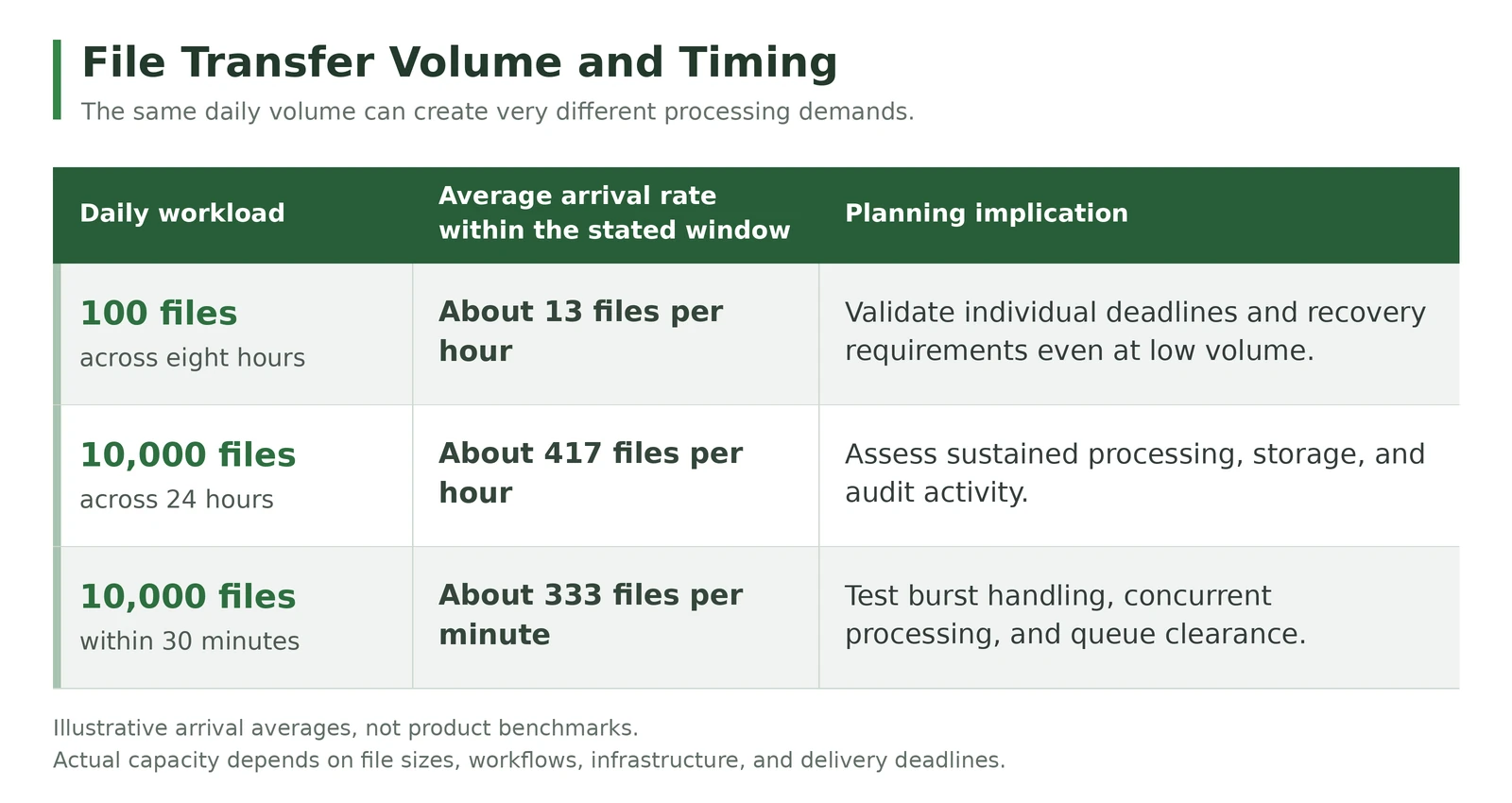
These are arithmetic examples, not TDXchange benchmarks. Arrival averages do not establish required concurrency or completion capacity. File sizes, workflow duration, and downstream response times still matter.
A daily dashboard can show comfortable averages while a short processing window becomes overloaded.
What to Measure Before Selecting or Expanding an MFT Platform
Build a workload profile from production activity where available. Include normal periods, month-end processing, and known seasonal peaks.
Record:
- Daily file counts and the busiest arrival windows.
- Typical and maximum file sizes, plus total bytes transferred.
- Concurrent partner connections and simultaneous workflows.
- Encryption, decryption, scanning, compression, and transformation steps.
- Required completion times, acknowledgments, and downstream dependencies.
- Retry activity, partner outages, and the backlog that may accumulate.
- File and audit retention periods, including backup requirements.
Define what counts as a completed transaction. A file reaching a destination may still need validation or an application acknowledgment before the business process is complete.
For example, a payment file delivered after the processing cutoff may be technically successful but operationally late. Capacity planning must reflect the business deadline.
How to Grow from 100 to 10,000 Daily Transfers
Start with a Suitable Initial Configuration
Begin with the capabilities and resources needed for the current workload, with agreed headroom for expected growth. Establish security, automated workflows, monitoring, and recovery procedures early.
Low volume does not automatically mean low business risk. A small number of critical payment or production files may justify high availability even when processing demand is modest.
Expand When Measurements Justify It
Review queue age, processing duration, delivery deadlines, storage latency, database response times, and resource utilization as activity increases.
Capacity expansion should address the observed constraint. Additional application resources will have limited benefit if a slow database, saturated storage, restricted network connection, or partner receiving limit remains the bottleneck.
A rise to 10,000 transfers daily does not by itself establish a need for clustering or Kubernetes. Those choices should follow workload testing, resilience requirements, and the operating model.
Keep Operations Manageable
Use reusable workflows, consistent partner configurations, centralized monitoring, and clear exception ownership. Establish alerts for late, missing, and failed transfers, with recovery actions appropriate to each process.
Where business deadlines permit, spread scheduled jobs across available windows. For inbound activity outside your control, plan how queues will absorb peaks and how quickly the backlog must clear.
How TDXchange and TDCloud Support Growth
TDXchange uses a license-controlled architecture that allows organizations to start with the functionality they need and expand as their business grows. Additional capabilities can be purchased individually or through bundled feature packages. Replacing the license enables the newly purchased features within the existing installation, without reinstalling the software or reconfiguring the platform to unlock them. Existing workflows and partner configurations remain in place.
This gives customers a practical path to expand functionality without replacing their MFT platform. Newly enabled capabilities may require setup for their intended use, such as configuring an integration or creating a workflow. Processing capacity can also grow through appropriately sized infrastructure, additional processing nodes, active-active clustering, or Kubernetes deployments.
TDCloud delivers SaaS Managed File Transfer built on TDXchange. bTrade operates and maintains the underlying platform infrastructure, while customers administer their workflows, partners, users, integrations, and business policies. Hosting details and operational responsibilities depend on the selected deployment.
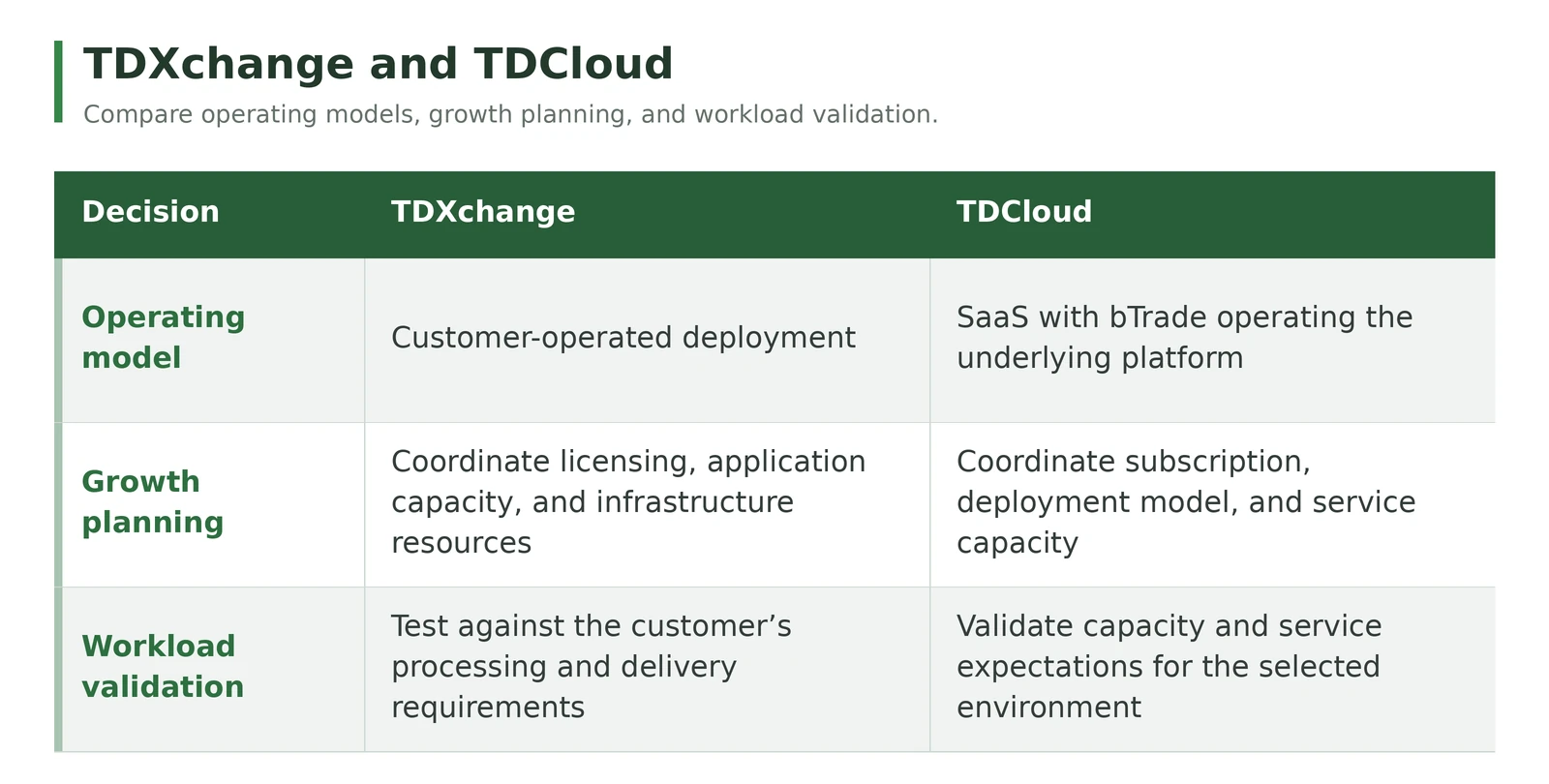
Discuss commercial growth alongside technical sizing. Confirm which entitlements, resources, or service charges change as requirements expand. A higher daily file count alone does not determine the total cost.
For broader design considerations, see Modern MFT Architecture.
How to Validate Capacity Before Growth Becomes a Problem
Use a representative test that includes the expected file mix, security controls, workflows, and downstream integrations.
- Establish the baseline. Measure the current workload and its completion times.
- Reproduce the future peak. Test the expected busy window, rather than spreading all files evenly across a day.
- Include processing overhead. Keep required encryption, scanning, logging, and transformation enabled.
- Test interrupted delivery. Simulate an unavailable partner and measure backlog clearance after service returns.
- Check business outcomes. Verify delivery deadlines, acknowledgments, recovery behavior, and duplicate prevention where required.
- Document expansion triggers. Agree which measurements will prompt additional capacity or an architecture review.
Record the software version, infrastructure, file sizes, concurrency, workflow steps, and test duration with the results. Those details make capacity evidence useful when the environment changes.
Questions to Ask Your MFT Provider
Before committing to a platform, ask:
- Can we retain established workflows and partner configurations as capacity grows?
- Which licensing or subscription changes apply to expansion?
- What workload assumptions support the proposed sizing?
- How will we detect a capacity constraint before deadlines are missed?
- Who is responsible for infrastructure changes and performance troubleshooting?
Specific answers provide a stronger basis for selection than an unqualified promise of unlimited scalability.
About the Author
Don Miller is President and General Counsel of bTrade, where he leads day-to-day operations and oversees legal, regulatory, and compliance activities for the company’s secure managed file transfer (MFT) platform. In this dual role, he helps ensure bTrade’s products and services meet the operational, data-protection, and governance expectations of enterprise and regulated customers. Don brings more than 20 years of legal experience advising businesses on risk management, contracts, intellectual property, and dispute resolution, applying that background to the practical realities of software operations and compliance. He holds a Juris Doctor from the University of Southern California Gould School of Law and is admitted to practice before California state and federal courts.
Frequently Asked Questions
Can bTrade support growth from 100 to 10,000 transfers per day?
TDXchange and TDCloud are designed to support growing transfer workloads. Suitability for a particular deployment depends on file sizes, peak demand, workflow complexity, infrastructure, and service requirements. Validate the expected workload and agree the capacity and licensing path before expansion.
Is automatic scaling required for a growing file transfer environment?
No. Predictable growth can be addressed through planned capacity changes. Autoscaling is useful for variable demand when the deployment supports it and suitable policies are configured. It does not remove the need to size databases, storage, networks, and downstream systems.
When should we review file transfer capacity?
Review capacity before major partner onboarding, new integrations, shorter processing windows, or seasonal peaks. Investigate increasing queue age, slower processing, and missed deadlines promptly, even if average CPU utilization appears low.
Plan the Next Stage of Growth
A useful capacity conversation starts with your current workload and the business activity you expect next. Bring daily counts, peak arrival windows, file sizes, workflow requirements, and delivery deadlines.
Contact bTrade to discuss an appropriately sized TDXchange or TDCloud deployment and a practical expansion path.
<script type="application/ld+json">
{
  "@context": "https://schema.org",
  "@graph": [
    {
      "@type": "Organization",
      "@id": "https://www.btrade.com/#organization",
      "name": "bTrade",
      "url": "https://www.btrade.com/",
      "logo": {
        "@type": "ImageObject",
        "url": "https://cdn.prod.website-files.com/66a7f3a6c2fca5ac33297031/66a7f3a6c2fca5ac3329719f_btrade-logo.svg"
      }
    },
    {
      "@type": "WebSite",
      "@id": "https://www.btrade.com/#website",
      "url": "https://www.btrade.com/",
      "name": "bTrade",
      "publisher": {
        "@id": "https://www.btrade.com/#organization"
      },
      "inLanguage": "en-US"
    },
    {
      "@type": "Person",
      "@id": "https://www.btrade.com/#don-miller",
      "name": "Don Miller",
      "url": "https://www.linkedin.com/in/don-miller-40927622/",
      "jobTitle": "President and General Counsel",
      "worksFor": {
        "@id": "https://www.btrade.com/#organization"
      }
    },
    {
      "@type": "ImageObject",
      "@id": "https://www.btrade.com/blogs/scaling-managed-file-transfer-for-business-growth#primaryimage",
      "url": "https://cdn.prod.website-files.com/66a7f3a6c2fca5ac33297043/6af9fabc9877212ff4cdac21_Secure%20file%20transfer%20growth.png",
      "caption": "Illustration of secure file transfer growth from a small deployment to a larger server and cloud environment."
    },
    {
      "@type": "WebPage",
      "@id": "https://www.btrade.com/blogs/scaling-managed-file-transfer-for-business-growth#webpage",
      "url": "https://www.btrade.com/blogs/scaling-managed-file-transfer-for-business-growth",
      "name": "How to Scale Managed File Transfer from 100 to 10,000 Daily Transfers",
      "description": "Scale from 100 to 10,000 daily file transfers with practical capacity planning, workload testing, and flexible deployment through TDXchange or TDCloud.",
      "inLanguage": "en-US",
      "isPartOf": {
        "@id": "https://www.btrade.com/#website"
      },
      "primaryImageOfPage": {
        "@id": "https://www.btrade.com/blogs/scaling-managed-file-transfer-for-business-growth#primaryimage"
      },
      "datePublished": "2023-07-21",
      "dateModified": "2026-11-15",
      "breadcrumb": {
        "@id": "https://www.btrade.com/blogs/scaling-managed-file-transfer-for-business-growth#breadcrumb"
      },
      "mainEntity": {
        "@id": "https://www.btrade.com/blogs/scaling-managed-file-transfer-for-business-growth#article"
      },
      "hasPart": {
        "@id": "https://www.btrade.com/blogs/scaling-managed-file-transfer-for-business-growth#faq"
      }
    },
    {
      "@type": "BlogPosting",
      "@id": "https://www.btrade.com/blogs/scaling-managed-file-transfer-for-business-growth#article",
      "url": "https://www.btrade.com/blogs/scaling-managed-file-transfer-for-business-growth",
      "headline": "How to Scale Managed File Transfer from 100 to 10,000 Daily Transfers",
      "description": "Scale from 100 to 10,000 daily file transfers with practical capacity planning, workload testing, and flexible deployment through TDXchange or TDCloud.",
      "inLanguage": "en-US",
      "dateCreated": "2023-07-21",
      "datePublished": "2023-07-21",
      "dateModified": "2026-11-15",
      "author": {
        "@id": "https://www.btrade.com/#don-miller"
      },
      "publisher": {
        "@id": "https://www.btrade.com/#organization"
      },
      "mainEntityOfPage": {
        "@id": "https://www.btrade.com/blogs/scaling-managed-file-transfer-for-business-growth#webpage"
      },
      "image": {
        "@id": "https://www.btrade.com/blogs/scaling-managed-file-transfer-for-business-growth#primaryimage"
      },
      "isAccessibleForFree": true,
      "articleSection": "Managed File Transfer",
      "keywords": [
        "managed file transfer scalability",
        "file transfer capacity planning",
        "business growth",
        "license-controlled feature expansion",
        "TDXchange",
        "TDCloud"
      ],
      "about": [
        {
          "@type": "Thing",
          "name": "Managed File Transfer scalability"
        },
        {
          "@type": "Thing",
          "name": "File transfer workload sizing and capacity planning"
        }
      ],
      "mentions": [
        {
          "@type": "Thing",
          "name": "TDXchange",
          "url": "https://www.btrade.com/solutions/tdxchange"
        },
        {
          "@type": "Thing",
          "name": "TDCloud",
          "url": "https://www.btrade.com/solutions/tdcloud"
        }
      ],
      "hasPart": {
        "@id": "https://www.btrade.com/blogs/scaling-managed-file-transfer-for-business-growth#faq"
      }
    },
    {
      "@type": "FAQPage",
      "@id": "https://www.btrade.com/blogs/scaling-managed-file-transfer-for-business-growth#faq",
      "inLanguage": "en-US",
      "isPartOf": {
        "@id": "https://www.btrade.com/blogs/scaling-managed-file-transfer-for-business-growth#webpage"
      },
      "mainEntity": [
        {
          "@type": "Question",
          "name": "Can bTrade support growth from 100 to 10,000 transfers per day?",
          "acceptedAnswer": {
            "@type": "Answer",
            "text": "TDXchange and TDCloud are designed to support growing transfer workloads. Suitability for a particular deployment depends on file sizes, peak demand, workflow complexity, infrastructure, and service requirements. Validate the expected workload and agree the capacity and licensing path before expansion."
          }
        },
        {
          "@type": "Question",
          "name": "Is automatic scaling required for a growing file transfer environment?",
          "acceptedAnswer": {
            "@type": "Answer",
            "text": "No. Predictable growth can be addressed through planned capacity changes. Autoscaling is useful for variable demand when the deployment supports it and suitable policies are configured. It does not remove the need to size databases, storage, networks, and downstream systems."
          }
        },
        {
          "@type": "Question",
          "name": "When should we review file transfer capacity?",
          "acceptedAnswer": {
            "@type": "Answer",
            "text": "Review capacity before major partner onboarding, new integrations, shorter processing windows, or seasonal peaks. Investigate increasing queue age, slower processing, and missed deadlines promptly, even if average CPU utilization appears low."
          }
        }
      ]
    },
    {
      "@type": "BreadcrumbList",
      "@id": "https://www.btrade.com/blogs/scaling-managed-file-transfer-for-business-growth#breadcrumb",
      "itemListElement": [
        {
          "@type": "ListItem",
          "position": 1,
          "name": "Home",
          "item": "https://www.btrade.com/"
        },
        {
          "@type": "ListItem",
          "position": 2,
          "name": "Blog",
          "item": "https://www.btrade.com/media/blog"
        },
        {
          "@type": "ListItem",
          "position": 3,
          "name": "How to Scale Managed File Transfer from 100 to 10,000 Daily Transfers",
          "item": "https://www.btrade.com/blogs/scaling-managed-file-transfer-for-business-growth"
        }
      ]
    }
  ]
}
</script>