
Executive Summary
SFTP (Secure File Transfer Protocol) and Managed File Transfer (MFT) are often compared, but they serve different purposes. SFTP is a secure file transfer protocol that encrypts data during transmission, while MFT is a comprehensive platform that adds automation, governance, auditing, compliance reporting, workflow orchestration, monitoring, partner onboarding, and operational visibility. Many MFT platforms use SFTP as one of several supported protocols. As organizations grow, increase regulatory requirements, and exchange data with more partners, MFT provides the controls and visibility that SFTP alone cannot deliver.
Key Takeaways
- SFTP Is a Protocol; MFT Is a Platform: SFTP securely transfers files, while MFT manages, governs, monitors, and automates enterprise file transfers.
- MFT Often Uses SFTP: Most enterprise MFT platforms support SFTP alongside AS2, HTTPS, FTPS, APIs, and other protocols.
- SFTP Provides Secure Transport: Encryption and authentication protect files during transmission.
- MFT Adds Governance: Audit trails, workflow automation, reporting, monitoring, and centralized administration support enterprise requirements.
- Compliance Often Drives MFT Adoption: Organizations subject to HIPAA, PCI DSS, GDPR, SOX, and other regulations typically require controls beyond basic SFTP.
- MFT Improves Operational Visibility: Teams gain insight into transfer status, failures, partner activity, workflow execution, and audit history.
- High-Volume Environments Benefit Most: As file counts, trading partners, and workflows grow, MFT provides scalability and governance that are difficult to achieve through SFTP alone.
What Is SFTP?
SFTP (Secure File Transfer Protocol) is a secure network protocol that transfers files over an encrypted SSH connection using port 22.
Organizations use SFTP to:
- securely exchange files
- transfer business documents
- automate server-to-server transfers
- support remote file access
SFTP encrypts both commands and file data during transmission, making it significantly more secure than traditional FTP.
How Does SFTP Work?
SFTP works by creating a secure encrypted SSH connection between a client and server before any files are transferred. Unlike traditional FTP, which sends data in plaintext, SFTP encrypts authentication credentials, commands, and file contents during transmission.
The process typically works as follows:
- The client opens a TCP connection to the server over port 22
- The SSH handshake begins
- The client and server negotiate encryption algorithms and cryptographic parameters
- Secure key exchange occurs using methods such as Diffie-Hellman or Elliptic Curve Diffie-Hellman (ECDH)
- The server presents its public host key so the client can verify the server identity
- The user authenticates using a password, SSH private/public key pair, or multi-factor authentication
- SSH establishes an encrypted communication tunnel
- The SFTP subsystem initializes and begins secure file operations
Once the secure session is established, users can:
- upload files
- download files
- rename files
- create directories
- delete files
- manage remote file systems securely
Common SFTP Authentication Methods
Password Authentication
Users authenticate with a username and encrypted password.
SSH Key Authentication
SSH key authentication uses a private/public key pair. The private key remains on the client while the public key is stored on the server. During authentication, the server validates the client without transmitting the private key across the network, making this method significantly more secure and ideal for automation.
Multi-Factor Authentication (MFA)
Modern SFTP environments may also support:
- TOTP applications
- hardware tokens
- smart cards
- push authentication
- certificate-based authentication
How SFTP Protects Data
SFTP secures file transfers through:
- encryption in transit
- integrity validation
- host authentication
- secure key exchange
- encrypted command channels
Most modern SFTP implementations support strong encryption algorithms such as:
- AES-256
- ChaCha20
- SHA-2 hashing
- Ed25519 keys
These mechanisms help protect against:
- packet sniffing
- credential theft
- session hijacking
- man-in-the-middle attacks
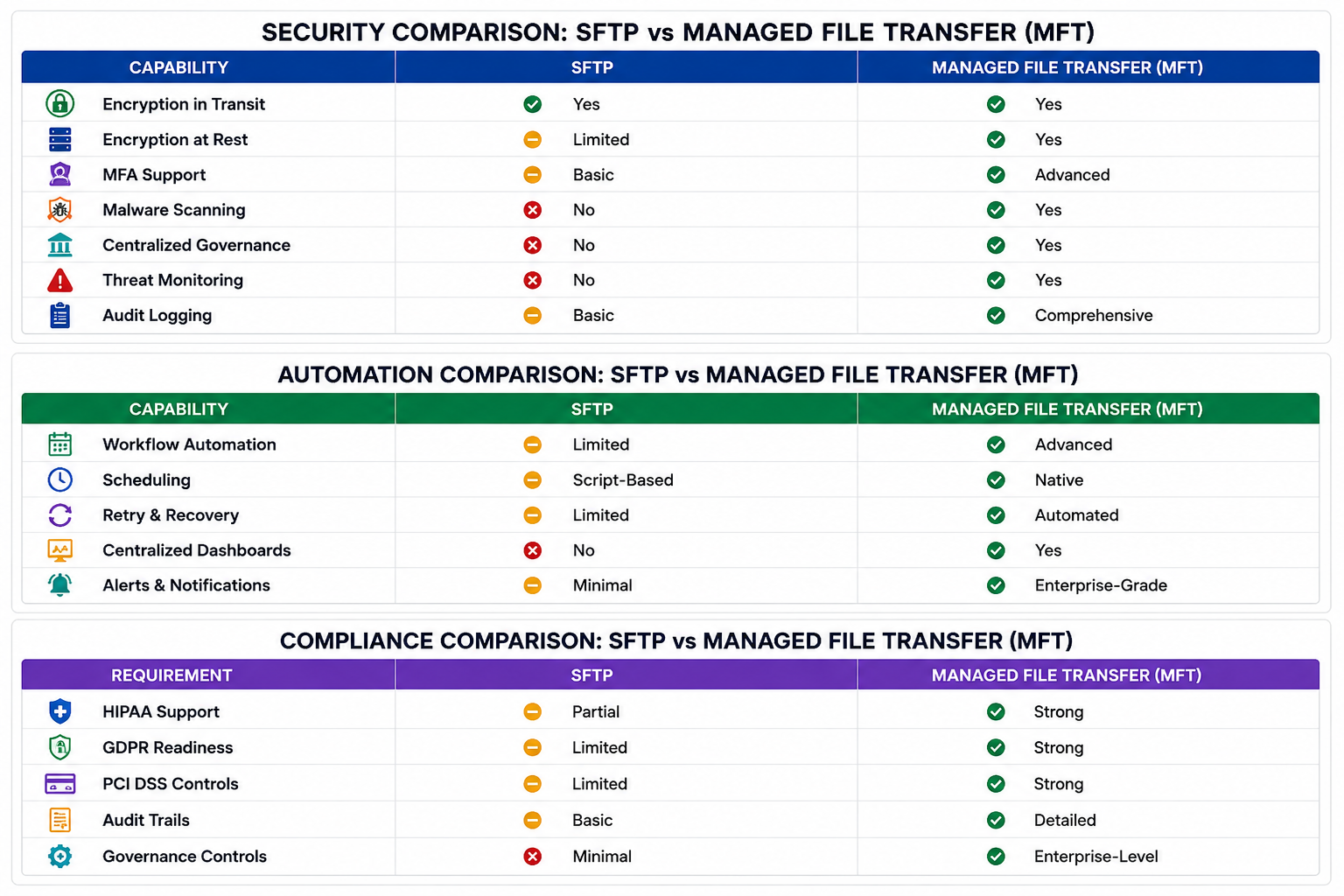
Although SFTP provides strong transport security, standalone SFTP servers often lack enterprise capabilities such as centralized governance, workflow automation, malware scanning, audit logging, compliance reporting, failover, and operational resiliency. That is why many enterprises eventually adopt Managed File Transfer platforms that build on top of SFTP while adding broader security and operational controls.
What Is Managed File Transfer (MFT)?
Managed File Transfer(MFT) platforms such as bTrade’s TDXchange help organizations centralize, automate, secure, monitor, and govern file transfer operations across cloud, hybrid, and partner environments.
Unlike standalone SFTP, MFT platforms provide:
- centralized governance
- automation
- compliance controls
- audit trails
- workflow orchestration
- ransomware protection
- operational monitoring
- multi-protocol support
Modern MFT platforms support secure enterprise data exchange at scale.
Why Do Enterprises Use Managed File Transfer?
Organizations use MFT because enterprise file transfer requires more than encrypted transport.
Platforms like TDXchange are designed to support enterprise-scale file transfer environments requiring compliance, operational resiliency, centralized visibility, and automation.
Modern businesses need:
- compliance readiness
- centralized visibility
- workflow automation
- operational resiliency
- secure partner onboarding
- ransomware protection
- scalable integrations
- auditability
MFT helps organizations securely manage:
- customer data
- healthcare records
- financial transactions
- operational files
- EDI workflows
- cloud integrations
- B2B data exchange
What Are the Core Features of MFT?
Enterprise Security Controls
MFT platforms support:
- encryption in transit
- encryption at rest
- multi-factor authentication
- role-based access controls
- malware scanning
- Zero Trust security models
Centralized Audit Logging
MFT systems track:
- who transferred files
- where files moved
- when transfers occurred
- transfer status
- workflow activity
- compliance reporting
Workflow Automation
MFT automates:
- scheduled transfers
- event-driven workflows
- batch processing
- retries and recovery
- partner onboarding
- routing logic
Example:
Modern MFT platforms such as TDXchange support advanced capabilities including centralized audit and governance, quantum-safe encryption in transit and at rest, workflow automation, failover, and high-volume transfer orchestration.
High Availability and Scalability
Modern MFT platforms support:
- clustering
- failover
- load balancing
- hybrid cloud deployments
- Kubernetes environments
- disaster recovery
Example:
TDXchange supports enterprise deployment models including multi-node clustering, failover, Kubernetes orchestration, and hybrid cloud architectures designed for operational resiliency.
Why Do Regulated Industries Choose MFT?
Industries such as:
- healthcare
- financial services
- insurance
- retail
- manufacturing
- government
- logistics
- critical infrastructure
often require stronger governance and compliance capabilities than standalone SFTP can provide.
MFT helps these organizations improve:
- cybersecurity posture
- audit readiness
- operational continuity
- ransomware protection
- compliance reporting
- business resiliency
Why Is MFT Better for High-Volume File Transfers?
High-volume environments create operational complexity that standalone SFTP often struggles to manage.
MFT platforms improve:
- scalability
- transfer visibility
- workflow automation
- centralized monitoring
- partner onboarding
- operational resiliency
Organizations with growing file transfer demands often outgrow traditional SFTP environments quickly.
When Is SFTP Enough?
SFTP may still work well for organizations that:
- transfer files occasionally
- have low transfer volumes
- lack regulatory requirements
- use simple workflows
- operate with smaller teams
For some businesses, SFTP remains a practical and cost-effective solution.
When Should Organizations Upgrade from SFTP to MFT?
Organizations should strongly consider MFT when they experience:
- increasing transfer volumes
- compliance pressures
- ransomware concerns
- workflow complexity
- partner onboarding challenges
- visibility limitations
- repeated transfer failures
- growing cloud integrations
Best Practices for Enterprise File Transfer
Enterprise File Transfer Best Practices
- Encrypt files in transit and at rest
- Implement centralized audit logging
- Use multi-factor authentication
- Eliminate manual transfer workflows
- Scan files for malware
- Support failover and disaster recovery
- Continuously monitor transfer activity
- Integrate file transfer into compliance workflows
Final Thoughts: Should You Choose SFTP or MFT?
SFTP remains effective for secure file transfer in simpler environments.
But organizations requiring:
- scalability
- compliance
- automation
- centralized governance
- operational resiliency
- auditability
- enterprise integrations
typically benefit far more from Managed File Transfer platforms.
As cybersecurity threats and compliance requirements continue increasing, many enterprises are moving beyond standalone SFTP toward centralized Managed File Transfer solutions like TDXchange.
About the Author
Don Miller is President and General Counsel of bTrade, where he leads day-to-day operations and oversees legal, regulatory, and compliance activities for the company’s secure managed file transfer (MFT) platform. In this dual role, he helps ensure bTrade’s products and services meet the operational, data-protection, and governance expectations of enterprise and regulated customers. Don brings more than 20 years of legal experience advising businesses on risk management, contracts, intellectual property, and dispute resolution, applying that background to the practical realities of software operations and compliance. He holds a Juris Doctor from the University of Southern California Gould School of Law and is admitted to practice before California state and federal courts.
FAQ
What is the difference between SFTP and Managed File Transfer (MFT)?
SFTP (Secure File Transfer Protocol) is a secure network protocol that encrypts file transfers over SSH using port 22. It focuses primarily on secure transport between systems.
Managed File Transfer (MFT) is an enterprise file transfer platform that builds on protocols like SFTP while adding:
- centralized governance
- workflow automation
- audit logging
- compliance controls
- encryption at rest
- operational monitoring
- failover and resiliency
- multi-protocol support
While SFTP secures file movement, MFT helps organizations manage, automate, monitor, and govern enterprise-wide file transfer operations.
Is SFTP secure enough for transferring sensitive business data?
SFTP provides strong encryption during transmission and is significantly more secure than traditional FTP. It supports:
- encrypted communication channels
- SSH key authentication
- integrity validation
- secure remote access
However, standalone SFTP servers often lack enterprise capabilities such as:
- encryption at rest
- centralized audit logging
- malware scanning
- compliance reporting
- workflow automation
- operational resiliency
For organizations handling regulated or highly sensitive data, Managed File Transfer platforms typically provide stronger security, governance, and compliance capabilities.
When should organizations upgrade from SFTP to MFT?
Organizations should consider upgrading from SFTP to MFT when they experience:
- growing file transfer volumes
- compliance requirements
- manual workflow bottlenecks
- ransomware concerns
- limited visibility into transfers
- partner onboarding complexity
- repeated transfer failures
- increasing cloud or hybrid integrations
Industries such as healthcare, finance, government, manufacturing, and retail often require the advanced governance, automation, and audit capabilities provided by enterprise MFT platforms.
Can Managed File Transfer platforms support existing SFTP environments?
Yes. Modern Managed File Transfer platforms fully support SFTP while also supporting additional protocols such as:
- FTPS
- HTTPS
- AS2
- SCP
- OFTP
- APIs
This allows organizations to continue using existing SFTP connections while adding:
- centralized management
- automation
- compliance controls
- monitoring
- operational resiliency
Many MFT platforms also integrate with:
- LDAP
- Active Directory
- Identity Providers (IdP)
- Single Sign-On (SSO)
- Multi-Factor Authentication (MFA)
This makes migration and hybrid deployments significantly easier.
Why do enterprises prefer MFT over standalone SFTP servers?
Enterprises often prefer MFT because modern file transfer environments require more than encrypted transport alone.
Managed File Transfer platforms help organizations improve:
- cybersecurity posture
- compliance readiness
- auditability
- operational efficiency
- scalability
- ransomware protection
- business continuity
- centralized governance
MFT also reduces reliance on:
- manual scripting
- disconnected transfer tools
- unmanaged automation
- fragmented monitoring systems
What security features does Managed File Transfer provide?
Modern Managed File Transfer platforms typically include:
- encryption in transit
- encryption at rest
- SSH key management
- multi-factor authentication
- malware scanning
- centralized audit logging
- role-based access controls
- policy enforcement
- threat monitoring
- Zero Trust security support
These capabilities help organizations secure sensitive business data while improving visibility and operational control.
Is MFT better than SFTP for compliance requirements?
Yes. MFT platforms are generally better suited for compliance-driven environments because they provide:
- comprehensive audit trails
- tamper-resistant logging
- automated reporting
- policy enforcement
- role-based permissions
- centralized governance
- encryption at rest
These capabilities help organizations support:
- HIPAA
- GDPR
- PCI DSS
- SOX
- NIST
- data governance requirements
Standalone SFTP may help secure transmission but often lacks the broader controls required for full enterprise compliance.
What industries benefit most from Managed File Transfer?
Managed File Transfer is commonly used in industries that handle sensitive, regulated, or high-volume data exchanges, including:
- healthcare
- financial services
- insurance
- manufacturing
- retail
- logistics
- government
- energy
- critical infrastructure
These industries often require stronger governance, security, auditability, and operational resiliency than standalone SFTP environments can provide.
What are the cost benefits of moving from SFTP to MFT?
Although MFT platforms typically require a larger upfront investment than standalone SFTP servers, many organizations reduce long-term operational costs through:
- workflow automation
- reduced manual effort
- faster issue resolution
- fewer transfer failures
- simplified compliance reporting
- improved operational visibility
- lower downtime risk
MFT also helps organizations reduce the financial risks associated with:
- compliance violations
- ransomware incidents
- operational disruptions
- failed partner integrations
Can MFT improve business continuity and operational resiliency?
Yes. Enterprise MFT platforms often include:
- clustering
- automated failover
- load balancing
- disaster recovery support
- retry and recovery workflows
- centralized monitoring
These capabilities help organizations maintain secure file transfer operations during outages, infrastructure failures, or unexpected disruptions.