
Why MFT SLA Governance Must Measure Business Outcomes
A Managed File Transfer server can be running perfectly while the business process depending on it is already in trouble.
The service may be available. The network port may be open. The transfer may even have completed successfully.
But did the payment file arrive before settlement? Did the healthcare claim complete processing? Did the regulatory submission reach the correct destination? Did the receiving application acknowledge it?
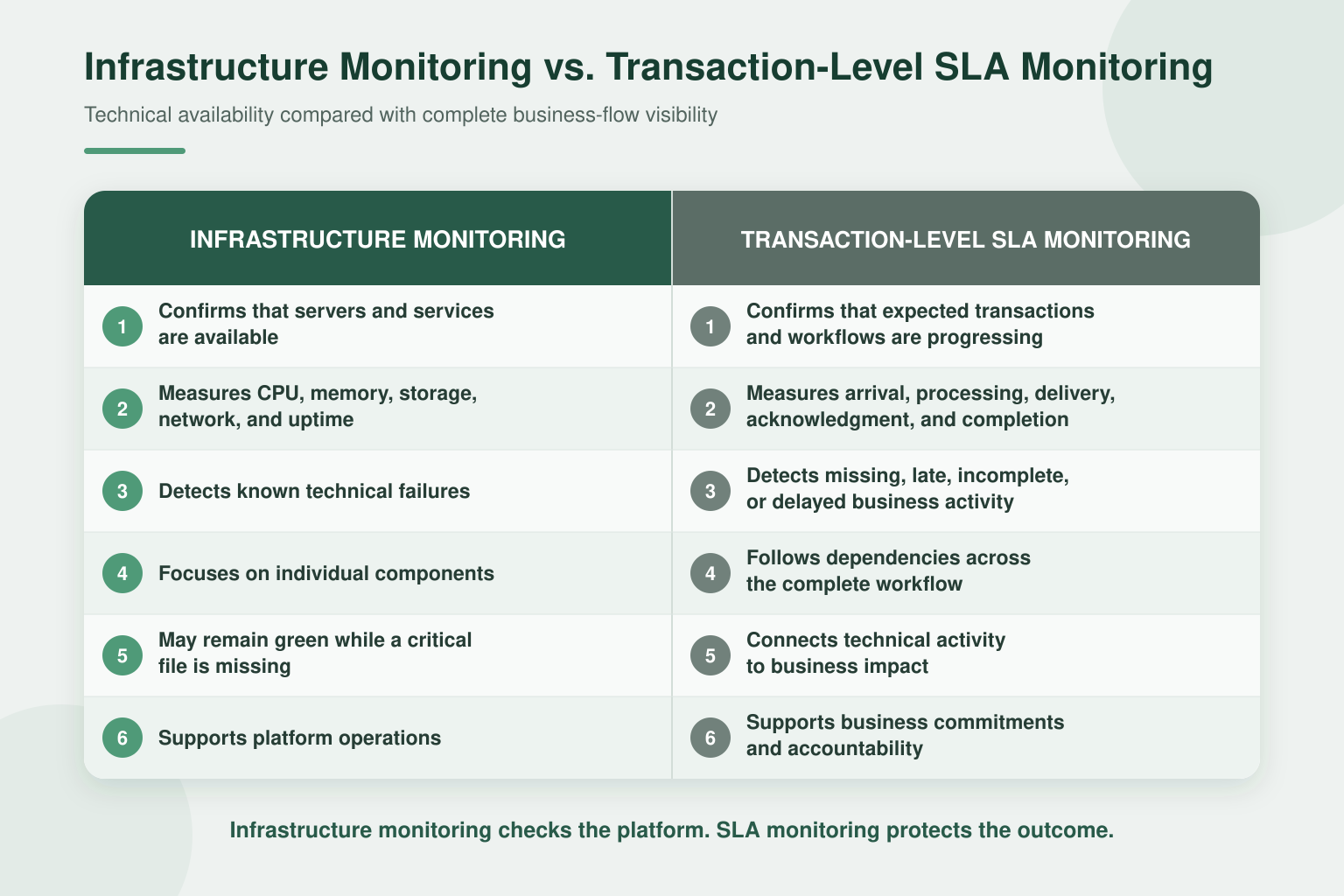
That is the difference between monitoring infrastructure and governing a Managed File Transfer SLA.
Modern MFT SLA management focuses on complete business outcomes. It defines what must happen, when it must happen, how success is measured, who must respond when a workflow is at risk, and what evidence must be retained.
The objective is not simply to report missed deadlines more efficiently. It is to identify developing problems early enough to prevent those deadlines from being missed.
In Summary
A Managed File Transfer SLA defines measurable expectations for a business-critical file-transfer workflow.
Depending on the workflow, an MFT SLA may specify:
- When a file must arrive
- When processing must begin or finish
- Which validation and security steps must succeed
- When delivery must be completed
- Whether an acknowledgment is required
- Which performance thresholds apply
- Who owns the workflow
- When alerts and escalations must occur
- What evidence must be retained
- How exceptions and breaches must be reported
Infrastructure monitoring confirms that technical components are available. Transaction-level monitoring follows the actual file and workflow. SLA governance evaluates that operational evidence against defined business commitments.
Together, these capabilities help organizations move from reactive MFT firefighting to proactive operational governance.
TDXchange provides workflow-level SLA definitions, transaction-level monitoring, early-warning and breach thresholds, automated alerts and escalation, historical performance analytics, and audit-ready reporting. These capabilities allow organizations to monitor complete business outcomes rather than relying only on platform availability or basic transfer status.
MFT SLA governance is also a practical implementation of Pillar 5 of Enterprise Data Exchange: Enterprise Observability and Predictive Operational Intelligence.
Pillar 5 describes the evolution from recording technical events to understanding business impact, identifying developing risk, and taking corrective action before disruption occurs. Workflow-level SLAs put that vision into operation by converting transaction visibility into measurable commitments, early warnings, automated escalation, and continuous service improvement.
Key Takeaways
- An available MFT server does not prove that a business-critical transaction completed successfully.
- MFT SLAs should be defined at the workflow or business-flow level rather than applied uniformly to every transfer.
- Transaction-level monitoring provides more meaningful SLA evidence than infrastructure monitoring alone.
- Early-warning thresholds should identify workflows at risk before they enter breach status.
- Missed SLAs may result from source-system delays, workflow failures, partner behavior, capacity constraints, configuration changes, network issues, or unavailable downstream applications.
- Trading-partner activity can affect performance and service levels across the wider MFT environment.
- Capacity monitoring should connect infrastructure utilization to transaction delays and business impact.
- Automated escalation should notify the correct technical and business owners with enough context to act.
- AI-assisted analytics can help identify abnormal patterns and potential SLA violations that static thresholds may not reveal.
- SLA reports should support operational improvement, partner accountability, executive visibility, compliance, and audit evidence.
- Observability supplies the evidence. SLA governance evaluates that evidence against business expectations.
- TDXchange supports workflow-level SLA definitions, transaction monitoring, proactive alerts, escalation, partner controls, reporting, and operational analytics.
What Is a Managed File Transfer SLA?
A Managed File Transfer Service Level Agreement defines measurable expectations for how a file-transfer workflow must perform.
A formal SLA may exist between a service provider and a customer, between an organization and a trading partner, or between internal technology and business teams. Organizations may also establish internal service-level objectives for critical workflows even when no contractual SLA exists.
An effective MFT SLA answers questions such as:
- Which workflow or business process is covered?
- Which file, message, batch, or transaction is expected?
- Who is responsible for producing it?
- When should it arrive?
- Which processing steps must complete?
- When must it reach its destination?
- Is a delivery receipt or application acknowledgment required?
- Which conditions place the workflow at risk?
- Who must be notified or escalated?
- What constitutes successful completion?
- What evidence must be retained?
- How will exceptions and recurring problems be reviewed?
A broad statement such as “the MFT platform must be available 99.9% of the time” may be useful, but it does not answer whether Monday morning’s payment file arrived before the bank’s cutoff.
MFT SLAs must connect technical execution to business commitments.
How Are MFT SLAs Different from Infrastructure SLAs?
Traditional infrastructure SLAs often focus on platform availability and component performance.
Typical questions include:
- Is the server online?
- Is the MFT service running?
- Is the network port available?
- Is storage accessible?
- Are CPU and memory within acceptable limits?
Those checks remain important. However, they do not prove that the expected business transaction occurred.
MFT SLAs ask different questions:
- Did the expected file arrive?
- Did it arrive before the cutoff?
- Was it complete and valid?
- Did every required workflow step succeed?
- Was it delivered to the correct destination?
- Did the receiving application process it?
- Was an acknowledgment returned?
- Did the complete process finish within the required window?
For the authoritative observability definition and capability discussion, read What Is MFT Observability? Complete Visibility for Enterprise File Transfer.
Why Do MFT SLAs Matter?
Enterprise file transfers frequently support processes in which timing, completeness, and accuracy directly affect business operations.
A delayed file can interrupt:
- Payments and settlements
- Healthcare claims
- Payroll processing
- Regulatory submissions
- Shipment scheduling
- Inventory synchronization
- Manufacturing operations
- Customer communications
- Billing and reconciliation
- Analytics and reporting
- Government services
- Partner and supplier transactions
Without defined service levels, teams may know that a transfer failed but not understand its urgency. A routine archive can receive the same operational attention as a payment file approaching a settlement deadline.
SLA governance introduces business context. It allows organizations to prioritize critical workflows, assign ownership, automate escalation, measure performance, and distinguish minor exceptions from events requiring immediate intervention.
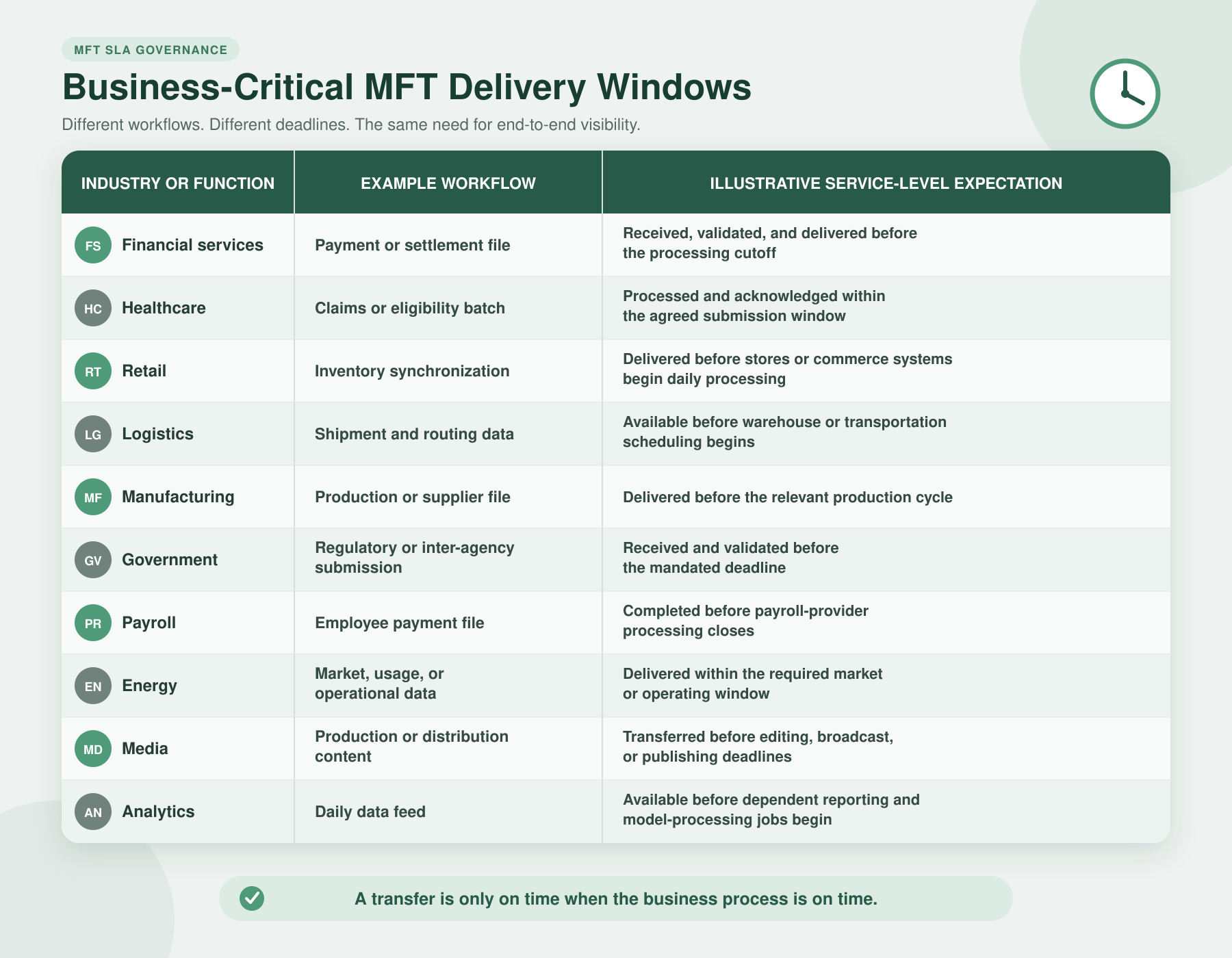
Examples of Business-Critical MFT Delivery Windows
These are examples rather than universal targets. Each SLA should reflect the workflow’s actual business impact, technical dependencies, contractual obligations, and regulatory exposure.
What Should an Enterprise MFT SLA Include?
A useful SLA must be specific enough to measure and practical enough to operate.
Workflow Scope
Identify the exact business flow covered by the SLA, including:
- Source application
- Sending organization
- Trading partner
- Expected file or message
- MFT workflow
- Destination
- Receiving application
- Required acknowledgment
Timing Requirements
Define the relevant times and windows:
- Expected arrival time
- Earliest acceptable arrival
- Delivery cutoff
- Maximum processing duration
- Permitted maintenance window
- Calendar, time zone, holidays, and business days
- Frequency and recurrence
- Grace period, if applicable
Completion Criteria
Define what “success” means:
- File received
- Authentication completed
- Validation passed
- Required inspection completed
- Transformation succeeded
- File delivered
- Checksum or signature verified
- Partner receipt received
- Downstream processing completed
- Application acknowledgment returned
Performance and Reliability Targets
Depending on the workflow, measurements may include:
- On-time completion percentage
- Transfer success rate
- End-to-end processing time
- Throughput
- Retry frequency
- Error rate
- Acknowledgment time
- Recovery time
- Incident-response time
- Mean time to resolution
Ownership and Escalation
Every critical SLA should identify:
- Business owner
- Application owner
- MFT operations owner
- Trading-partner contact
- Security or compliance contact
- First-level response team
- Management escalation path
- Communication requirements
- Resolution and closure responsibilities
Evidence and Reporting
Define what must be retained:
- SLA configuration
- Transaction history
- Alert and escalation records
- Exception details
- Retry activity
- Delivery and acknowledgment evidence
- Incident records
- Resolution history
- Approved exclusions
- Historical performance reports
If an SLA cannot be measured, assigned, escalated, and evidenced, it is closer to a hope than an operating commitment.
What Causes MFT SLA Violations?
Most missed SLAs are not caused by one dramatic platform failure. They often result from smaller issues developing across several systems.
1. The Expected File Was Never Generated
The source application may fail to produce the expected file, produce it late, or create it in the wrong location.
A traditional MFT monitor may have nothing to report because no transfer was attempted. An SLA-aware workflow must recognize that an expected event did not occur.
2. Authentication or Connectivity Failed
Potential causes include:
- Invalid credentials
- Expired SSH keys or certificates
- Identity-provider outages
- Firewall or routing changes
- DNS failures
- Partner endpoint changes
- Protocol or cipher incompatibility
- Cloud connectivity problems
3. Processing Took Longer Than Expected
The file may arrive on time but spend too long in:
- Validation
- Malware or DLP inspection
- Transformation
- Encryption or decryption
- Compression
- Approval
- Queueing
- Routing
- Downstream application processing
An SLA should measure the complete workflow rather than only network-transfer time.
4. The Workflow Failed After Delivery
A partner server may accept the file even though the receiving application later rejects it.
Without downstream confirmation, the transport layer can report success while the business process remains incomplete.
5. Capacity or Performance Became Constrained
Growing file sizes, transaction volumes, concurrent connections, workflows, and trading-partner activity may exceed the environment’s available capacity.
Common constraints include:
- CPU or memory saturation
- Storage latency or insufficient space
- Database contention
- Queue growth
- Network congestion
- Insufficient processing threads
- Overloaded MFT nodes
- Slow inspection or transformation services
- Downstream application bottlenecks
6. Trading-Partner Behavior Changed
External partners may introduce:
- Unexpected traffic spikes
- Excessive connection attempts
- Too many simultaneous sessions
- Oversized files
- Repeated retries
- Poorly configured automated jobs
- New authentication methods
- Changed encryption settings
- Unannounced maintenance
- Slower acknowledgments
One partner’s behavior can consume shared resources and affect service levels for other workflows.
7. A Configuration or Infrastructure Change Introduced Risk
A certificate replacement, workflow modification, firewall change, schedule update, storage migration, or load-balancer adjustment may unintentionally affect processing.
SLA reporting should show when degradation began and provide enough operational context to investigate it. Detailed configuration governance belongs in the specialist guide How MFT Change Tracking Improves Security, Compliance, and Operations.
8. Ownership or Escalation Was Unclear
An alert provides little value when nobody knows who owns the transaction.
SLA programs fail operationally when:
- Contacts are outdated
- Alerts go to generic mailboxes
- Business and technical ownership are unclear
- Partner escalation paths are undocumented
- Teams receive alerts without actionable context
- Repeated exceptions are closed without remediation
Strong SLA governance defines responsibility before an incident occurs.
How Can Partner Behavior Affect MFT Service Levels?
An enterprise MFT environment extends beyond infrastructure directly controlled by the organization.
Partner systems, schedules, credentials, configurations, and usage patterns can influence the performance of shared services and business-critical workflows.
Organizations should monitor partner-specific indicators such as:
- Connection frequency
- Concurrent sessions
- Authentication failures
- Retry rates
- File sizes
- Transaction volume
- Queue or mailbox growth
- Delivery latency
- Acknowledgment time
- Activity outside expected windows
- Changes from historical patterns
Operational controls may include:
- Per-partner connection-rate limits
- Concurrent-session limits
- Maximum file-size policies
- Mailbox-capacity limits
- Configurable retry rules
- Maintenance windows
- IP-address restrictions
- Ability to terminate problematic connections
- Partner-specific alerting
- Fair-use and capacity policies
These controls are not intended to punish partners. They help prevent one integration from unintentionally affecting the reliability of many others.
Partner onboarding and lifecycle governance are important supporting disciplines, but they should not be recreated inside an SLA guide. For the complete discussion, read MFT Partner Onboarding: Challenges, Automation, and Best Practices.
How Do Capacity and Performance Constraints Affect SLAs?
Capacity becomes an SLA issue when it affects the completion of business workflows.
A CPU warning alone does not explain the business impact. Capacity monitoring should show whether resource pressure:
- Delayed specific workflows
- Increased queue time
- Reduced throughput
- Affected particular partners
- Increased retries
- Extended acknowledgment times
- Created a growing transaction backlog
- Placed upcoming delivery windows at risk
Organizations should analyze:
- Normal and peak transaction volume
- File-size distribution
- Concurrent sessions
- Processing duration by workflow step
- Queue depth and age
- Database and storage performance
- Network utilization
- Cluster-node distribution
- Partner-specific consumption
- Historical growth
- Seasonal and month-end patterns
- Available recovery capacity during a node failure
Capacity planning should also account for failover. An environment operating comfortably across four nodes may become constrained if it cannot maintain critical SLAs while one node is unavailable.
For the broader platform and infrastructure discussion, read Modern MFT Architecture: Secure and Scalable Enterprise File Transfer.
What Is Early-Warning SLA Monitoring?
An SLA warning indicates that a workflow is still capable of completing on time but is approaching a defined risk threshold. An SLA breach indicates that a required delivery, processing, acknowledgment, performance, or completion commitment was not met. TDXchange can use these states to prioritize alerts and initiate the appropriate escalation path.
Traditional SLA reporting often identifies a breach after the deadline has passed.
Early-warning monitoring evaluates whether a workflow is progressing quickly enough to meet its commitment.
A practical SLA model may use four states:
- Healthy: The transaction is progressing within its expected window.
- At risk: The transaction has not breached the SLA, but remaining time, workflow progress, or historical behavior indicates elevated risk.
- Breached: The defined completion time or required condition was missed.
- Recovered: The workflow completed after intervention or automated recovery.
Early-warning indicators may include:
- Expected file has not arrived by a warning threshold
- Processing duration exceeds its normal range
- Queue age is increasing
- Retry count is rising
- Partner response time is deteriorating
- Throughput is below the level required to meet the cutoff
- A downstream dependency is unavailable
- File size differs significantly from its expected pattern
- Similar workflows are beginning to fail
- Capacity utilization is affecting processing time
This allows operations teams to act while a successful outcome is still possible.
What Should an SLA Alert Contain?
An alert should help someone make a decision.
Useful context includes:
- Workflow name
- Business process
- SLA state
- Expected completion time
- Remaining time
- Current processing stage
- Source and destination
- Trading partner
- File or transaction identifier
- Last successful step
- Current error or delay
- Retry history
- Related dependency status
- Business and technical owner
- Required escalation path
- Link to the complete transaction history
An alert saying “transfer delayed” creates another investigation. An alert explaining which payment workflow is delayed, where it stopped, how much time remains, and who owns it creates an opportunity to act.
How Does Automated Escalation Reduce MFT Firefighting?
Not every warning requires the same response.
Automated escalation can apply rules based on:
- Business criticality
- Time remaining
- Severity
- Partner
- Workflow
- Regulatory relevance
- Number of affected transactions
- Duration
- Whether automated retries are succeeding
- Whether the issue is recurring
A typical escalation sequence may:
- Notify the MFT operations team when a workflow becomes at risk.
- Notify the application or partner owner if the condition continues.
- Create an ITSM incident when the risk reaches a defined threshold.
- Escalate to management when a breach occurs or multiple workflows are affected.
- Notify business stakeholders when customer or regulatory impact is likely.
- Record actions, acknowledgments, exceptions, and resolution details.
Automation improves consistency, but escalation policies should still be reviewed. An obsolete contact list can automate silence with remarkable efficiency.
How Can AI Help Identify Potential SLA Violations?
Static thresholds remain important because they enforce explicit commitments.
AI-assisted analytics can complement those rules by identifying patterns that may indicate developing risk, including:
- A critical file arriving progressively later each day
- File sizes falling outside their normal range
- Increasing partner response times
- Unusual retry behavior
- Transaction-volume changes
- Slower workflow stages
- New capacity patterns
- Activity outside established partner baselines
- Multiple weak signals occurring across related systems
- Configuration changes followed by performance degradation
AI-assisted operations may also help teams:
- Correlate relevant events
- Summarize the likely cause
- Identify affected workflows
- Prioritize alerts by business impact
- Recommend investigation steps
- Compare current behavior with historical patterns
An anomaly is a signal, not a verdict. AI should assist experienced operators rather than make unrestricted operational decisions.
AI services must follow the same Zero Trust, role-based access, least-privilege, data-protection, and auditing requirements applied to every other enterprise workload.
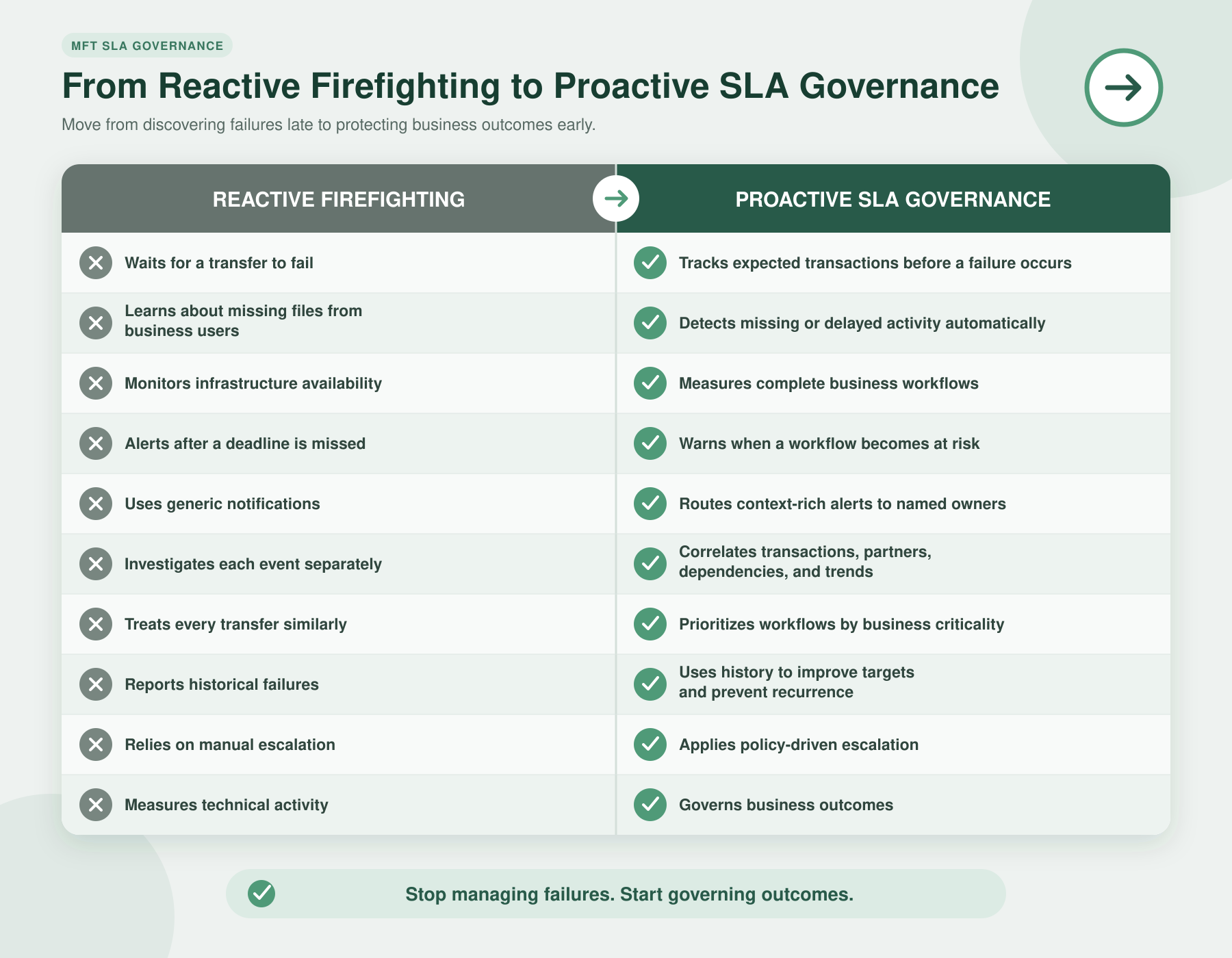
The objective is not to eliminate every exception. Complex enterprise ecosystems will always experience failures, partner issues, maintenance events, and unexpected conditions.
The goal is to detect risk earlier, respond consistently, reduce business impact, and learn from recurring patterns.
How TDXchange Provides Detailed SLA Monitoring and Reporting
TDXchange is bTrade’s enterprise Managed File Transfer and secure data exchange platform.
TDXchange supports SLA governance through capabilities that connect business-flow definitions with real-time operational evidence.
TDXchange combines workflow-level SLA definitions with real-time transaction monitoring, proactive alerts, automated escalation, historical analytics, and audit-ready reporting. It enables organizations to define what successful completion means, identify workflows that are at risk or in breach, investigate underlying causes, and retain evidence of performance and corrective action.
Workflow-Level SLA Definitions
Organizations can associate SLA rules with specific business workflows rather than relying on one platform-wide target.
Rules can reflect:
- Expected arrival windows
- Completion deadlines
- Workflow milestones
- Transfer and processing outcomes
- Partner requirements
- Throughput expectations
- Acknowledgment requirements
- Warning and breach thresholds
Transaction-Level Monitoring
TDXchange tracks the execution of the transaction and its workflow, including:
- Authentication
- Partner connectivity
- File reception
- Validation
- Processing
- Routing
- Delivery
- Retries
- Exceptions
- Final outcome
This provides a more accurate representation of business-service health than infrastructure availability alone.
Proactive Alerting and Escalation
Teams can be notified when expected transactions are missing, delayed, failed, or approaching defined thresholds.
Alerts and escalations can be aligned with workflow criticality, business ownership, partner relationships, and operational severity.
Partner-Level Operational Controls
TDXchange provides granular controls that can help prevent partner activity from affecting broader service levels, including:
- Connection-rate limits
- Simultaneous-thread limits
- File-size controls
- Mailbox-capacity controls
- Connection management
- IP-address blocking
- Partner-specific policies
- Operational alerting
Detailed SLA Reporting and Historical Analytics
TDXchange retains operational and transaction evidence that authorized users can use to evaluate SLA performance by workflow, partner, application, business unit, status, and reporting period. Reports can connect high-level service results with the underlying transfers, processing steps, alerts, exceptions, retries, acknowledgments, and resolution activity.
Historical information can help organizations evaluate:
- On-time completion percentage
- At-risk, breached, recovered, and completed workflows
- Missing and late files
- End-to-end processing duration
- Transfer and workflow success rates
- Partner performance
- Retry and exception frequency
- Delivery and acknowledgment status
- Warning and breach history
- Escalation and response activity
- Recurring failure patterns
- Historical performance trends
Audit and Governance Evidence
SLA events, alerts, exceptions, actions, and transaction outcomes can be retained to support operational reviews, partner discussions, compliance activities, and audits.
Controlled Stakeholder Visibility
Where appropriately configured, internal business teams, customers, and external trading partners can receive role-based visibility into the transfers and workflows relevant to them.
This reduces dependency on the central MFT team for routine status questions while preserving centralized access control and governance.
AI-Assisted Operational Intelligence
bTrade’s AI-assisted operational direction is intended to help teams identify anomalous behavior, correlate operational evidence, recognize potential SLA risk, and investigate likely causes more efficiently.
The purpose is not to replace operators. It is to help them identify the right problem while there is still time to solve it.
How to Implement an MFT SLA
A practical implementation can follow these steps.
Step 1: Identify the Critical Business Flow
Begin with the workflows whose delay or failure would create the greatest business, customer, partner, financial, or regulatory impact.
Do not attempt to apply the same SLA to every transfer.
Step 2: Map the Complete Transaction
Document:
- Source
- Destination
- Trading partner
- Workflow steps
- Security and validation requirements
- Dependencies
- Required acknowledgment
- Final business outcome
Step 3: Define Measurable Targets
Specify the arrival window, completion deadline, integrity requirements, performance thresholds, and success criteria.
Include calendars, time zones, maintenance periods, and approved exceptions.
Step 4: Establish Warning and Breach Thresholds
Do not wait until the final deadline.
Define when the workflow becomes at risk and how the warning threshold relates to the time required for investigation and recovery.
Step 5: Assign Ownership
Identify technical, application, partner, business, security, and management contacts.
Document who must respond at each escalation level.
Step 6: Configure Monitoring and Escalation
Associate the SLA with the workflow and configure alerts, escalation, incident creation, retries, and stakeholder notifications.
Step 7: Test Normal and Failure Conditions
Test scenarios such as:
- Missing file
- Late file
- Authentication failure
- Partner outage
- Slow processing
- Capacity constraint
- Downstream rejection
- Missing acknowledgment
- Escalation failure
- Recovery after breach
Step 8: Capture Evidence
Verify that transaction history, alerts, actions, exceptions, and final outcomes are retained and reportable.
Step 9: Review Performance
Analyze breaches, near misses, partner trends, recurring causes, alert quality, response time, and capacity.
Step 10: Improve the SLA
Adjust thresholds, responsibilities, escalation paths, automation, and capacity based on operating evidence.
An SLA program should evolve with the business process rather than remain frozen in the document created during implementation.
Managed File Transfer SLA Best Practices
- Define SLAs at the workflow level.
- Prioritize flows according to business impact.
- Measure complete outcomes rather than transport success alone.
- Establish warning thresholds before breach thresholds.
- Include downstream processing and acknowledgment where relevant.
- Assign named business and technical owners.
- Monitor trading-partner behavior separately.
- Connect capacity trends to workflow performance.
- Automate escalation while preserving human accountability.
- Include maintenance windows and approved exclusions.
- Test missing, late, failed, and slow-processing scenarios.
- Retain evidence of alerts, actions, exceptions, and outcomes.
- Review near misses, not only completed breaches.
- Use historical patterns to improve targets and capacity planning.
- Ensure AI-assisted analysis follows Zero Trust and RBAC controls.
How Do MFT SLAs Support Compliance?
An MFT SLA does not automatically make an organization compliant.
SLA governance can, however, provide evidence that critical data exchanges are defined, monitored, escalated, investigated, and reviewed.
Useful evidence may include:
- Workflow ownership
- Delivery and processing targets
- Transaction histories
- Validation results
- Alert and escalation records
- Exception approvals
- Incident-response records
- Resolution activity
- Historical performance
- Corrective actions
- Periodic control reviews
These records may support requirements associated with HIPAA, PCI DSS, SOX, GDPR, GLBA, DORA, CJIS, NIST frameworks, and other applicable obligations. The specific requirements depend on the information, industry, jurisdiction, and organization’s responsibilities.
For the broader audit perspective, read What Auditors Expect from Managed File Transfer Platforms.
Keep Adjacent MFT Disciplines in Their Proper Place
Several capabilities can affect service levels without belonging inside the authoritative SLA definition.
For deeper guidance, use these specialist resources:
- End-to-end observability: What Is MFT Observability?
- Configuration history and administrative auditing: How MFT Change Tracking Improves Security, Compliance, and Operations
- Trading-partner onboarding: MFT Partner Onboarding: Challenges, Automation, and Best Practices
- Certificate, key, and layered security governance: Modern Secure File Transfer: Layered Security, Zero Trust, and Operational Best Practices
- Architecture, scalability, and capacity: Modern MFT Architecture
These disciplines support reliable service delivery, but the purpose of SLA governance remains specific: define business commitments, evaluate performance, identify risk, enforce escalation, and demonstrate results.
Operational MFT SLA Checklist
Organizations evaluating their SLA maturity should ask:
- Have we identified our most business-critical file flows?
- Does each critical workflow have a named owner?
- Is the expected file, schedule, source, partner, and destination documented?
- Do we define success beyond basic transfer completion?
- Are validation, delivery, acknowledgment, and downstream processing included where required?
- Can we detect when an expected file never arrives?
- Do we have warning thresholds before the final deadline?
- Are alerts routed to current technical and business contacts?
- Are partner-specific performance patterns visible?
- Can one partner’s activity affect other service levels?
- Do we connect capacity constraints to affected workflows?
- Are maintenance windows and approved exceptions documented?
- Can we distinguish at-risk, breached, and recovered transactions?
- Are escalation actions and responses retained?
- Can authorized stakeholders see the status of relevant workflows?
- Do we review near misses and recurring causes?
- Can we produce historical SLA reports for management and auditors?
- Are AI-assisted tools limited by identity, role, and data-access policies?
- Do we periodically test monitoring, escalation, and recovery procedures?
- Are SLA targets updated when workflows or business requirements change?
If the organization learns about most SLA problems from users, customers, or trading partners, the SLA program is measuring history rather than governing operations.
How MFT SLA Governance Puts Pillar 5 into Practice
SLA governance is a practical implementation of Pillar 5 of Enterprise Data Exchange: Enterprise Observability and Predictive Operational Intelligence.
Observability correlates transactions, workflows, identities, trading partners, configuration changes, infrastructure dependencies, and business context to explain what is happening and why. SLA governance evaluates that evidence against defined delivery, processing, performance, and business commitments.
SLA governance asks:
- Did the expected file arrive?
- Is the workflow progressing normally?
- Will processing finish before the business cutoff?
- Which partner, application, or dependency is creating risk?
- Who owns the transaction?
- When should escalation begin?
- What corrective action could prevent a breach?
This creates a progression from visibility to proactive governance:
- Logging: Record individual events.
- Monitoring: Detect known failures and threshold violations.
- Observability: Correlate events and explain end-to-end behavior.
- SLA governance: Evaluate behavior against business commitments.
- Operational intelligence: Identify patterns, dependencies, and developing risks.
- Predictive operations: Anticipate potential disruption and recommend action before an SLA is missed.
Observability supplies the evidence. SLA governance applies business expectations. AI-assisted operational intelligence helps teams identify risk earlier and reach the correct decision faster.
TDXchange supports this progression through transaction-level monitoring, workflow-based SLA rules, early-warning thresholds, automated escalation, partner-level controls, historical analytics, audit evidence, and AI-assisted operational analysis.
Executive Takeaways
Managed File Transfer SLAs should measure what the business actually depends on.
Server uptime matters, but it is not enough. A modern SLA program must determine whether expected files arrived, required workflow steps completed, delivery occurred on time, acknowledgments were received, and the complete business process succeeded.
Organizations should also understand why commitments are at risk. Trading-partner behavior, capacity constraints, source-system delays, processing bottlenecks, downstream failures, and environmental changes can all affect service levels even when the MFT platform remains available.
Transaction-level monitoring, early warning, automated escalation, partner controls, historical analytics, and AI-assisted operational intelligence help organizations identify these risks before they become missed deadlines.
Together, workflow-level monitoring, early warnings, automated escalation, historical reporting, and AI-assisted analysis turn SLA management from retrospective reporting into proactive operational governance.
TDXchange brings these capabilities together by connecting SLA definitions with transaction-level visibility, business context, automated response, historical analytics, and audit-ready evidence.
To discuss improving SLA governance across your Managed File Transfer environment, contact the bTrade team.
About the Author
Andrei Olin is Chief Technology Officer at bTrade, where he leads product strategy, delivery, architecture, and security across the company’s B2B, Managed File Transfer, and secure data exchange platforms.
Andrei has more than 30 years of experience spanning enterprise architecture, software development, infrastructure, cybersecurity, middleware, trading systems, SaaS, and Managed File Transfer. His career includes building mission-critical systems and infrastructure at Bear Stearns and Morgan Stanley, designing and operating enterprise MFT and messaging platforms for Merrill Lynch and Deutsche Bank, and building and scaling SaaS and security products at startups. He holds master’s and bachelor’s degrees in Information Technology with a focus on Information Security.
Frequently Asked Questions
What is a managed file transfer SLA?
A managed file transfer SLA (Service Level Agreement) defines measurable expectations for how file transfer workflows perform. It typically covers delivery timelines, success rates, integrity validation, incident response, and reporting requirements. Unlike basic uptime SLAs, an MFT SLA focuses on whether business-critical data actually arrives and completes successfully.
Why are SLAs important in managed file transfer?
SLAs reduce operational risk by clearly defining expectations and accountability. They help prevent silent failures, protect downstream business processes, improve partner trust, and provide evidence of governance for audits and compliance requirements.
What is the difference between an MFT SLA and a system uptime SLA?
A system uptime SLA measures infrastructure availability, while an MFT SLA measures whether business-critical workflows complete successfully, on time, and according to defined business requirements.
What industries benefit most from MFT SLA monitoring?
Financial services, healthcare, logistics, government, retail, manufacturing, and any organization that depends on time-sensitive data exchanges benefit from SLA monitoring.
How can MFT SLA monitoring support compliance and audits?
MFT SLA monitoring can provide evidence that critical data exchanges are defined, monitored, escalated, investigated, and reviewed. SLA definitions, transaction histories, performance reports, exception records, alerts, acknowledgments, resolution activity, and documented corrective actions can help demonstrate operational control. Compliance depends on each organization’s obligations, architecture, configuration, procedures, and governance model.
What metrics should a managed file transfer SLA include?
Common SLA metrics include:
- File delivery cutoff times
- End-to-end workflow completion time
- On-time completion percentage
- Transfer and processing success rate
- Integrity verification (e.g., checksum validation)
- Incident response and resolution times
- Availability of the MFT platform
The right metrics depend on business impact and regulatory exposure.
What is the difference between monitoring transfers and monitoring SLAs?
Basic transfer monitoring confirms whether a file moved. SLA monitoring evaluates whether the entire workflow met business expectations, including timeliness, completeness, integrity, and downstream processing. This distinction is critical in enterprise environments.
Does TDXchange provide detailed SLA monitoring and reporting?
Yes. TDXchange supports workflow-level SLA definitions, real-time transaction monitoring, early-warning and breach thresholds, automated alerts and escalation, historical performance analytics, and audit-ready reporting. Organizations can evaluate expected file arrival, workflow processing, delivery, acknowledgment, exceptions, partner performance, and complete business outcomes rather than relying only on infrastructure availability.
How should organizations get started with improving their MFT SLAs?
Start by identifying your most business-critical file flows, defining realistic SLA targets, and evaluating whether your current tooling provides visibility, alerting, and reporting. Many organizations begin with a formal SLA assessment to establish a baseline.
Recommended Reading and References
· ISO/IEC 20000 (Service Management) guidance on Service Level Management and SLAs: https://www.iso.org/standard/70636.html
· ITIL v4 guidance on Service Level Management and SLAs (AXELOS): https://www.peoplecert.org/Frameworks-Professionals/ITIL-framework
· Gartner research on Managed File Transfer (MFT) and operational best practices: https://www.gartner.com/en/information-technology/glossary/managed-file-transfer-mft