
In Summary
Modern enterprises require more than secure file transfers, they need intelligent automation that ensures files move at exactly the right time, under the right conditions, and through the right business processes.
Whether a workflow should begin immediately after a file arrives, execute every five minutes, run on the last Friday of every month, or process annual compliance reports once a year, enterprise automation must be flexible enough to adapt to business requirements rather than forcing organizations to adapt to the software.
TDXchange combines event-driven automation, enterprise scheduling, workflow orchestration, Native Zero Trust Architecture, operational visibility, and AI-powered operational intelligence into a single Managed File Transfer (MFT) platform that simplifies even the most complex enterprise data exchange environments.
Key Takeaways
- Automate file transfers using schedules, business events, APIs, or workflow dependencies
- Execute transfers from every few seconds to once per year
- Support highly flexible enterprise scheduling and business calendars
- Orchestrate multi-step business workflows without manual intervention
- Apply Native Zero Trust Architecture to every automated workflow
- Improve operational visibility with centralized monitoring and auditing
- Reduce manual effort while increasing reliability and compliance
- Future-ready AI capabilities simplify operations and identify anomalies
What Is Automated File Transfer?
Automated file transfer is the process of securely moving files between applications, cloud platforms, internal systems, and external trading partners without manual intervention.
Rather than relying on administrators or business users to initiate transfers manually, enterprise Managed File Transfer (MFT) platforms automate file movement using schedules, business events, policies, APIs, and workflow dependencies.
Automation helps organizations:
- Eliminate repetitive manual work
- Reduce human error
- Improve operational consistency
- Accelerate business processes
- Meet regulatory and compliance requirements
- Scale enterprise-wide data exchanges
Modern MFT platforms extend automation beyond simply moving files by combining workflow orchestration, security, governance, and operational intelligence into a single platform.
Why Organizations Automate File Transfers
As organizations grow, manual file movement becomes increasingly difficult to manage.
Common enterprise challenges include:
- Manual file uploads
- Email-based document exchange
- Legacy FTP scripts
- Multiple scheduling tools
- Missed processing windows
- Human errors
- Failed transfers
- Limited operational visibility
- Increasing support overhead
These challenges become even more complex when organizations manage hundreds of applications, thousands of trading partners, multiple cloud providers, and millions of file transfers each day.
Automation allows organizations to replace manual tasks with reliable, repeatable business processes.
Common enterprise automation use cases include:
- Payroll processing
- Financial settlement files
- Healthcare claims
- Retail inventory synchronization
- Manufacturing supply chain integration
- Database exports
- Cloud storage synchronization
- Regulatory reporting
- Disaster recovery replication
- Business application integration
Event-Driven Automation
Not every business process should wait for a scheduled time.
Many enterprise workflows begin because something happens.
Examples include:
- A trading partner uploads a file
- A file appears in a monitored directory
- A REST API request is received
- A JMS message arrives
- A database export completes
- A cloud storage object is created
- A business approval is completed
- A previous workflow finishes successfully
TDXchange immediately triggers downstream workflows when these business events occur, reducing latency while ensuring data moves as quickly as business requires.
Instead of waiting for the next scheduled execution window, event-driven automation allows organizations to process information in near real time.
Flexible Enterprise Scheduling
While event-driven automation is essential, many business processes still depend on precise scheduling.
TDXchange provides one of the industry's most flexible enterprise scheduling engines.
Workflows can execute:
- Every few seconds
- Every minute
- Hourly
- Daily
- Weekly
- Monthly
- Quarterly
- Yearly
- On specific dates
- On specific weekdays
- During business hours
- According to custom business calendars
Real-world scheduling examples include:
- Every weekday at 7:00 AM
- Every last Friday of the month
- Every second Tuesday
- Every month on the 15th at 11:30 PM
- Every January 1st
- Every December 31st
- Once every year for certificate rotation
- Every five minutes during business hours
The scheduling engine adapts to business requirements instead of forcing organizations into rigid execution models.
Scheduling Should Be Business-Driven, Not Time-Driven
Traditional schedulers focus almost entirely on time.
Modern enterprises operate differently.
Business processes often begin because business events occur and not because the clock reaches a specific time.
For example:
- A customer submits an order
- An ERP system generates invoices
- A payment batch is approved
- A healthcare provider submits claims
- A manufacturing system completes production
- A cloud application exports customer data
TDXchange allows organizations to combine event-driven automation with flexible scheduling, enabling workflows to execute exactly when business requires.
Intelligent Workflow Orchestration
Enterprise automation rarely consists of a single transfer.
Most business processes require multiple coordinated steps.
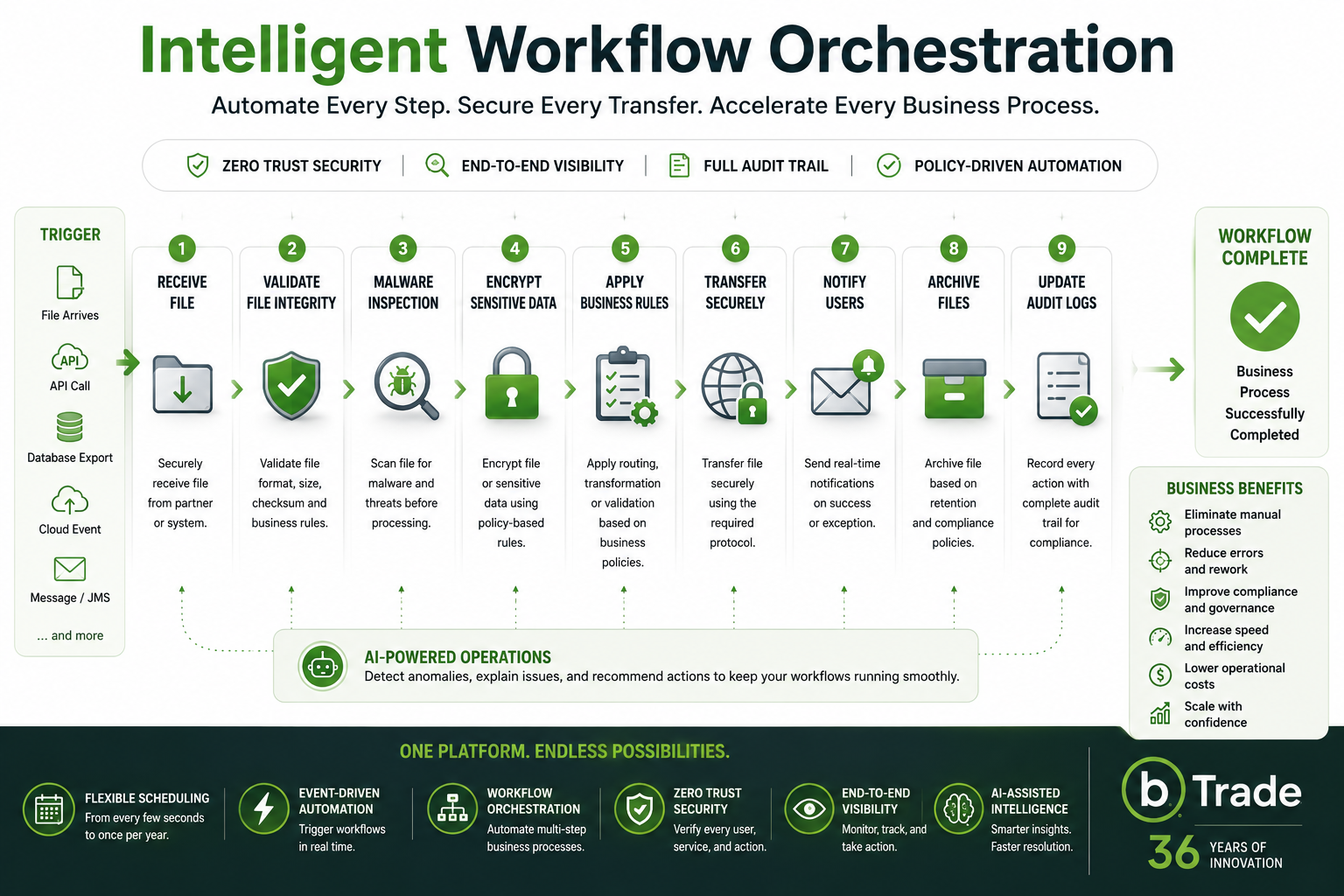
Each step executes automatically only after the previous step completes successfully.
This dramatically reduces operational complexity while increasing reliability.
Native Zero Trust Architecture for Every Workflow
Automation should never bypass security.
Every automated workflow executed by TDXchange follows Native Zero Trust Architecture principles.
Rather than assuming trust because a workflow is automated, every process continuously validates:
- User identity
- Service identity
- Authorization
- Workflow permissions
- Security policies
- Access controls
Every internal TDXchange component is designed around Zero Trust principles, ensuring that services authenticate and validate each interaction rather than relying on implicit trust.
This approach significantly reduces operational risk while maintaining enterprise security.
AI Makes Automation Even Smarter
As organizations automate more workflows, operational visibility becomes increasingly important.
Future AI capabilities within TDXchange are designed to simplify day-to-day operations by helping administrators:
- Identify failed workflows
- Detect abnormal transfer patterns
- Explain operational issues using natural language
- Recommend corrective actions
- Identify configuration anomalies
- Reduce troubleshooting time
- Prioritize real operational issues over log noise
Rather than replacing automation, AI enhances operational intelligence by helping support teams focus on what actually matters.
Built for Enterprise Scale
Large enterprises often manage:
- Thousands of trading partners
- Hundreds of workflows
- Multiple business units
- Global operations
- Millions of file transfers
- Strict compliance deadlines
TDXchange centralizes scheduling, workflow orchestration, monitoring, auditing, and security while providing granular role-based access controls that empower both IT and business users.
Why TDXchange Is Different
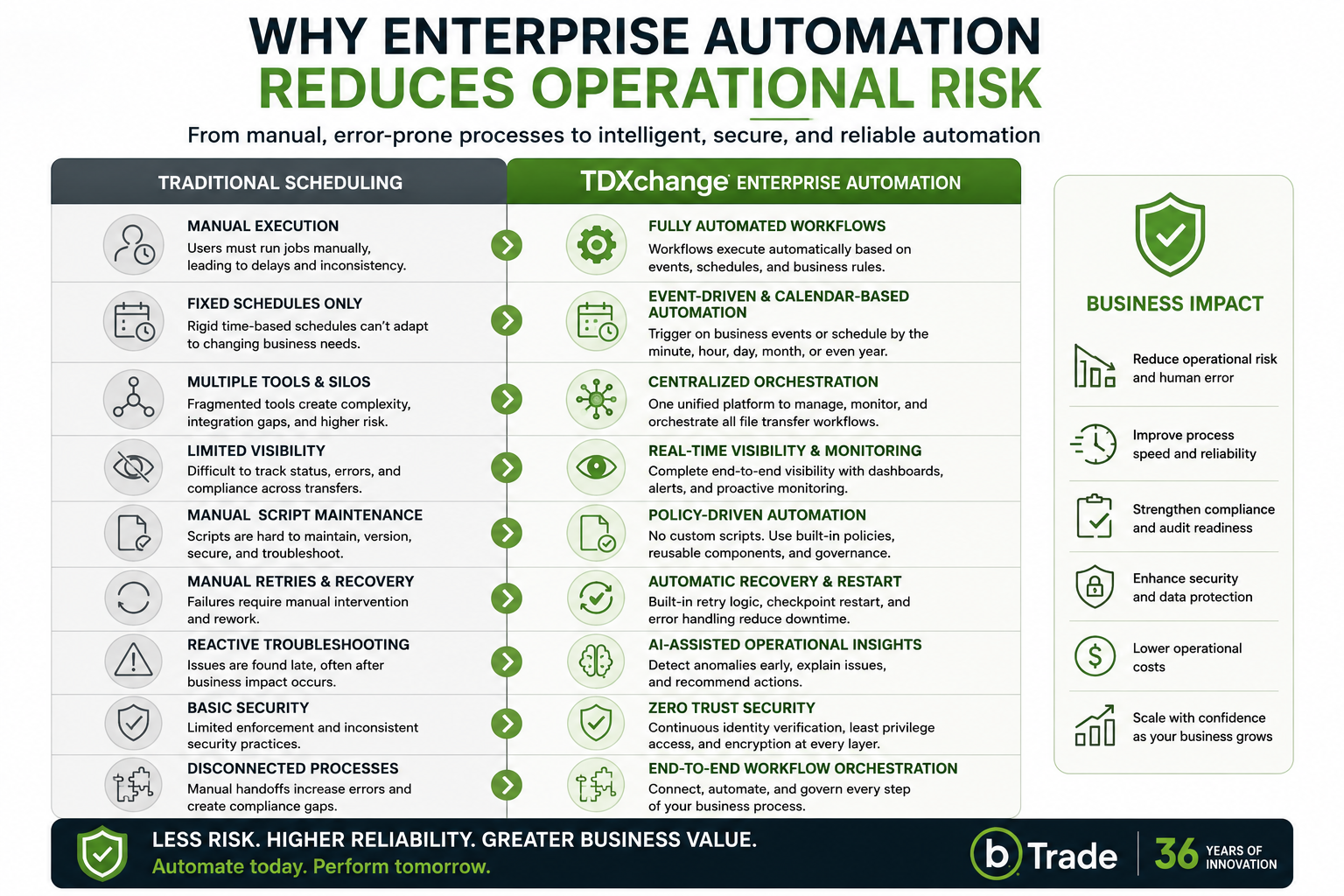
TDXchange was designed to automate complete business processes and not simply transfer files.
By combining:
- Event-driven automation
- Enterprise scheduling
- Intelligent workflow orchestration
- Native Zero Trust Architecture
- Operational observability
- Comprehensive auditing
- AI-assisted operational intelligence
- Enterprise scalability
organizations can automate virtually any secure file exchange scenario while maintaining complete governance, visibility, and security.
Whether a workflow needs to execute immediately after a file arrives, once every month, once every year, or according to complex business logic, TDXchange provides the flexibility modern enterprises require.
Final Thoughts
Enterprise automation is no longer just about scheduling jobs.
It's about orchestrating business processes securely, intelligently, and reliably.
Whether a workflow begins because a file arrives, an API is called, a database export completes, or a calendar reaches a specific date, organizations need automation that adapts to their business and not the other way around.
Since 1990, bTrade has helped organizations automate secure data exchange by listening closely to customers and developing solutions to real operational challenges. That philosophy continues with TDXchange, combining enterprise scheduling, event-driven automation, workflow orchestration, Native Zero Trust Architecture, AI-assisted operational intelligence, and complete operational visibility into a single enterprise platform built for today's and tomorrow's business requirements.
About the Author
Hanz Jorgensen is Chief Operating Officer and Managing Member at bTrade, where he oversees daily operations and works closely with the leadership team to shape and execute the company’s strategic direction. With more than 20 years of experience with several different MFT/technology companies spanning system administration, development, customer support, pre-sales, and enterprise solution delivery, Hanz brings a uniquely practical perspective on what organizations actually need from managed file transfer platforms. He leads bTrade’s Solution Consulting team and plays a central role in aligning product capabilities with real customer requirements across regulated and high-complexity environments.
Frequently Asked Questions
What is automated file transfer?
Automated file transfer securely moves files between systems, applications, cloud services, and trading partners without manual intervention. Enterprise MFT platforms automate transfers using schedules, business events, APIs, and workflow orchestration.
Does TDXchange support event-driven workflows?
Yes. Workflows can automatically begin when files arrive, APIs are called, database exports complete, cloud events occur, JMS messages are received, or previous workflows successfully finish.
Can TDXchange schedule workflows monthly or yearly?
Yes. TDXchange supports highly flexible scheduling, including execution every few seconds, minutes, hours, daily, weekly, monthly, quarterly, yearly, or on specific calendar dates and times.
Can workflows include multiple automated steps?
Yes. TDXchange orchestrates complete business workflows including validation, malware inspection, encryption, routing, notifications, API integration, retries, and auditing.
Does scheduling bypass Zero Trust security?
No. Every automated workflow follows Native Zero Trust Architecture principles. Internal services continuously authenticate, validate permissions, and enforce security policies before executing each workflow step.
How will AI improve enterprise file transfer automation?
Future AI capabilities within TDXchange will help administrators identify failed workflows, detect anomalies, explain operational issues in natural language, recommend corrective actions, and simplify day-to-day operations.
Does TDXchange support file transfer job automation?
Yes. TDXchange supports scheduled, event-driven, API-initiated, application-initiated, and dependent file transfer jobs. Workflows can monitor folders, process complete directory structures, apply business rules, invoke applications or APIs, retry failures, send notifications, and preserve transaction history.